



NursingNnenna
Participant
June 17, 2026
Answered

All Tools Pane Disappears/Empty When I Select Edit PDF?

  • June 17, 2026
  • 59 replies
  • 3645 views

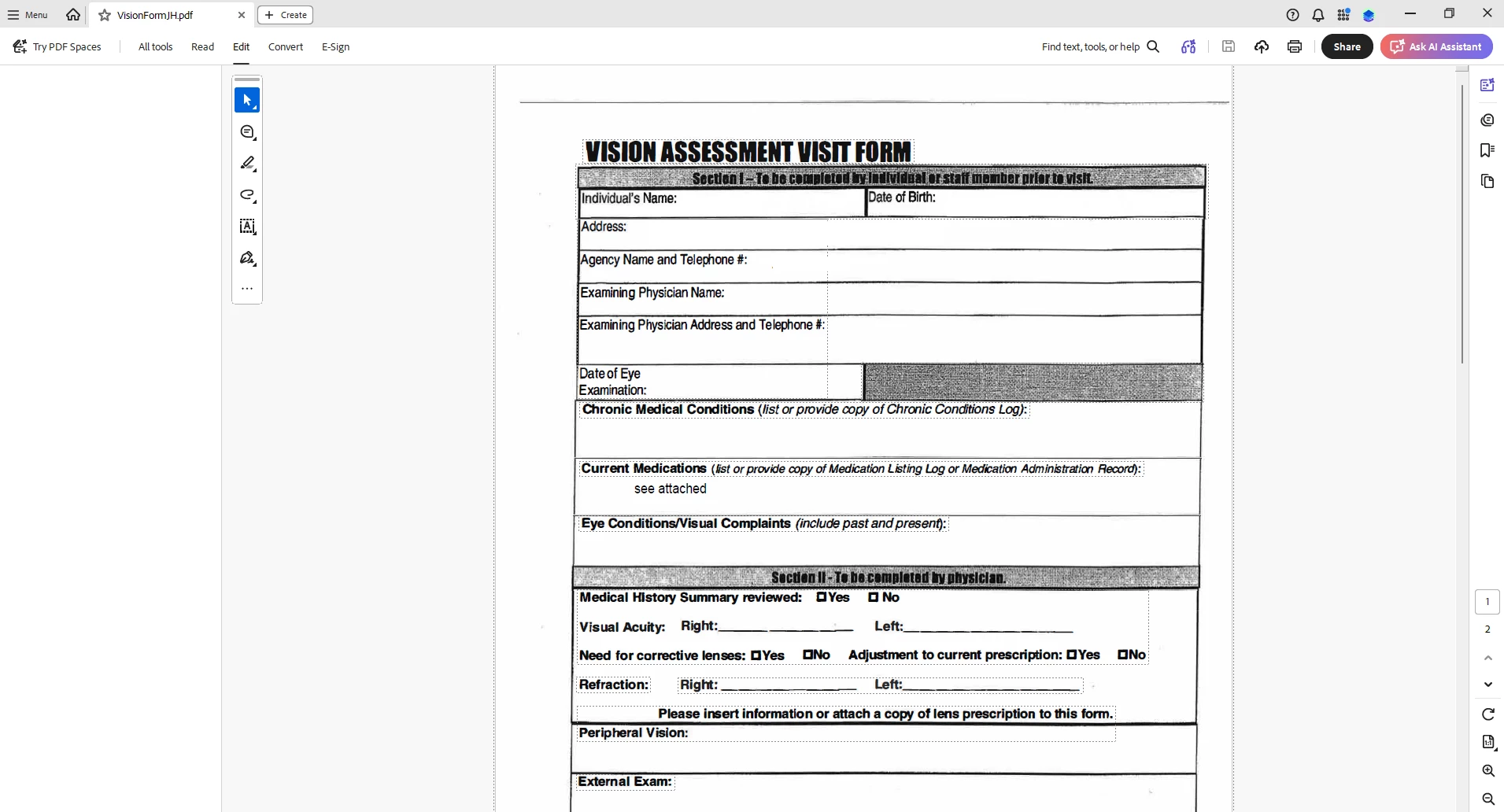
When I select “Edit PDF” option, the “All Tools” pane disappears.

This issue seems persistent.

I’ve tried looking at the view/show settings.

Running a repair on the installation.

Uninstalling and Reinstalling Adobe Acrobat.


Can someone please help or provide some suggestions?


Thank you,
 

    Correct answer Anand Sri Bhattacharya

    Hi All!


    Thanks for your patience and cooperation on this.


    Please try the following suggestions, and let us know if this fixes the issue for you.

    Please note: Create a backup of the registry settings before making any changes. To create a backup, check this article: https://support.microsoft.com/en-us/topic/how-to-back-up-and-restore-the-registry-in-windows-855140ad-e318-2a13-2829-d428a2ab0692


    • Go to the registry location: "Computer\HKEY_LOCAL_MACHINE\SOFTWARE\Policies\Adobe\Adobe Acrobat\DC\FeatureLockDown"
    • Right-click on the right blank space > select New > DWORD 32-bit value.
    • Rename it to:  bGenCoverPagesLabelStrings
    • Right click on the new value > Click Modify > add the value as ‘1’ (numeric one)
    • Restart the Acrobat and the machine and check the performance.

    Let us know if you experience any issues.

    Regards,

    Anand Sri.

    59 replies

    Businessinthefront2026
    Participant
    June 18, 2026

    None of the other troubleshooting steps have worked. And when I attempt to create a new value in that register I get an error “Cannot create value: Error writing to the registry.” Is this just due to the profile settings my company has? 


    Monica5C74
    Participant
    June 18, 2026

    Your IT department will need to run the reg editor as admin if it’s locked down to make those changes for you. 

    victor_4693
    Participant
    June 18, 2026

    Worked for me but i did new install on another device after the issue in my computer and that computer wasn’t or hasn’t been afected yet.

    Have you identified what or when is the issue being triggered? 


    Thanks!

    TechDude
    Participant
    June 18, 2026


    If you can’t access registry, you can disable new acrobat, and you should be able to use tools.

    Participant
    June 18, 2026

    This worked well for me. Nice easy fix!

    Josh
    Wendyb33
    Participant
    June 18, 2026

    Hello,

    (small hack)

    If you don’t need the full capabilities, just use the toolbar and add what you need to it. Toolbar still works!


    Local_Gov
    Participant
    June 18, 2026

    Confirmed this fixes the menu issue for Acrobat Pro

    Participating Frequently
    June 18, 2026

    we are also experiencing this issue in our environment. 

    Anand Sri Bhattacharya
    Community Manager
    Community Manager
    June 18, 2026

    Hello ​@renadi5FB0 


    Can you please try the suggestion shared here, and let us know how it goes:


    Regards,

    Anand Sri.

    DKB+-+TWC
    Participant
    June 18, 2026

    From their support team:

    This is a known issue and our engineering team is already working on a fix. It will take effect tentatively by tomorrow. In the mean time, you can ask the user to create the following registry: Computer\HKEY_LOCAL_MACHINE\SOFTWARE\Policies\Adobe\Adobe Acrobat\DC\FeatureLockDown

    Dword - bGenCoverPagesLabelStrings Value - 1
    Reboot the computer.

    Worked for me. 

    CityCRLuedtke
    Participant
    June 18, 2026

    Hello,

    So there isnt an update or patch fix for this to roll it back we have to change something in regedit to fix the application?

    Anand Sri Bhattacharya
    Community Manager
    Community Manager
    June 18, 2026

    Hello ​@CityCRLuedtke 


    This is the current fix available. However, this will be incorporated with a public release, which will be available soon. We’ll update the thread once it ships out.


    Regards,

    Anand Sri

    JERitz
    Participant
    June 18, 2026

    Happening for our company as well.  The panel disappears when we Search or select any function on the All Tools panel.  

    Anand Sri Bhattacharya
    Community Manager
    Community Manager
    June 18, 2026

    Hello ​@JERitz 


    Can you please try the suggestions shared here, and let us know how it goes: 

    Regards,

    Anand Sri.

    Anand Sri Bhattacharya
    Community Manager
    Community Manager
    June 18, 2026

    Hi All!


    Thanks for your patience and cooperation on this.


    Please try the following suggestions, and let us know if this fixes the issue for you.

    Please note: Create a backup of the registry settings before making any changes. To create a backup, check this article: https://support.microsoft.com/en-us/topic/how-to-back-up-and-restore-the-registry-in-windows-855140ad-e318-2a13-2829-d428a2ab0692


    • Go to the registry location: "Computer\HKEY_LOCAL_MACHINE\SOFTWARE\Policies\Adobe\Adobe Acrobat\DC\FeatureLockDown"
    • Right-click on the right blank space > select New > DWORD 32-bit value.
    • Rename it to:  bGenCoverPagesLabelStrings
    • Right click on the new value > Click Modify > add the value as ‘1’ (numeric one)
    • Restart the Acrobat and the machine and check the performance.

    Let us know if you experience any issues.

    Regards,

    Anand Sri.

    DrewLarsonNWP
    Participant
    June 18, 2026

    Quick command to run as admin for the key for those skimming this:

    reg add "HKLM\SOFTWARE\Policies\Adobe\Adobe Acrobat\DC\FeatureLockDown" /v bGenCoverPagesLabelStrings /t REG_DWORD /d 1 /f


    Participant
    June 18, 2026

    Make sure Adobe is updated prior, as it breaks it further.
