Participant
November 5, 2020
Answered

Calculation to score a quiz with radio buttons?

  • November 5, 2020
  • 5 replies
  • 7627 views

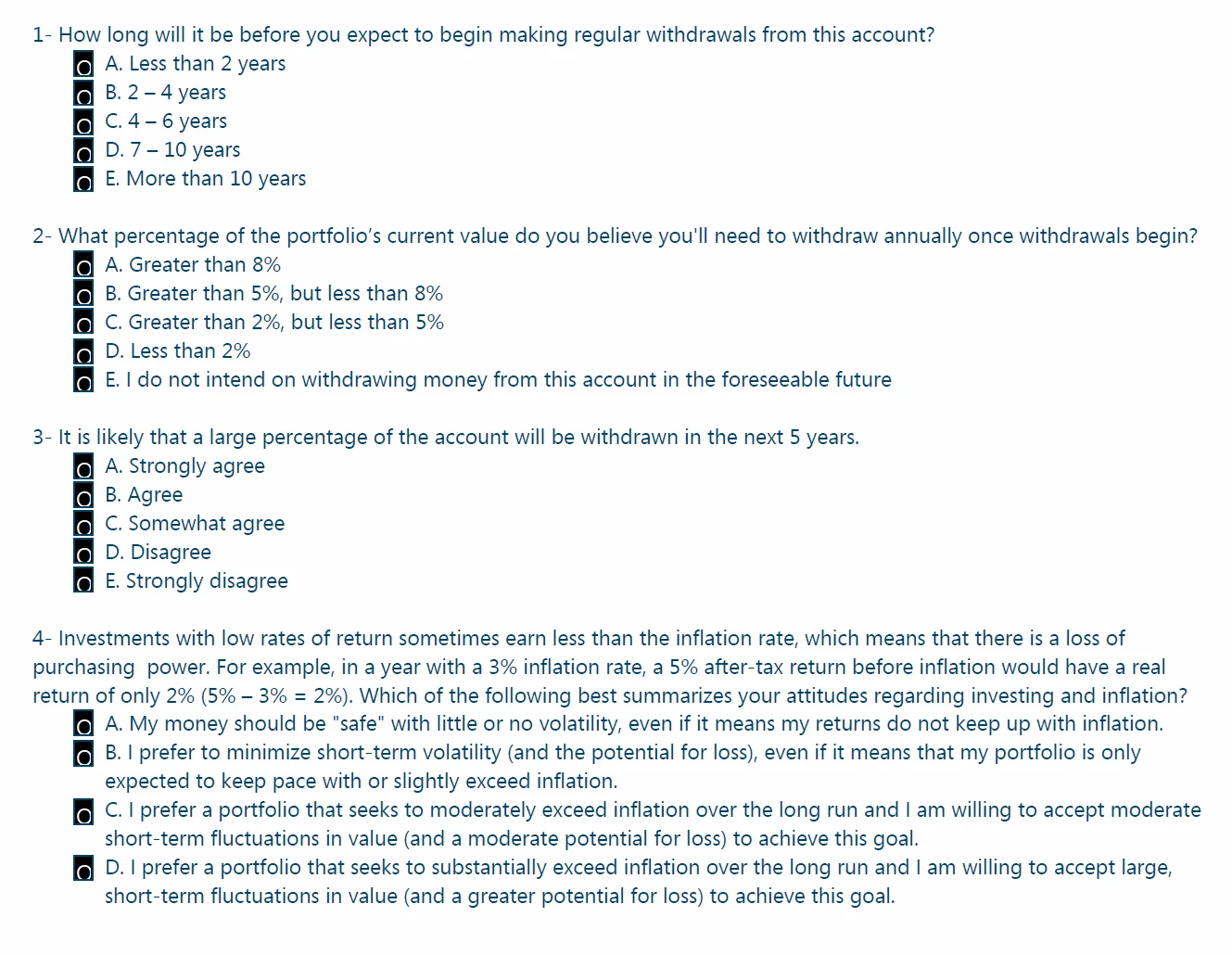
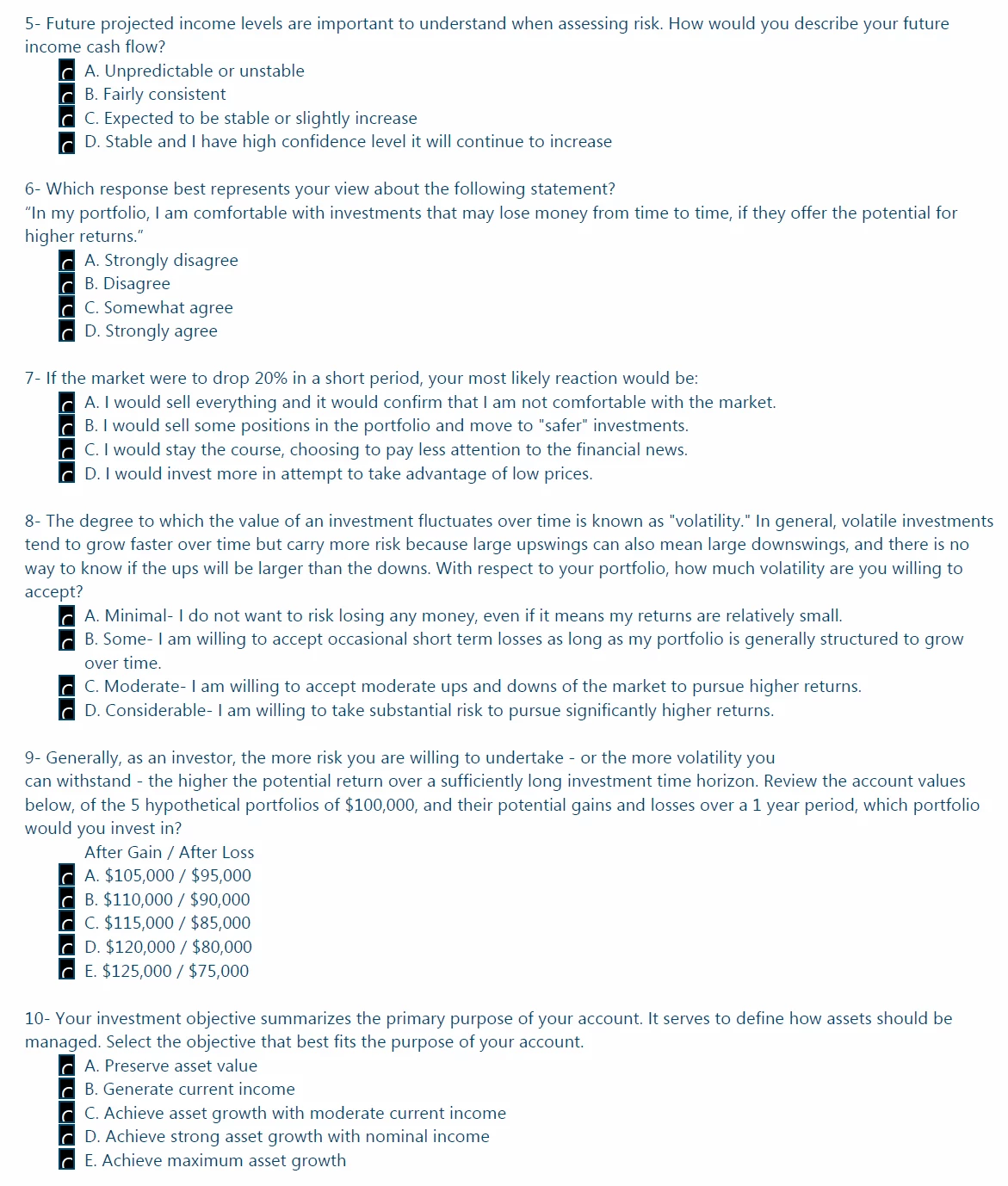
I have a 10 question multiple choice quiz that uses radio buttons to select the answer. There are no right or wrong answers, but each answer is assigned a certain number of points. For example, with question 1, an answer of A = 0, B = 4, C = 8, D = 16, E = 20. I'd like to create a calculation that will add up the score from all 10 questions.


Desired answer values:

1. A=0, B=4, C=8, D=16, E=20

2. A=0, B=1, C=2, D=3, E=5

3. A=0, B=4, C=8, D=12, E=20

4. A=0, B=2, C=3, D=5

5. A=0, B=4, C=6, D=10

6. A=0, B=2, C=3, D=4, E=5

7. A=0, B=2, C=8, D=10

8. A=0, B=2, C=6, D=10

9. A=0, B=4, C=6, D=8, E=10

10. A=0, B=2, C=3, D=4, E=5


Radio buttons are grouped by question (Question 1, Question 2, etc) and are named choice1, choice2, etc. Screenshots of form are below. I want to tally all of this into one field. Any suggestions?
 

This topic has been closed for replies.
Correct answer Asim123

I don't get why you guys complicate it so much, he don't need any script just give groups a choice of points ,

First group of radio buttons named "Question1" and choice for A answer is 0 choice for B answer is 4...etc and just use value is the in total field.

5 replies

Participant
November 6, 2020

Thank you all. This was super helpful and got me where I needed to be.

B.A.S.I.C.S., LLC
Participating Frequently
November 6, 2020

Do you want questions that are not answered to be excluded from the calculation or to default to 0?

ls_rbls
Community Expert
Community Expert
November 6, 2020

I didn't think of that, yes.

B.A.S.I.C.S., LLC
Participating Frequently
November 6, 2020

Yes, you want it to be excluded or, yes, you want the default value to be zero.  If you want the default value to be zero then I would suggest following Nesa Nurani's solution provided above.  Here are more detailed actions:

  • Select the Options tab from the Properties dialog box for each of the radio buttons
  • Update the Radio Button Choice to correspond with the point value for each of the answers (Ex:  set Radio Button Choice for  A to 0, B to 4, C to 8, D to 16, and E to 20)
  • Repeat this for each question and corresponding radion buttons
  • Create a text field and format it as a number to sum the values, then select the Calculate tab from the Properties dialog box
  • Select "Value is the" radio button and "(sum+)" from the dropdown menu, then click the "Pick" button and check the boxes of the 10 questions you want to sum


Hope this helps!

ls_rbls
Community Expert
Community Expert
November 6, 2020

There are many ways to do this with Acrobat JavaScript, but I think that the easiest way to grasp the concept of adding export values taken from different groups of radio buttons  is to name your radio button fields in a hierarchy fashion. Like for example, "Group.1", "Group.2", "Group.3", "Group.4", and so on.


In my example below I did two rows of 5 radio buttons, but I named all radio buttons in the first group with the same name and assigned to each one a different export value (taken from your example table above)  to make them mutually exclusive.


In my first set of radio buttons all of them are named "Group.1" and in the other set they are all named "Group.2".


Doing this allows to use the code shown below in a very easy way to add up all the values. 


So, in the text field that you want to show the total use the following calculation script:


var f = this.getField("Group.");
var a = f.getArray();
var v = 0.0;

for (i =0; i < a.length; i++)  v += a[i].value;

event.value = v;


The only problem with this, is that I haven't been able to figure out how to make the total field null when the radio buttons are reset. I can't figure out how to not make the value "Off" not to be counted by the script.

Asim123Correct answer
Inspiring
November 6, 2020

I don't get why you guys complicate it so much, he don't need any script just give groups a choice of points ,

First group of radio buttons named "Question1" and choice for A answer is 0 choice for B answer is 4...etc and just use value is the in total field.

ls_rbls
Community Expert
Community Expert
November 6, 2020

The complication is not on our end.


The complication is what the user asks here:


I'd like to create a calculation that will add up the score from all 10 questions.


Desired answer values:

1. A=0, B=4, C=8, D=16, E=20

2. A=0, B=1, C=2, D=3, E=5

3. A=0, B=4, C=8, D=12, E=20

4. A=0, B=2, C=3, D=5

5. A=0, B=4, C=6, D=10

6. A=0, B=2, C=3, D=4, E=5

7. A=0, B=2, C=8, D=10

8. A=0, B=2, C=6, D=10

9. A=0, B=4, C=6, D=8, E=10

10. A=0, B=2, C=3, D=4, E=5


The OP asked for a calculation that will add all scores,


The script that I posted above is the simplest form but tge user is employing mutually exclusive radio buttons but to make them mutually exclusive the score values should be used as export values, like NesaNurani suggested.


So in short, the calculation script that OP  is asking for should add up all the export values of all radio buttons.


try67
Community Expert
Community Expert
November 5, 2020

Your scoring system is not a good one. It doesn't allow you to distinguish between questions that were answered A, and questions that were not answered at all, as in both scenarios it will add zero to the total sum...

Nesa Nurani
Community Expert
Community Expert
November 5, 2020

Instead of choice1,choice2 name them points value e.g. 0,4,8,16,20 do that for all buttons then in properties of field where you want to show result, in  "calculate" tab go to "Value is the" and pick your buttons groups.