


ColdFyre
Known Participant
February 5, 2018
Question

Change default profile for Output Preview?

  • February 5, 2018
  • 3 replies
  • 10183 views

Previously, PDFs that were CMYK or had an embedded profile would automatically have their correct profile populated in "Simulation Profile" field. Now every one defaults to Adobe RGB (1998). I'd like to change that to a different profile by default OR have it use the profile embedded in the PDF.
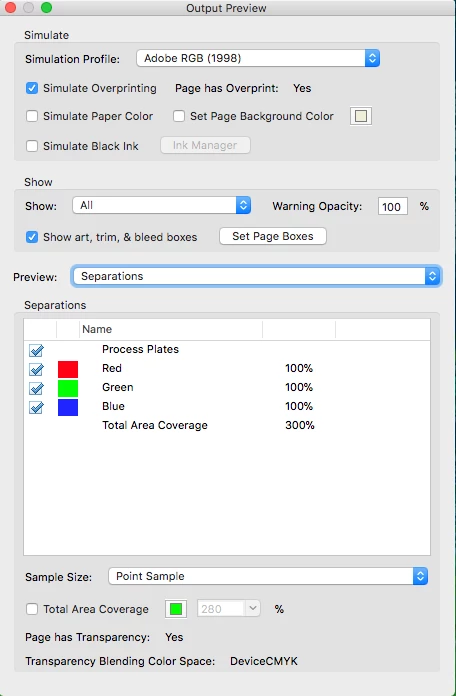
Any way to change this?

thanks!

3 replies

Dov Isaacs
Brainiac
February 19, 2021

The problem is typically caused by whatever generates the PDF file, not Acrobat.


- Dov Isaacs, former Adobe Principal Scientist (April 30, 1990 - May 30, 2021)
New Participant
February 18, 2021

New Participant
June 9, 2021

Thank you for the simplicity! Rockstar. 👏 

AnandSri
Community Manager
Community Manager
February 12, 2018

Hello ColdFyre

As per the description above, you want to change the Simulation Profile to CMYK, Is that correct?

Please refer to the following KB docs which discuss the similar scenario How do I set the Simulation Profile to CMYK by default in the Output Preview Window Link: https://forums.adobe.com/thread/1013966

Output Preview Simulation Profile Automatically Shows Embedded Profile Link: https://forums.adobe.com/thread/1685718

You may also refer to Previewing output (Adobe Acrobat Pro)

If the issue still persists, is it possible to share a sample PDF file which has Adobe RGB (1988) as default profile? To share the file, please use Adobe Send, share the link to document via private message only How Do I Send Private Message Link: https://forums.adobe.com/thread/1184148

Let us know how it goes and share your findings.

Regards,

Anand Sri.

ColdFyre
ColdFyreAuthor
Known Participant
April 2, 2018

I went through all the links and the only thing that seems to help was changing the CMYK profile from CGATS21_CRPC6.icc (GraCol profile from Idealliance) to Photoshop 5 Default CMYK.  After I did that, the output preview stayed on that profile. However, I need it to stay on my CGATS21 profile. If I have it set like the attached screenshot.

The only type of PDF that will come up with the correct profile are the "X" series files that have the output intent profile enabled.

That's not what I'm looking for.  I'm looking to have my CMYK profile (CGATS21) to be active any time I open a PDF.