


Inspiring
March 29, 2023
Answered

Color of a text field based on whether the calculations of three other fields are equal.

  • March 29, 2023
  • 1 reply
  • 1340 views

I can't seem to figure out how to do this. I would like my "Totals" title text field to turn from red to green if the three subtotaled fields underneath it all contain the same calculated number. I already have the calculations in the three transparent boxes. 
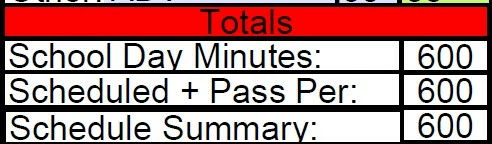
The script I was able to piece together from my limited background knowledge and other resources is below.  


var t1 = Number(this.getField("SchoolDayMinutes").valueAsString);
if(event.value && t1)
var t2 = Number(this.getField("ScheduledPlusPassPer").valueAsString);
if(event.value && t2)
var t3 = Number(this.getField("ScheduleSummary").valueAsString);
if(event.value && t3)
event.target.fillColor = t1 = t2 = t3 == event.value ? color.green : color.red;


Thank you


This topic has been closed for replies.
Correct answer Nesa Nurani

Try this:

var t1 = Number(this.getField("SchoolDayMinutes").valueAsString);
var t2 = Number(this.getField("ScheduledPlusPassPer").valueAsString);
var t3 = Number(this.getField("ScheduleSummary").valueAsString);
if(t1&&t2&&t3){
if(t1 == t2 && t2 == t3)
event.target.fillColor = color.green;
else
event.target.fillColor = color.red;}
else
event.target.fillColor = color.red;


1 reply

Nesa Nurani
Community Expert
Nesa NuraniCommunity ExpertCorrect answer
Community Expert
March 29, 2023

Try this:

var t1 = Number(this.getField("SchoolDayMinutes").valueAsString);
var t2 = Number(this.getField("ScheduledPlusPassPer").valueAsString);
var t3 = Number(this.getField("ScheduleSummary").valueAsString);
if(t1&&t2&&t3){
if(t1 == t2 && t2 == t3)
event.target.fillColor = color.green;
else
event.target.fillColor = color.red;}
else
event.target.fillColor = color.red;


Inspiring
March 29, 2023

It works, but if one of the numbers that is part of a calculation field changes, it doesn't turn red again. For example, if someone changes an early entry that makes the Schedule Summary = 590 and the other two subtotal fields are = 600, the "Totals" field remains green. Is there a way to make the "Totals" field update if there are any changes?

Inspiring
March 29, 2023

That shouldn't happen. 

If other fields are calculated check if field calculation order is correct. 


I just checked the calculation order and it appears that I have a lot of work ahead. I have a lot of fields to calculate. I know how to use the menu and click them up and down, but is there a quicker way you can suggest? I also need to do a cusom tab order. Any suggestions on how to do these two tasks quickly would be greatly appreciated. Thank you.