


New Participant
May 20, 2020
Answered

Combining PDFs Error, "Adobe XML forms cannot be merged"

  • May 20, 2020
  • 4 replies
  • 23229 views

Adobe Acrobat 2017 version - 17.011.30171

Window 10 1809
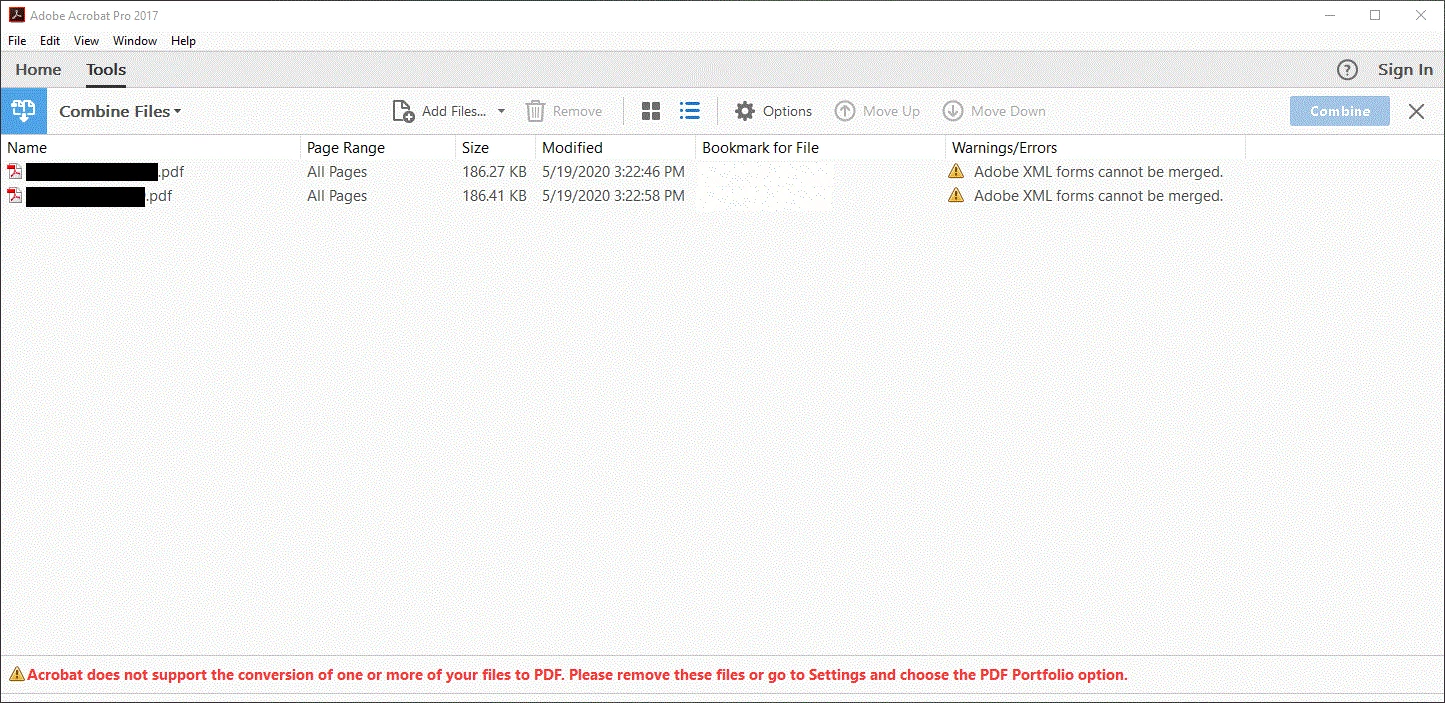
I am having issues combining pdfs on certain computers due to acrobat saying they are XML forms (see image) yet when I try a different computer it doesn't throw any error and is able to combine the files into one easily. Is there a setting that needs to be on or off am not seeing? Is there a way to tell if they really are XML forms? They don't carry any fillable fields. I don't want it to be a "portfolio". Just simiply need a single pdf. Any help is appreciated.

Things I've tried:

Restarting, Reinstalling, and deleteing everything adobe and then reinstalling

Haven't tried:

complete wipe of said computer and really starting fresh

Correct answer RedPhoenix789

For PC. Try opening the individual file in adobe and select "Microsoft Print to PDF". This will save it in a pdf format that you can then use to combine. 


Unfortunately, the XML files format is a designer file with a pdf jacket. Great for creating files but not very functional.


I followed the steps above today and it worked like a charm.

4 replies

New Participant
March 18, 2025

I used to be able to combine the xml pdf with other pdfs.  Today is the first time that it didn't work.  Same xml pdf file that I combined before.  Continous release version 2024.005.20399   Adobe changed something.


Microsoft Print to PDF pdf works, but the resolution is not as good, even at 600 dpi.


New Participant
March 4, 2025

I was having the same problem and it was baffling.  I thought I was following the instruction provided by some of you by clicking the printer icon on the top right hand side corner and selecting Adobe PDF.  BIG MISTAKE!  We need to select Mocrosoft Print to PDF  and not Adobe PDF.  Now it works like magic.  Thank you all for all the support you provided. 


RedPhoenix789Correct answer
New Participant
April 15, 2022

For PC. Try opening the individual file in adobe and select "Microsoft Print to PDF". This will save it in a pdf format that you can then use to combine. 


Unfortunately, the XML files format is a designer file with a pdf jacket. Great for creating files but not very functional.


I followed the steps above today and it worked like a charm.

New Participant
May 16, 2024

This works!  Thank you.


try67
Adobe Expert
May 20, 2020

It's not possible that it worked on one computer and not another, unless you combined them as a Portfolio in the one where it worked. XML forms can't be merged with regular PDF files, period.

-zmd0Author
New Participant
May 20, 2020

That's what I don't understand. I spent half a day checking that everything between the computers were the same and they were. The other computer wasn't making a portfolio, I checked. It was combining them normally into a pdf. I also checked that they were pdfs and all the properties say they were. I understand that XML forms can't be merged that is not what am trying to do. I am simply trying to find why one computer says a file is a okay to combine and the other computer is reporting those same files as XML when trying to combine them.


ls_rbls
Adobe Expert
May 22, 2020

Are both computers updated to the same versions of MS Windows 10 and using the same updated versions of Adobe Acrobat?


Also, could it be that the computer that was merging successfully is somehow flattening the source files before the merge?


Is the Combine Files tool configured to delete the source files after the merge is finalized in the computers that have no issue?