slickslack
Participant
May 10, 2018
Answered

Default to Opening in Organize Pages view

  • May 10, 2018
  • 1 reply
  • 2877 views

Processing a lot of scans.

The majority of the work is changing order, deleting blanks, then rotating individual pages.

Is there a way to have Acrobat Pro DC default to opening in Organize Pages mode?

If not, is there a shortcut to switch quickly to Organize Pages mode.

(Mac, 10.11.6 El Capitan, CC fully updated)
This topic has been closed for replies.
Correct answer Cari Jansen

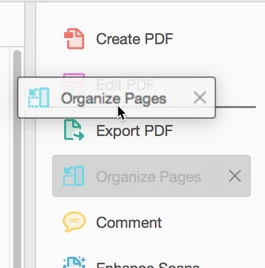
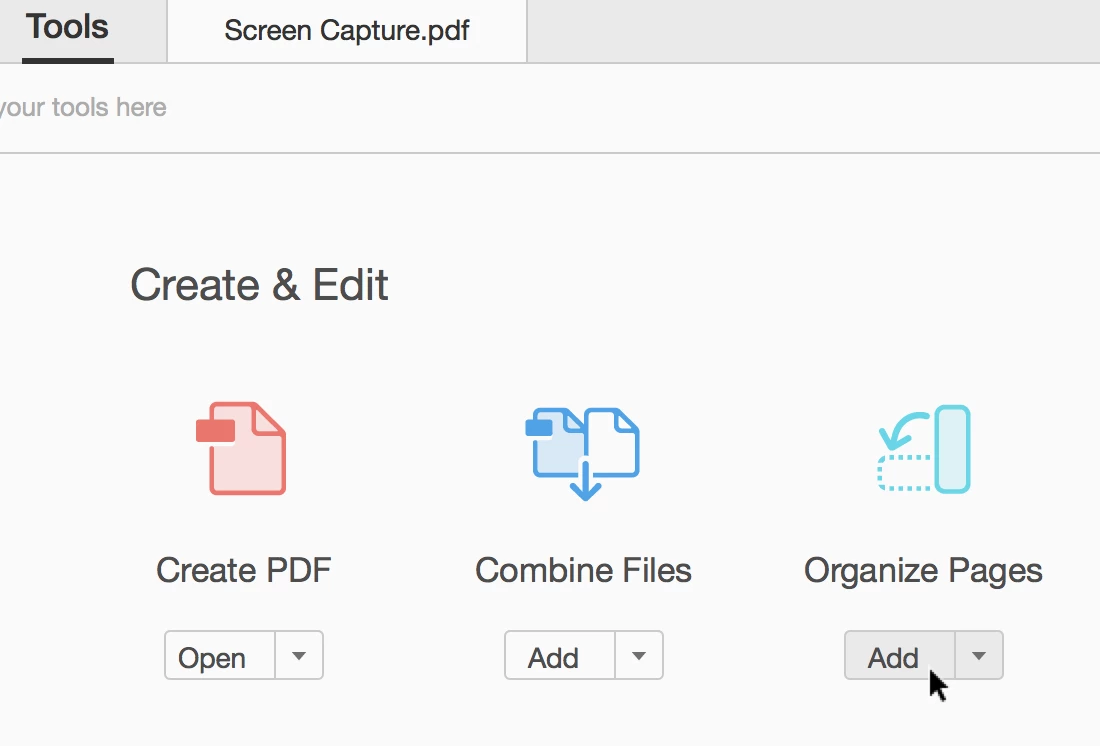
I don't think that is possible. The best thing you can do is ensure that Organise Pages is added to the Tools pane, so that you can click it to open it. (saves you from having to navigate to it via a menu item, or Tools).

  1. Click Tools.
  2. Under Create & Edit, locate Organise Pages, and click Add.
  3. You can now drag it into preferred position, so it's easily accessible next time you open a scanned PDF.

1 reply

Cari JansenCorrect answer
Legend
May 15, 2018

I don't think that is possible. The best thing you can do is ensure that Organise Pages is added to the Tools pane, so that you can click it to open it. (saves you from having to navigate to it via a menu item, or Tools).

  1. Click Tools.
  2. Under Create & Edit, locate Organise Pages, and click Add.
  3. You can now drag it into preferred position, so it's easily accessible next time you open a scanned PDF.