Participating Frequently
November 26, 2021
Answered

Documents opening with incorrect fonts

  • November 26, 2021
  • 10 replies
  • 16645 views

Some of my pdf documents open with incorrect fonts, even though I have the fonts used to created the documents.


Example: I've received files sent to me in pdf where Arrial Narrow was used, but Acrobat opens them using Adobe Sans MM. When I print to that same document to pdf, they suddenly have the right font again. Any idea of what can cause something like this? It's a big pain and printing all my documents to pdf is not an option.


It's been happening with various files over the past 6 months and I've just not had the time to dig into the issue. I've uninstalled, reinstalled etc, but no luck.
This topic has been closed for replies.
Correct answer Luke Jennings3

Adobe is fully updated and the MS Office is a licensed and up to date Office 365 package.


Why would Adobe be looking for Arral MT and give an Arial MT error if the font is actually supposed to be Arial Narrow?


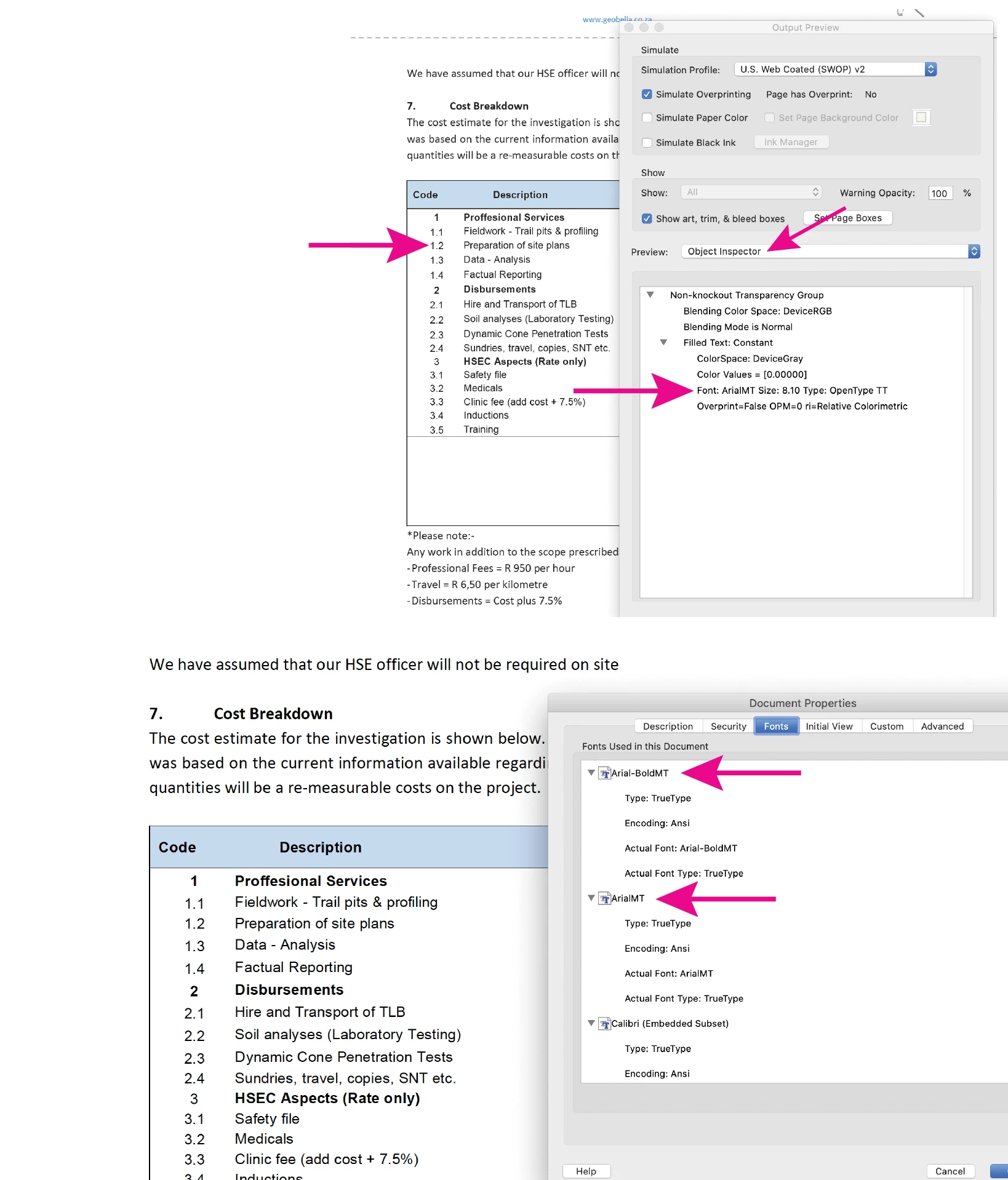
The fonts missing from your PDF are ArialMT & Arial-BoldMT, as indicated by the document properties and the Output Preview Object Inspector tool, not Arial Narrow. Arial Narrow may be used by your computer as a substitute font. You could try to re-install MS Word (your original PDF was created in Word) which may install the needed fonts to your computer.

What is your OS? If Mac, you may need to clear your font cache.

From Acrobat, did you go to Help> Check for updates?

10 replies

Participant
March 14, 2024

I was having the same problem, and the solution from this other thread worked for me: Re-installing arial.ttf from the windows command prompt. https://community.adobe.com/t5/acrobat-discussions/option-to-use-similar-system-font-or-error/td-p/13971827 


Navigate to C:\Windows\Fonts, then execute arial.ttf 

C:\Windows\Fonts>arial.ttf

Then install and voila.

JR Boulay
Community Expert
Community Expert
December 1, 2021

It looks like a font issue, is Arial installed?

Acrobate du PDF, InDesigner et Photoshopographe
Participating Frequently
December 1, 2021

Yes, I'm using Arial fonts in all my other software packages and it's even listed as possible fonts in Adobe Acrobat...


Participant
January 22, 2024

Its very annoying issue. I've same problem. We are waiting a urgent solution from ADOBE COMMUNITY.

JR Boulay
Community Expert
Community Expert
December 1, 2021

Good news: the problem is elsewhere.

Your PDFs displays fine on my side, even with "Use local fonts" unchecked.

Be sure you have the Arial font installed.


Acrobate du PDF, InDesigner et Photoshopographe
Participating Frequently
December 1, 2021

But where is "elsewhere" ? I don't have this issue with any other software packages...


And how do I go about resolving this?

JR Boulay
Community Expert
Community Expert
December 1, 2021

Can you share one of these PDFs?

Acrobate du PDF, InDesigner et Photoshopographe
Participating Frequently
December 1, 2021

In this file, look at the table on Page 4, Section 7 under cost breakdown. If I open that file in a browser, it also opens with the (supposedly correct) font. 

JR Boulay
Community Expert
Community Expert
November 30, 2021

"This is not a solution, because I surely cannot do this for every PDF I get sent"

Sure it is.

To solve your problem you just have to check the box that I indicated to you above, once and for all.

Why don't you give it a try first?

Acrobate du PDF, InDesigner et Photoshopographe
Participating Frequently
November 30, 2021

I tried it and it didn't resolve the problem.

JR Boulay
Community Expert
Community Expert
November 29, 2021

"This is useful if you are creating the document, but doesn't help if you get sent a document."

No, it's the other way around.

This option is only useful for received documents.

When you create a document you must incorporate all the fonts to avoid this type of inconvenience to your correspondents.

Acrobate du PDF, InDesigner et Photoshopographe
Participating Frequently
November 30, 2021

This is not a solution, because I surely cannot do this for every PDF I get sent.


Can someone please mark that none of these are the correct answer and none of them have resolve the issue...

Participating Frequently
November 29, 2021

Hi guys, none of the suggestions thus far could resolve the issue. Please marked this as "Not resolved"

Luke Jennings3
Community Expert
Community Expert
November 26, 2021

In addition to the good information above, when saving a Word file to PDF, be sure to embed the fonts, here is a link to instructions:

https://www.adobe.com/acrobat/how-to/convert-word-to-pdf.html

If you have a PDF without embedded fonts, you can often embed the fonts using an Acrobat preflight profile, here is a related discussion:

https://community.adobe.com/t5/acrobat-discussions/embedded-font/m-p/12203259


Participating Frequently
November 29, 2021

This is useful if you are creating the document, but doesn't help if you get sent a document.

Luke Jennings3
Community Expert
Community Expert
November 29, 2021

Have you tried embedding the fonts using a preflight fixup?

Tools> Print Production> Preflight> PDF fixups. If your PDF is still not displaying correctly, it's possible the needed font is not on your system and cannot be embedded. To check your PDF fonts, go to File> Properties> Fonts, all should say embedded or embedded subset.


JR Boulay
Community Expert
Community Expert
November 26, 2021

You will find confirmation in File menu : Properties

This is typical of PDFs made with Powerpoint (but I don't know why).


Acrobate du PDF, InDesigner et Photoshopographe
JR Boulay
Community Expert
Community Expert
November 26, 2021

This is because these fonts are not embedded in the document.

Acrobat does not use system fonts to display documents unless explicitly instructed.

You must enable this option to see documents correctly displayed:


Acrobate du PDF, InDesigner et Photoshopographe
Participating Frequently
November 29, 2021

Hi, this box was ticked, so this wasn't the issue.