


Participant
January 28, 2022
Question

Documents\*.pdf missing from Ports list in Adobe PDF Printer Properties

  • January 28, 2022
  • 4 replies
  • 20145 views

Hello,


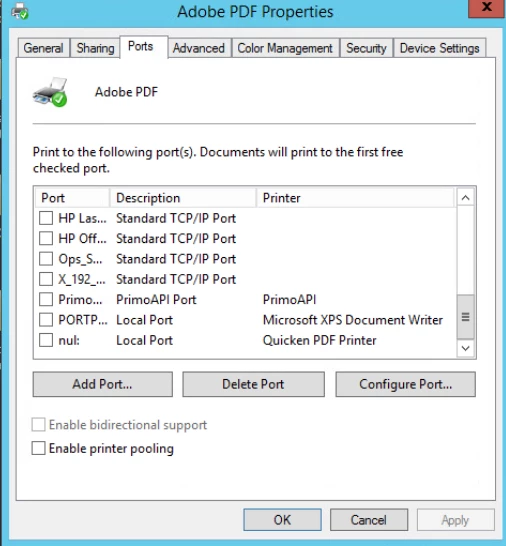
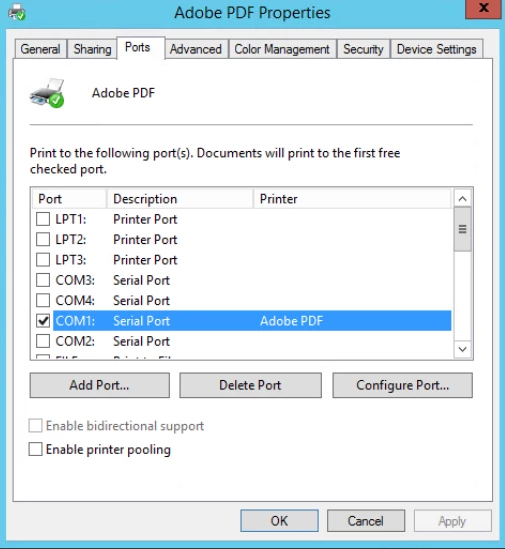
I have uninstalled Adobe and ran the Acro Cleaner tool as well and reinstalled Adobe Acrobat DC Pro with the latest update and I am still not able to restore the Document\*.pdf port for the Adobe PDF printer.  The printer gets installed but defaults to the COM1 port in the printer properties.  We are a subscriber paying for this product and have contacted Adobe support multiple times and it seems to be useless.  Does anyone know a good fix for this?
This topic has been closed for replies.

4 replies

Participant
September 16, 2022

Has anyone found a solution for this?


The original Adobe Acrobat DC install works fine.  As soon as its patched or updated the "Documents\*.pdf" port gets removed and the Adobe "Printer" is assigned to a COM port as described in the original post.  Reparing install does not work.  The only thing that works is reinstalling the original without any patches or updates, bet we require an update in order for a  certain redaction feature to work.


Users can still print to pdf, but they recieve an error and their file is never removed from the print queue until an adminstrator manually deletes the files in the print queue.


As a work around we use 'save as pdf' in Microsoft Office but users being users constantly ask about it.


I am using Remote Desktop on Server 2012.  I have read that this is an issue on Server 2016 also.


seanperryman
Participant
September 16, 2022

I can confirm it is not an issue in Server 2016. However, if you must remain on Server 2012, installing the software and never updating it seems to work as well.


You can also set a script to automatically clear the print queue every night. That's what I did, and didn't seem to have any negative consequences. Sometimes people would complain that there were "documents stuck in the queue", but I would just tell them to ignore that if they received the PDF they were printing (which they did in ALL cases). 

Participant
September 16, 2022

Thank you for your prompt response, Sean.  We are upgrading to Server 2019 in the near future so hopefuly it wont be an issue with that OS version either.


I continued testing in the meantime and I think I found a fix.  In the Adobe Printer properties, instead of using Com 4 as the port (which is what it gets set to as default when you patch / update Adobe)  I set the port to "Null Port"  .  That seems to work.  Looking through these posts again I noticed someone else posted this as a solution also.  I will continue to test, if it fails at some point ill post an update.


I totally understand about the users complaining.  Hahah.  I know if we told the users a work around, or let them know to ignore any warning/error messages, they would still harass us to no end with questions and panic emails.


Thanks again

D


seanperryman
Participant
March 10, 2022

TL;DR for my post: If you don't ever update the software past the initial installation, your Documents\*.PDF port will remain in place. 

Participant
February 3, 2022

I'm seeing the same issue on a Server 2012 terminal server using Adobe DC. This just started being an issue for our users.


The PDFs are created but the job stays in the queue and displays an error. The Document\*.pdf is missing completely and the printer is using COM1.


Repairing Adobe and doing a complete uninstall/reinstall did not result in any changes even thought the printer was added back.

Any help would be appreciated.

seanperryman
Participant
February 25, 2022

Came here to say exactly this. I never really cared before because the PDFs would be printed, and I'd just have to clear the queue every so often. I have also tried a repair and a complete remove/reboot/reinstall to no avail.


Acrobat 2020

Windows Serve 2012R2 Citrix/RDS

seanperryman
Participant
March 10, 2022

So, I found the cause of the missing Documents\*.PDF printer port, but not the solution for it. A bit of a story first. 


I work for a tax firm, and this is one of our most heavily used pieces of software. It breaks FREQUENTLY. I often have to engage in early morning repair-installs or even remove and replace to get it working as expected (btw, I noticed this morning that repair or installing will remove you from TS install mode. Not cool.) Yesterday, the PDF printer just broke on one of my servers. Wouldn't print, even though everything looked good. I noticed it had been renamed to Adobe PDF (Copy), which was a big red flag. Turns out that normal users can install updates for PDF, why that is I have no idea and haven't investigated, because usually a repair install fixes it. That is, until the hundreds to thousands of document pile up in the spooler. 


It would seem that the updater specifically removes the existing PDF printer and replaces it with the broken one using the COM1: port. I tested this theory by removing and reinstalling, and before applying ANY update the Adobe PDF printer port was correct. 


I tried applying the update from within acrobat (Check for Updates) and that broke the printer port. I tried re-downloading the package and installing the update from the included .MSI file, that broke the printer port. I removed the printer before applying the update, that broke the printer. 


In my case, the Adobe PDF (Copy) came about because a user either was able to or forced the update to go through between my usual check window, and because the print spooler is usually full of PDFs it couldn't delete the printer like normal, so it sat there in limbo until the queue was cleared. Then the original printer went away and the new one was able to be renamed.


Anyway, I don't see any immediate way to fix this. I have a secondary PDF printer loaded on my servers (PDF reDirect v2) and that works well enough when things like this happen. Perhaps it will be better when I get up to 2016 or later, but I cannot say for sure. 

Abambo
Community Expert
Community Expert
January 29, 2022

Sorry for your troubles. What is your OS and version? I suspect Windows 7.


Have you tried out adding a port? (Add Port... Button).

ABAMBO | Hard- and Software Engineer | Photographer
MCMC@cssiAuthor
Participant
February 3, 2022

Windows Server 2012 R2.  Have not tried adding a port as I dont know the specifics of what needs to be set for the port.