


Participant
October 28, 2021
Answered

exception integer division by zero in Acrobat DC

  • October 28, 2021
  • 1 reply
  • 2775 views

Adobe Acrobat DC Standard & pro (latest version) is generating error messages for our staff 
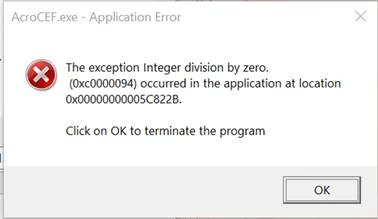
 

 and Adobe support have suggested the following fix, however this has not fixed the problem

  • To fix this issue, please whitelist the Acrobat installation directory  (C:\Program Files\Adobe\Acrobat DC) in HitmanPro to prevent dll injection in AcroCEF. This would allow the AcroCEF process to work as expected and the user should not experience this issue.


This topic has been closed for replies.
Correct answer defaultl7dt8pe77x81

We found the solution after logging the case with Adobe support, they told us to update our versions with these patches

Download Link: 

Reader: https://documentcloud.adobe.com/link/track?uri=urn:aaid:scds:US:26d5ff74-f58f-4619-96b6-697e216bee8c
Acrobat: 
https://documentcloud.adobe.com/link/track?uri=urn:aaid:scds:US:33e13d54-63b0-46a2-9a69-65b9eb26e6c3

1 reply

Amal.
Community Manager
Community Manager
October 28, 2021

Hi there


Hope you are doing well and sorry for the trouble. As described you are getting the above shown error message.


Would you mind sharing the workflow/steps you are doing that leads you this error message?


Its a AcroCEF.exe application error, please check out the steps shared in the help page https://helpx.adobe.com/acrobat/kb/acrocef-rdrcef-errors.html and see if that works for you.


Regards

Amal

Participating Frequently
November 15, 2021

We got the same Error and unfortunately the Solutions from the following article doesnt work for us.

Do you have any other recommendations?

quote

Its a AcroCEF.exe application error, please check out the steps shared in the help page https://helpx.adobe.com/acrobat/kb/acrocef-rdrcef-errors.html and see if that works for you.


By @Amal.


Amal.
Community Manager
Community Manager
November 16, 2021

Hi there


We are sorry to hear that. Would you mind sharing the workflow/steps you are doing that leads to the error message?


Also, please try to turn off the protected mode for testing  (Win only) Go to Edit > Preferences > Enhanced Security > Uncheck 'Enable Protected mode at startup' Turn off the protected mode and Uncheck 'Enhanced Security' Click OK and reboot the computer once.

Note: Please turn on the security after testing to avoid any security risk.


Regards

Amal