Inspiring
March 10, 2021
Answered

Folder with collection of html files => create pdf file

  • March 10, 2021
  • 4 replies
  • 2138 views

Hello

I have a collection of html files who are generated by an application. The folder contains scripts/graphics/html pages and also the index.html page.

If I consult the index.html with a text editor, I see that the order of the html pages is described in that file (correct me if I'm wrong or is it only the references who are collected in the index file?).

I'm searching for a manner to create a pdf file of the html pages in the perfect order how they were outputted by the creation of the html pages.

Who can give me tips? Scripts? Freeware tools?
This topic has been closed for replies.
Correct answer JR Boulay

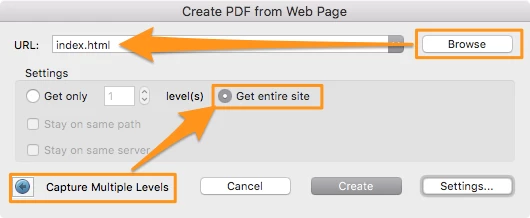
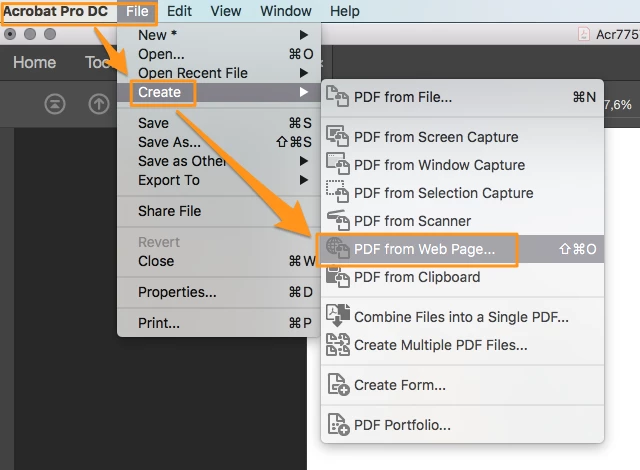
You will find more options under the "Settings" button:


4 replies

JR Boulay
Community Expert
Community Expert
March 10, 2021

If you are a Mac user you can try the free and very useful Paparazzi! : https://derailer.org/paparazzi/

It makes one HTML page = one PDF page, instead of truncating to A4/Letter format.

(This feature has been removed in Acrobat since version 9, I never understood why...)

Acrobate du PDF, InDesigner et Photoshopographe
JR Boulay
Community Expert
JR BoulayCommunity ExpertCorrect answer
Community Expert
March 10, 2021

You will find more options under the "Settings" button:


Acrobate du PDF, InDesigner et Photoshopographe
Inspiring
March 10, 2021

@JR Boulay So simple? Let's try!!! 😄

JR Boulay
Community Expert
Community Expert
March 10, 2021

Just do it!

😉

Acrobate du PDF, InDesigner et Photoshopographe
Bernd Alheit
Community Expert
Community Expert
March 10, 2021

What can you see when you open the index file in a browser?

Inspiring
March 10, 2021

@Bernd Alheit I see the unique id-numbers and affix .html and of course the path

Bernd Alheit
Community Expert
Community Expert
March 10, 2021

Are there links to the HTML files?

try67
Community Expert
Community Expert
March 10, 2021

I don't think there's a built-in way of doing it. You can convert all the files to PDFs, but to merge them in the order that is described in the index file will require reading it, parsing its contents and then merging the files in the same order.

This is not a simple task and will require the development of a custom-made script.


If you're interested in hiring someone to do it for you I'm happy to take a look at the files and let you know if I think it will work, and how much it will cost. You can contact me privately via [try6767 at gmail.com] to discuss it further.

Inspiring
March 10, 2021

@try67  thx for suggestion, but I will wait. Maybe somebody has a kind of tool or had similar problem in past.