santhoshr29800103
Known Participant
September 25, 2024
Answered

Font with the same name being embedded multiple times after combined in Acrobat Pro

  • September 25, 2024
  • 1 reply
  • 895 views

Hi,


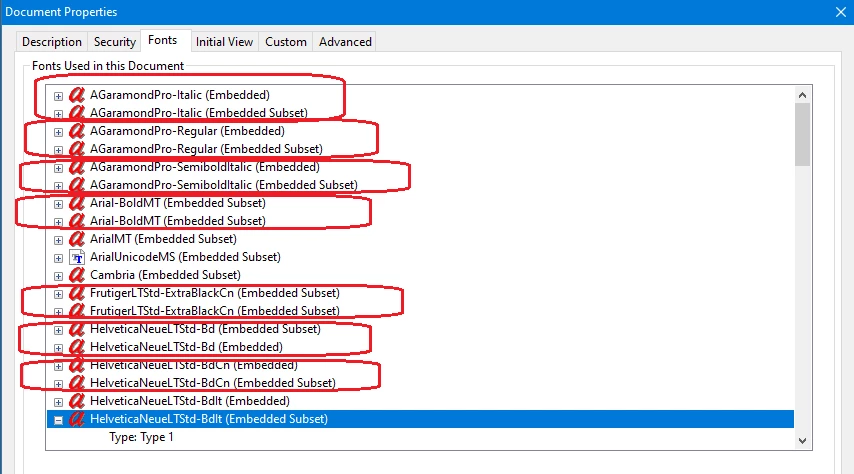
I am combining the  Chapters PDF in to a combined One using Acrobat Professional Xi, 2024.  After combined, if i check the fonts in document properties the same name being embedded as multimple times. 


Please advise why the same name of the fonts shows in two times. How to fix this?


Screenshot for references:


Thanks,

Santhosh

Correct answer Tariq Ahmad

Hi 

Sorry for the delayed response, and thanks for reaching out with this question.


When combining multiple PDFs in Adobe Acrobat Pro, you might notice that the same font appears multiple times in the document properties. This occurs because each original PDF may have its own subset of the font embedded, tailored specifically to the characters used in that document. When these PDFs are merged, Acrobat retains each subset to ensure accurate rendering, leading to multiple instances of the same font being listed.

Why Does This Happen?

  • Font Subsetting: To reduce file size, PDFs often embed only the specific characters of a font that are used in the document, creating a subset. Different PDFs might have different subsets of the same font.

  • Merging PDFs: When combining PDFs, Acrobat includes all font subsets from the original documents to maintain the correct appearance of text. This results in multiple embedded subsets of the same font in the combined PDF.

How to Address This Issue:

To consolidate these font subsets and reduce redundancy, you can use Acrobat's optimization tools:

PDF Optimization:

  • Open the combined PDF in Acrobat Pro.
  • Navigate to File > Save As Other > Optimized PDF.
  • In the PDF Optimizer dialog, select the Fonts category.
  • Ensure that "Subset all embedded fonts" is unchecked to embed entire fonts rather than subsets.
  • Click OK to save the optimized PDF.


Preflight Tool:

  • Go to Tools > Print Production > Preflight.
  • In the Preflight dialog, select a profile that consolidates fonts or create a custom fixup to merge font subsets.
  • Run the preflight profile to process the PDF.

By performing these steps, Acrobat will attempt to merge identical font subsets, resulting in a single embedded font and potentially reducing the file size.




~Tariq

1 reply

Tariq AhmadCommunity ManagerCorrect answer
Community Manager
January 24, 2025

Hi 

Sorry for the delayed response, and thanks for reaching out with this question.


When combining multiple PDFs in Adobe Acrobat Pro, you might notice that the same font appears multiple times in the document properties. This occurs because each original PDF may have its own subset of the font embedded, tailored specifically to the characters used in that document. When these PDFs are merged, Acrobat retains each subset to ensure accurate rendering, leading to multiple instances of the same font being listed.

Why Does This Happen?

  • Font Subsetting: To reduce file size, PDFs often embed only the specific characters of a font that are used in the document, creating a subset. Different PDFs might have different subsets of the same font.

  • Merging PDFs: When combining PDFs, Acrobat includes all font subsets from the original documents to maintain the correct appearance of text. This results in multiple embedded subsets of the same font in the combined PDF.

How to Address This Issue:

To consolidate these font subsets and reduce redundancy, you can use Acrobat's optimization tools:

PDF Optimization:

  • Open the combined PDF in Acrobat Pro.
  • Navigate to File > Save As Other > Optimized PDF.
  • In the PDF Optimizer dialog, select the Fonts category.
  • Ensure that "Subset all embedded fonts" is unchecked to embed entire fonts rather than subsets.
  • Click OK to save the optimized PDF.


Preflight Tool:

  • Go to Tools > Print Production > Preflight.
  • In the Preflight dialog, select a profile that consolidates fonts or create a custom fixup to merge font subsets.
  • Run the preflight profile to process the PDF.

By performing these steps, Acrobat will attempt to merge identical font subsets, resulting in a single embedded font and potentially reducing the file size.



~Tariq

santhoshr29800103
Known Participant
February 5, 2025

Thanks for your detailed reply. I will check and get back...

AnandSri
Community Manager
Community Manager
March 10, 2025

Hello!


Just following up to see if you have tried the suggested steps. I hope the fonts are no longer being embedded multiple times.

Please ensure you have the latest version of the app installed: 25.001.20428 (Planned update – March 4, 2025)For future reference, you can check this article:

🔗 Correcting Problem Areas with the Preflight Tool


Thanks,

Anand Sri.