I'm not sure this will work, but it's worth it to try. The fact that you are seeing the files is why I think it might be this issue. Please let me know if this solves your issue.
This sounds like you've not given Acrobat permission for Apple's protection. Simply, this is an Apple protection issue, not Adobe's issue. The following was written for someone who needed (the same) help with Acrobat,
Go into the System Settings and select the Privacy & Security tab on the left, then First Full Disk Access, and after finishing that, select the Accessibility option. [Note: the location of the tabs may or may not match what I’m showing.]
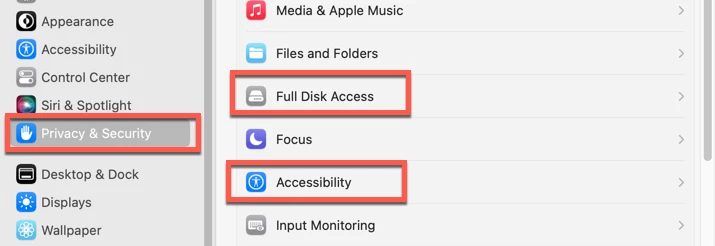
If you do not see Acrobat listed, click on the "+" button at the very bottom, which will open a Finder's window into the Applications folder. Select Acrobat Pro. Be sure to slide the On/Off button to On (to the right). You may need to enter your administrator's password at some point. You also may need to quit Acrobat and reopen.

If this doesn’t work yet, then also do the Accessibility tab and turn on that button as well.
Please let us know if that works or not.




 AdChoices