Participant
April 28, 2017
Question

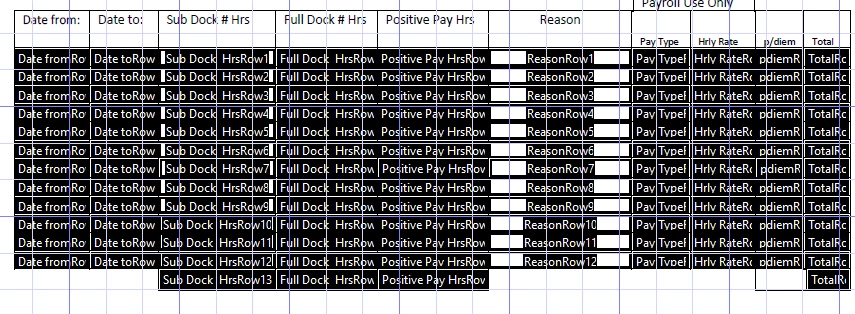
How can I create a "Total" or "Sum of" field? I have created my fields, just need to total them up.

  • April 28, 2017
  • 2 replies
  • 5996 views

It would be placed here, in the bottom

2 replies

Inspiring
May 20, 2017

Select the "TotalRow13"(?) or the field to hold the total and use the right mouse click to bring up the "Properties" for the field. Select the "Calculate" tab and then you can use any of the 3 calculation options.

For the "Field is the _____ of the following fields:" you can chose the calculation option (Sum) and then select the field names to use in the calculation. You may need to highlight the field name and then press the space bar to select the field.

For the "Simplified Field Method" you can enter the field names separated by the "+" operator.

For the "Custom JavaScript Calculation" will require writing JavaScript statements to numerically sum the fields, but we will skip the code for now.

If you had used the Hierarchical naming convention or created the fields by creating the first row without a numerical index and then use the "Create multiple fields" option the fields would be systematically named with a suffix of ".#" ranging from 0 to the number of fields - 1 and then some calculation methods would be simpler.

Adorobat
Community Manager
Community Manager
May 20, 2017

Hi cindyd89266771,

Sorry for the delay in response.

Please refer to the following links discussing the same topic:

https://acrobatusers.com/tutorials/print/how-to-do-not-so-simple-form-calculations

How do I use acrobat to calculate quantity/price as a form?

Field Calculations in Adobe Acrobat XI Pro

Let us know if you have any further questions on this.

Thanks,

Shivam