
Participating Frequently
December 1, 2020
Beantwortet

How to combine "calculate" and "hidden" scripts for result from dynamic dropdown

  • December 1, 2020
  • 3 Antworten
  • 1374 Ansichten

Back again! Searched and read many an article/post on here but found nothing for what I am looking to do. If I happened to miss it, I apologize.


Origination dropdown results in a second dropdown, which ultimately results in a series of fillable texts (see image).
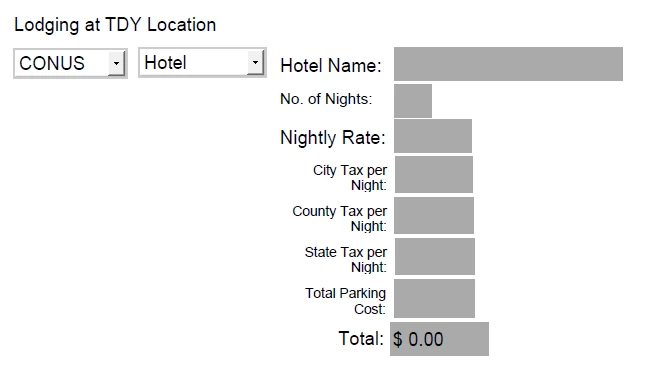
For hotel name, nights, city tax, county tax, state tax, and parking I used the following script to cause them to be hidden when the dropdown options have changed:

event.target.display = (this.getField("lodginglocationdropdown13").value == "CONUS" && this.getField("lodgingdropdown14").value == "Hotel")?display.visible:display.hidden;


This works wonderfully; however, the final box, "Total," needs to be calculated AND hidden.

The calculation is as follows: (nightlyrate*numbernightsstayed)+(hotelcitytax*numbernightsstayed)+(hotelcountytax*numbernightsstayed)+(hotelstatetax*numbernightsstayed)+(hotelparkingtotal)


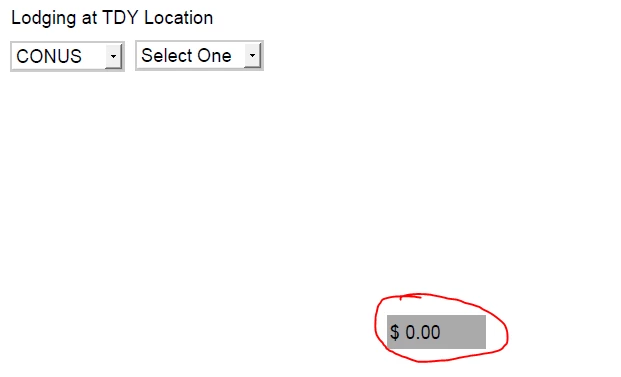
I have attempted to place the math portion in the calculation tab (simplified and custom) while putting the hide script in the validate tab, and vice versa for giggles, but no dice. The "Total" item won't disappear: 
 

How can I combine these two scripts to be able to calculate AND hide the text box when either of the two dropdown selections are changed?

TIA! 😃

Dieses Thema wurde für Antworten geschlossen.
Beste Antwort von Thom Parker

Ok, So first, there is an order to how the different events are called on a field. The Validation script is only called when the field it is on has changed. So the Validation event for the Total field will not change when either of the dropdowns change, unless it causes a change in field value.  Take a look at this article. It is not on validation, but shows the event ordering for a single field, based on different actions.

https://www.pdfscripting.com/members/Formatting-Form-Fields.cfm#EvtSequ


The dropdown script shown in the show/hide article needs to be modified to fit the parameters on your form. It will not work as written in the article, this is just an example of how it can be done. However, in your case the field visibility depends on two dropdowns, so there is a better way to approach this. 


But first, how do you hide/show the other fields? Are all of these fields controled through validation scripts? This only works if there are unique changes made to each field, which is not reliable. 


Here is the better way. Use a calculation script in a hidden field that is on this form for the sole purpose of housing the calculation script. Calculations are called any time any field anywhere on the form is changed. This script will set the visibility for all of the fields. This method places all control in a single central location, making it more robust, more free of human error, and easier to maintain than distributing the code to several events that may or may not fire when needed.   


Here's the script outline:


// First, only run this script if the calculation was triggered by one of the dropdowns
if((event.source.name == "lodginglocationdropdown13") ||(event.source.name == "lodgingdropdown14"))
{
   // Next , find the display value for all fields
   var nDisplay = (this.getField("lodginglocationdropdown13").value == "CONUS" && 
   this.getField("lodgingdropdown14").value == "Hotel")?display.visible:display.hidden; 

   // Now set the display value for all fields
   this.getField("Total").display = nDisplay;
    ... set other fields ...
}


3 Antworten

Thom Parker
Community Expert
Community Expert
December 1, 2020

Did you read this article?

https://www.pdfscripting.com/public/Hiding-and-Showing-Form-Fields.cfm


So, is the calculation working? 

The calculation is a completely separate issue from hiding the fields. Either the calulation works or it doesn't. This has nothign to do with whether or not the total field is hidden.


Simply hide the total field in the same way the other fields are hidden. 


Thom Parker - Software Developer at PDFScriptingUse the Acrobat JavaScript Reference early and often
Participating Frequently
December 1, 2020

Forgive my ignorance, as I am quite the newbie at this and am learning on the fly.

I previously viewed that article, and, since you posted it, I just read through it again to check myself in case I overlooked something the first time. I currently am using event.target.display = (this.getField("lodginglocationdropdown13").value == "CONUS" && this.getField("lodgingdropdown14").value == "Hotel")?display.visible:display.hidden; to control the visibility of the item; however, with this in the validation field and the Math stuff in the calculate field (I tried the simplified and custom fields), the box still won't go away when the dropdown selection is changed. I can get it to do one or the other, but not both (conditionally, of course).

There are no radio buttons or checkboxes used. From the article you posted, "Setting Field Visibility Based on a Dropdown Selection" provided this script: 

var nHide = (event.value=="Other")?display.visible:display.hidden; 
this.getField("OtherValue").display = nHide; 

Unfortunately, this script did not work, either. The "Total" item is still not "hiding" when the dropdown selections change. 

Bernd Alheit
Community Expert
Community Expert
December 1, 2020

For the calculation use also a Javascript script and use both scripts at calculation.

Participating Frequently
December 1, 2020

Can you please elaborate? I am familiar-ish with how to perform calculations using simplified field notation and the "value is" options; however, I am not versed on how to create a custom calculation script merged with the "hide" script.

Hence why I posted this. (PS thank you for your help yesterday!)

Thom Parker
Community Expert
Community Expert
December 1, 2020
Thom Parker - Software Developer at PDFScriptingUse the Acrobat JavaScript Reference early and often
Participating Frequently
December 1, 2020

Note: Correction- For the "hide" code, IOT hide the mentioned hotel options, I do NOT use "Hotel," I used the other available option.