


Inspiring
February 27, 2022
Question

How to print only the black text in fillable form if you have color in the background of the fields

  • February 27, 2022
  • 3 replies
  • 1208 views

Hi,

I need your help.


My client want to have fillable form creat in Indesign with green background of every field with black color text inside. This he need for his web needs.....but in the same time he need to print the Form on paper.....but he need the green color of the background to be remove only the text to appeare.


Here i send image to show how the file look in Indesign:
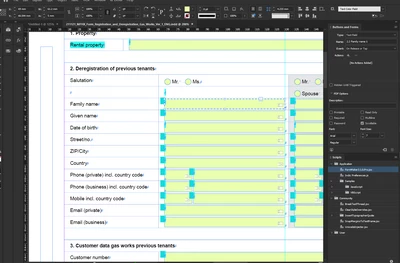
From this i make PDF which look like this:
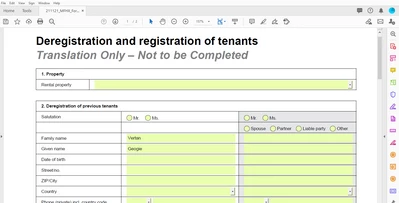
And from this PDF when i print on PAPER i want all the green color in the back ground to be remove only the black color to stay in every field.


If i need more info just ask me and i will upload more image.


Thank you for your help

This topic has been closed for replies.

3 replies

JR Boulay
Community Expert
Community Expert
February 28, 2022

Acrobate du PDF, InDesigner et Photoshopographe
JR Boulay
Community Expert
Community Expert
February 28, 2022

Using these two scripts should be faster. The first must be placed in the "Document will print" event, the other must be placed in the "Document did print" event.

Don't forget to edit color values to match your green color.


// DOCUMENT WILL PRINT
var bSale = this.dirty;
for (var i=0; i<this.numFields; i++) {
var oFld = this.getField(this.getNthFieldName(i));
if (oFld.type == "text") {oFld.fillColor = color.white;}
}
this.dirty = bSale;


// DOCUMENT DID PRINT
var bSale = this.dirty;
for (var i=0; i<this.numFields; i++) {
var oFld = this.getField(this.getNthFieldName(i));
if (oFld.type == "text") {oFld.fillColor = ["RGB", 244/255, 249/255, 255/255];}
}
this.dirty = bSale;

Acrobate du PDF, InDesigner et Photoshopographe
NikVetroAuthor
Inspiring
February 28, 2022

Hi,


Thank you very much


Sorry that i will ask something stupid but i cant understand where to put this scripts....i know the scripts menu and validate menu in acrobat....

What you mean under

"The first must be placed in the "Document will print" event"

What event you mean


Thank you

JR Boulay
Community Expert
Community Expert
February 27, 2022

Place the green backgrounds on a separate layer.

Set this layer as "visible but non printable".*

Use a transparent background for form fields.*

Then export to "Interactive PDF" with PDF layers.


* This can be done with Acrobat Pro too.

Acrobate du PDF, InDesigner et Photoshopographe
NikVetroAuthor
Inspiring
February 28, 2022

Hi,


Thank you.

You are smart.....its there is way this to be done more qukly because the form have more than 200 fields.

If not i will have to try it