lenb33719699
Participant
May 31, 2018
Answered

I'm unable to print grayscale when printing to Adobe PDF.

  • May 31, 2018
  • 4 replies
  • 14622 views

I'm unable to print grayscale when printing to the printer "Adobe PDF". The option to print in grayscale is grayed out. How do I turn that back on?

This topic has been closed for replies.
Correct answer Abambo

If I understand your problem correctly, you cannot do this?
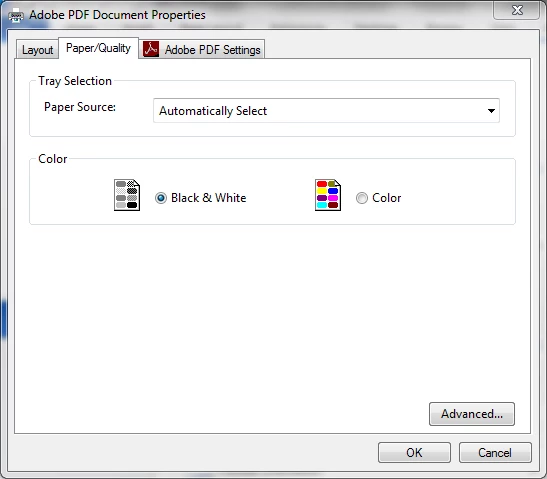
From what program do you print?

What is your OS version?

What is your Acrobat version?

4 replies

Participant
May 9, 2024

I have the exact same problem and none of the fixes listed have helped. I have selected to prinit in Black & White, but it still prints in colour. I cannot check the print-in-grayscale option because it is grayed out and cannot be selected.


Abambo
Community Expert
Community Expert
May 9, 2024

Change to a differenc printer and check if the greyscale option is still disabled.

ABAMBO | Hard- and Software Engineer | Photographer
Adorobat
Community Manager
Community Manager
June 6, 2018

Hi Len,

Try clicking Black and white option as Abambo mentioned in post # 2 above and check if that works:

Click File > Print > select Adobe PDF as a printer, click Properties > click Paper quality > and select Black & White.

Thanks,

Shivam

Participant
February 25, 2022

Hi,

The fix mentioned by Abambo. This still prints in color.

Ray L

Abambo
Community Expert
AbamboCommunity ExpertCorrect answer
Community Expert
June 1, 2018

If I understand your problem correctly, you cannot do this?

From what program do you print?

What is your OS version?

What is your Acrobat version?

ABAMBO | Hard- and Software Engineer | Photographer
Participating Frequently
November 11, 2023

Unfortunately this does not work for me: my adobe still prints in color. I have check all the boxes I could find, including this one, that used to do the trick, but not in the latest version...


Abambo
Community Expert
Community Expert
November 11, 2023

What is your OS and version?


The above problem is for printing to the Adobe PDF virtual printer and generating a greyscale PDF file.


What application are you using?

ABAMBO | Hard- and Software Engineer | Photographer
Adorobat
Community Manager
Community Manager
June 1, 2018

Hi Lenb,

As per the issue description mentioned above, you are unable to print pdf in grayscale using Adobe PDF printer, is that correct?

Try following steps:

Open the pdf file in Acrobat > click File > Print

Select Adobe PDF as a printer > Advanced

Under Color Profile, select dot gain 10% or 15% , click OK and print.

Let us know if you need any further help.

Shivam

lenb33719699
Participant
June 1, 2018

I tried the setting and after I made the change, and returned to the print screen, it went back to graying out the option to print in grayscale

Adorobat
Community Manager
Community Manager
June 5, 2018

Could you try clicking on Advanced next to properties under print dialogue box > uncheck print as image > click OK and check if that allows to uncheck print in grayscale option.

Thanks,

Shivam