Participant
June 10, 2021
Answered

Impossible d'importer une image dans ACROBAT DC

  • June 10, 2021
  • 2 replies
  • 1524 views

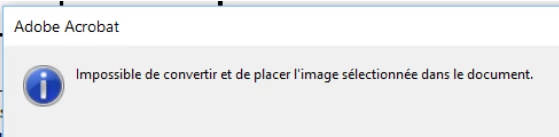
Cette fonction est devenue impossible pour, le texte peut toujours être modifié mais l'imsertion d'image conduit au message d'erreur "Impossible de convertir et de placer l'image sélectionnée dans le document".

Dans le même document PDF la même image s'insérait il y quelques semaines...

Que faire ?


This topic has been closed for replies.
Correct answer Jean-Marie5E2E

The bug was fixed with my IT dpt: the imageconversion.api plugin was reinstalled in the C:\Program Files (x86)\Adobe\Acrobat DC\Acrobat\plug_ins directory, then the image insertion tool works well.

Issue closed.

2 replies

Participant
June 11, 2021

Hi Amal,

Thanks for your answers.

My Acrobat DC version is 2021.005.20048

I reinstalled it this week and tried to repair the installation with no change.

This affect all PDF files.

I am an enterprise user, so I didn't try the reset to default, I will ask my IT.

I tried the administrator mode, no effect.

I will try on a different PC without the IT environment.

Regards

Jean-Marie

Participant
June 18, 2021

The same software version works well when installed on a different computer out of the IT environment. The issue probably comes from an IT change, I reported this.

Thanks for your support.

Jean-Marie5E2EAuthorCorrect answer
Participant
June 22, 2021

The bug was fixed with my IT dpt: the imageconversion.api plugin was reinstalled in the C:\Program Files (x86)\Adobe\Acrobat DC\Acrobat\plug_ins directory, then the image insertion tool works well.

Issue closed.

Amal.
Legend
June 11, 2021

Hi Jean-Marie


Hope you are doing well and sorry for the trouble. As described you are unable to add the image to the PDF file and get the error 'Unable to convert and place the selected image in the document'


Would you mind sharing the version of the Adobe Acrobat DC you are using? To check the version goto Help > About About Acrobat and make sure you have the latest version 21.05.20048 installed. Go to Help > Check for updates and reboot the computer once.


Also, is this a behavior with a particular PDF file or with all the PDF? Please try with a different PDF file and check.


Also, please try to repair the installation from the help menu (Windows Only) and reboot the computer. Go to Help > Repair Installation.


If it doesn't work, please reset the Acrobat Preferences to default as described in the help page https://community.adobe.com/t5/acrobat/how-to-reset-acrobat-preference-settings-to-default/td-p/4792082 and check.


You may also try to create a new test user profile with full admin rights in Windows and try using the application there and check.


Also, please check out the correct answer marked in a similar discussion https://community.adobe.com/t5/acrobat/can-t-add-image-to-pdf/td-p/10471911#M141539 and see if that works for you.


Regards

Amal