


Known Participant
June 29, 2018
Answered

Is it possible to have two instances of the "Adobe PDF" virtual printer?

  • June 29, 2018
  • 2 replies
  • 2066 views

Hello:

My application needs the Adobe PDF (Distiller) printer to place its output (many PDF files) in a predetermined folder, silently, without asking questions. Such location varies every time the user runs it. I call this the "Automated/Robot" mode.

My users also need the regular mode ("Human/Interactive") in which they decide where to place each PDF file generated.
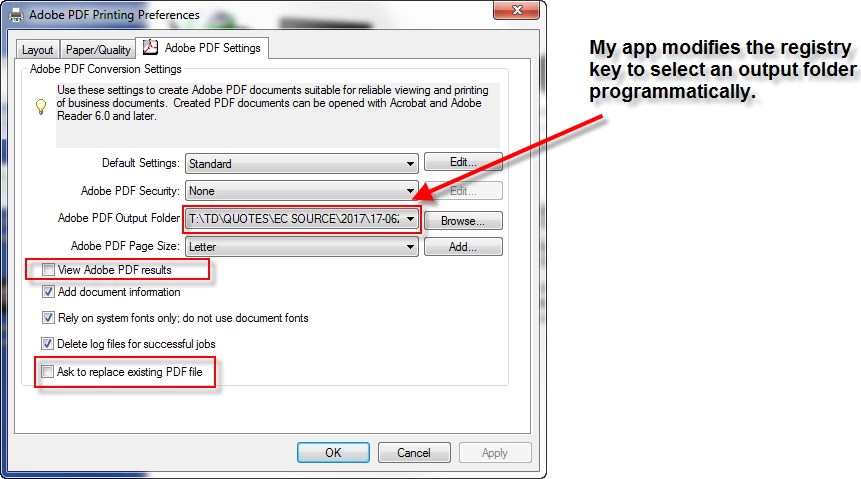
It has become very annoying for them to be switching back & forth, between the two modes.

An obvious solutions would be two install 2 separate printers, each with its own permanent settings.

Is this possible?

TIA

Adobe Acrobat 9 Pro.

    This topic has been closed for replies.
    Correct answer Test Screen Name

    Suggest you post in the Acrobat SDK forum. There is an interface you can use. This is a dead forum, Distiller Server no longer exists. (You must not use Acrobat 9 on a server).

    2 replies

    Known Participant
    June 29, 2018

    Hello all:

    My applications need the Adobe PDF (Distiller) printer to place its output (many PDF files) in a predetermined folder, silently, without asking questions. Such location varies every time the user runs it. I call this the "Automated/Robot" mode.

    My users also need the regular mode ("Human/Interactive") in which they decide where to place each PDF file generated.


    It has become very annoying for them to be switching back & forth, between the two modes.

    An obvious solutions would be two install 2 separate printers, each with its own permanent settings.

    Is this possible? How?

    TIA

    Adobe Acrobat 9 Pro.

    Known Participant
    June 29, 2018

    I just attempted something that seems to be a step in the right direction. I went into "Printer Properties", changed the name of the printer from "Adobe PDF" to "Adobe PDF Virtual Printer #1" and reinstalled the software. Much to my delight, look at the results in the screenshot:


    I have two printers now! Alas, when I go into the registry, the key that my application modifies is not duplicated.


    TIA

    lrosenth
    Adobe Employee
    Adobe Employee
    June 29, 2018

    No, it is NOT supported to have multiple instances of the Adobe PDF printer installed. If you do so, it is at your own risk and without support for Adobe.

    Test Screen NameCorrect answer
    Legend
    June 29, 2018

    Suggest you post in the Acrobat SDK forum. There is an interface you can use. This is a dead forum, Distiller Server no longer exists. (You must not use Acrobat 9 on a server).

    Known Participant
    June 29, 2018

    Done. Thanks!