


Participant
July 27, 2022
Answered

Is there a way to have it so that the Pan hand tool is selected as default when opening a PDF file?

  • July 27, 2022
  • 3 replies
  • 16957 views

Hi - Is there a way to have it so that the Pan hand tool is selected as default when opening a PDF file. Mine always opens with the Selection tool selected and I have to change it to te hand tool.

Correct answer Document Geek

It appears that if the hand tool is selected, it will remain selected until you change tools.


So with a document open, switch to the Pan tool. Then close your document and then reopen it. Is the hand tool still selected?


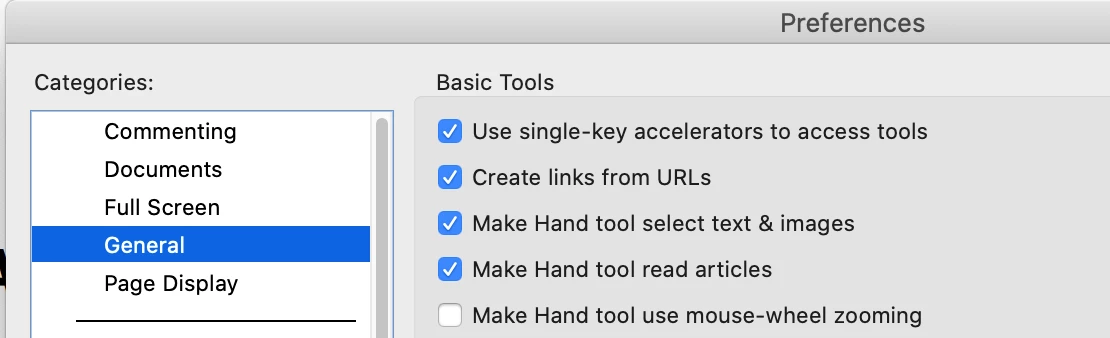
It's easy to change to the hand tool by pressing the letter h. Make sure you have Single-Key Accelerators turned on in your preferences.


3 replies

Participant
November 18, 2022

The issue here is the setting in Edit Menu>Preferences>General - third tick box down - "make hand tool select text & images". Whether the hand tool is set as the default, or not, you have to keep selecting the hand tool because it pings back to the selection tool. UNTICK "make hand tool select text & images" then you can pan your document till your hearts content without having to select the hand tool ALL the time. Just select the selection tool when you want to select. Odd default setting. 

Document Geek
Community Expert
Document GeekCommunity ExpertCorrect answer
Community Expert
July 27, 2022

It appears that if the hand tool is selected, it will remain selected until you change tools.


So with a document open, switch to the Pan tool. Then close your document and then reopen it. Is the hand tool still selected?


It's easy to change to the hand tool by pressing the letter h. Make sure you have Single-Key Accelerators turned on in your preferences.


Participant
July 28, 2022

Thanks!
Previously “…with a document open, switch to the Pan tool. Then close your document and then reopen it. Is the hand tool still selected?” This wasn’t happening, I would select Pan tool close the document then reopen and the Selection tool would be the currently selected tool.

I’m not sure what happened but I turned on Single-Key Accelerators, pressed h and then tested. Now the Pan tool is selected buy default when opening any pdf.
Thanks again.

Participant
July 27, 2022

To clarify this is for Adobe Acrobat Standard DC (64-bit) on a PC, not mobile.