Participating Frequently
March 17, 2022
Question

Linking files in Outlook 365 via Adobe Document Cloud

  • March 17, 2022
  • 3 replies
  • 3680 views

It is not possible any longer to attach a file via a link in my Outlook 365, either using below symbol or the links.
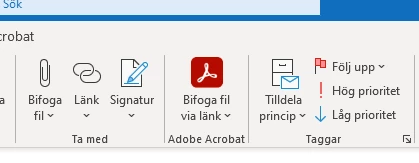
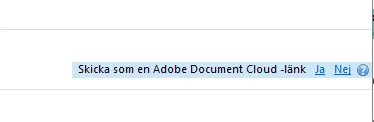
 

This topic has been closed for replies.

3 replies

Adobe Employee
September 1, 2022

Hi ,
Thank you for reaching out. Are you still facing the same issue?


Can you please share the below information to debug the issue -

  1.  Please share fiddler logs while you perform the Attach link workflow in the erroneous scenario. Below are the steps to capture fiddler logs :
    • Download fiddler from: https://www.telerik.com/download/fiddler 
    • Run fiddler and go to ‘Tools-> Options’
    • In the HTTPS tab, ensure the checkboxes are checked: ‘Capture HTTPs connects’ and ‘Decrypt HTTPs traffic’.
    • Now let fiddler run and launch Acrobat and perform the same operation.
    • Once complete do a save of data by ‘File->Save->All sessions’.
    • Please share this data
  2. Also if possible can you please attach the on-screen video so that we can have a better understanding of the issue.


Thanks

Himanshu

MarkholmAuthor
Participating Frequently
March 17, 2022

Thanks for reply! The transfer just stops or goes halfway and stops. 


Amal.
Community Manager
Community Manager
March 18, 2022

Hi there


Have you tried to attach the file to email from within the Adobe Acrobat/Reader DC application and see if that works as described here https://helpx.adobe.com/acrobat/using/send-pdf-by-email.html


Please try to repair the installation of Adobe Acrobat from the help menu (Win) Only and reboot the computer once.


Also, try to create a new test user profile with full admin rights in Win and try using the application there.


Regards

Amal


MarkholmAuthor
Participating Frequently
March 24, 2022

Not sure how a test profile will help me. We have other licenses and some have experienced same problems but could solve by logging in and out. I have reinstalled Adobe but have the same problems.

Amal.
Community Manager
Community Manager
March 17, 2022

Hi there


Hope you are doing well and sorry to hear that.


What happens when you try to attach the file via link using Document cloud? Do you get any error message? If yes, please share the screenshot of the same for a better understanding


Also, try to attach the file to email from within the Adobe Acrobat/Reader DC application and see if that works as described here https://helpx.adobe.com/acrobat/using/send-pdf-by-email.html


Please go through the correct answer marked in the similar discussion https://community.adobe.com/t5/adobe-acrobat-online-discussions/adobe-document-cloud-add-in-for-outlook-creates-problems-and-no-longer-works-correctly-it-arrives-to/m-p/10342815#M32331 and see if that works.


Also please go through the help page https://helpx.adobe.com/acrobat/using/adobe-document-cloud-for-outlook.html and see if that helps.


Regards

Amal

MarkholmAuthor
Participating Frequently
March 17, 2022

Could it be that I am missing a plug in? Also I note that the Aobe Creative Cloud icon is not coloured, see below


MarkholmAuthor
Participating Frequently
March 17, 2022

Sorry, made my reply Correct by misstake.
