

lawrencer20029198
Known Participant
August 11, 2021
Answered

Looking for javascript that compares two values and returns value of zero if first is >= 2d

  • August 11, 2021
  • 1 reply
  • 3691 views

I wish to compare the values of two fields that are calculated based upon the sum of other fields like this:

sum1=fieldx +fieldy+fieldz

sum2=fielda+fieldb+fieldc

if sum1>sum2 then sum2 should display a 0 and if sum2 displays a 0, then fielda+fieldb+fieldc should become invisible only to the user, but still be there since it is a part of theabove equation.  so far I have this, but this does not even insert 0 into the field

event.value=this.getField("2ea3").value>=event.value ? this.getField("2eD").value : 0;

In the above example I use 2ea3 for sum1 and 2eDfor sum2.  When I run it in debugger, it does show a zeo but it does not insert it into the form.  I don't know why it is not inserting a zero into the field when the debugger results to 0.

Thanks for your help.
This topic has been closed for replies.
Correct answer Nesa Nurani

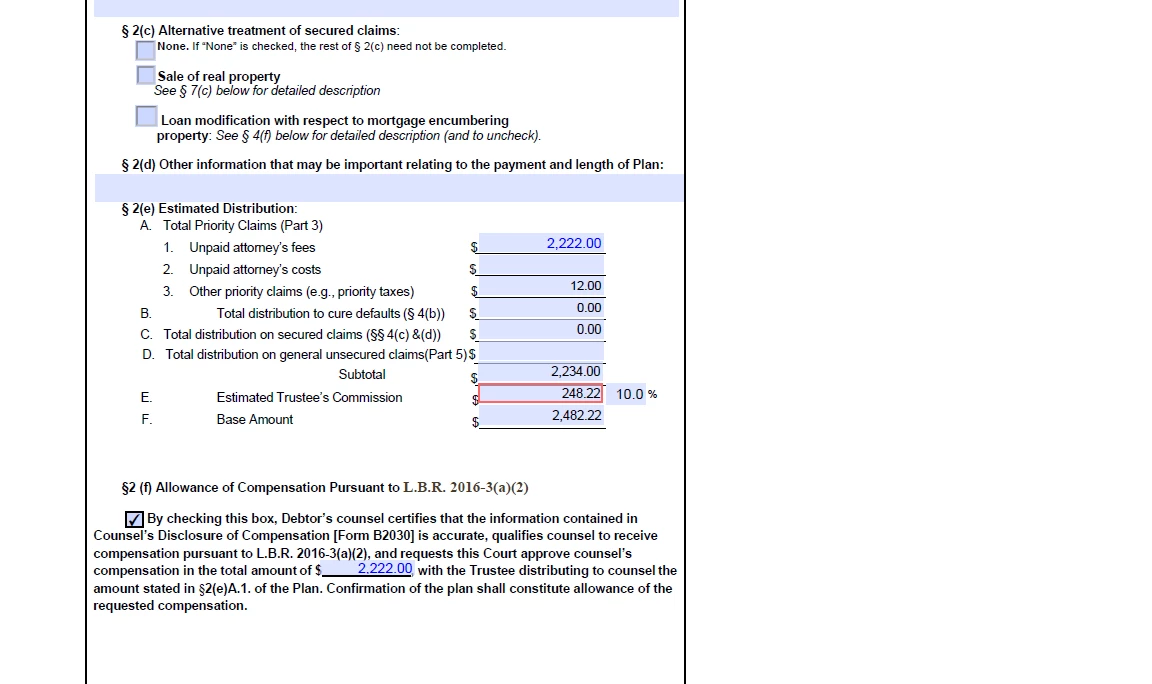
To further illustrate, this is what the field looks like.  Look at line 2(e) D.  It should have a number in there.  You can actually type a number in there but it stays blank.


You can't manually input value into that field because calculation will overwrite your input, thats way field stay blank. For the other part, script is set so it stays blank until there is value in all four fields.

See if this script does what you want:

var a = this.getField("5a.0.4");
var b = this.getField("5a.1.4");
var c = this.getField("5a.2.4");
var d = this.getField("5b1");
var y = this.getField("2ea3").value;

var x = Number(a.value)+Number(b.value)+Number(c.value)+Number(d.value);

if(x != 0 && y>=x){
event.value = 0;
a.display = display.hidden;
b.display = display.hidden;
c.display = display.hidden;}
else{
event.value = x;
a.display = display.visible;
b.display = display.visible;
c.display = display.visible;}

1 reply

Nesa Nurani
Community Expert
Community Expert
August 11, 2021

If you use that code in "2eD" field, then how do you calculate sum2?

Also you write that you want to check if sum1>(is greater)sum2 but in your script you used sum1>=(is greater or equal)sum2 so I'm not sure which one you want so Il use > in my script and you change it if it's not correct.

See if this is what you looking for,put it in "2eD" field as custom calculation script and if your actual name for fielda,fieldb and fieldc are different then in script, change them to your actual names:

var a = this.getField("fielda");
var b = this.getField("fieldb");
var c = this.getField("fieldc");
var y = this.getField("2ea3").value;

if(typeof a.value == 'string' || typeof b.value == 'string' || typeof c.value == 'string')
var x = "";
else
x = a.value+b.value+c.value;

if(x != "" && y>x){
event.value = 0;
a.display = display.hidden;
b.display = display.hidden;
c.display = display.hidden;}
else{
event.value = x;
a.display = display.visible;
b.display = display.visible;
c.display = display.visible;}

lawrencer20029198
Known Participant
August 11, 2021

Thank you for answering my question.  For the 2eD field, i used the built-in calculator under text field properties.  I told Adobe to give me the sum of these actual field names (actual names in my form -  5a.0.4, 5a.1.4, 5a.2.4, 5b1.  So 2eD = the sum of  5a.0.4, 5a.1.4, 5a.2.4, 5b1  I did not use any scripting for that.  Does that matter? Will javascripting override calculated values in that way?

try67
Community Expert
Community Expert
August 11, 2021

No, it doesn't matter. You just have to make sure the fields calculation order is correct.