

skillful_cause16B6
Inspiring
May 20, 2022
Answered

NeoID (Brazil gov. A3 cloud certificate) does not work fine when signed on Acrobat (Pro/Reader)

  • May 20, 2022
  • 1 reply
  • 3519 views

Hi team,

I am trying to sign document using my Adobe Acrobat DC Pro and it always reports that "the document has been altered or corrupted since the signature was applied".


The chain certificate is fine, and when certified using another application like PDF-XChange it validated fine on Adobe Acrobat. The problem is when sign it using Adobe Acrobat.

Please, how can we fix this issue?


Adobe Acrobat DC Pro version 2022.001.20117

Note: This "cloud" certificate works like any local certificate, when you sign it locally, instead of asking for a pin, it asks to confirm its 2FA prompt approval on a mobile app.


In attach:
screenshot "error signed by Adobe Acrobat DC Pro.png"

screenshot "pass signed by PDF-XChange.png"


Thanks a lot and regards
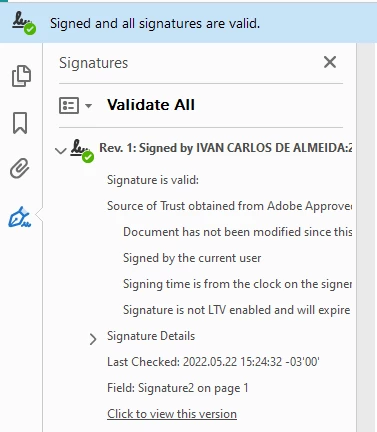
This topic has been closed for replies.
Correct answer skillful_cause16B6

The signed hash in your signature value is incorrect.

This hash value is calculated for the signed attributes of the CMS signature container embedded in your PDF.

These signed attributes are exceptionally large in your case. This is due to the embedded certificate revocation lists (CRLs).

Some signing devices (in your case the cloud signing API) may have restrictions in respect to the amount of data sent through them for signing.

Thus, I'd propose you try signing again without embedding certificate revocation information.

You can switch this off in the Preferences, category Signatures, frame Creation & Appearance, press button More..., de-select checkbox Include signature's revocation status.

(As an aside, PDF-XChange did not embed the CRLs, either.)

If you need LTV-enabled signatures in the end, you can also add revocation information afterwards in an incremental update.


Plot twist:

Using CAdES signing format AND without signature revogation it is valid 🙂

Thank you!!


1 reply

MikelKlink
Participating Frequently
May 20, 2022

Can you share the corresponding PDFs for analysis?

skillful_cause16B6
Inspiring
May 20, 2022

Follow in attach

MikelKlink
Participating Frequently
May 22, 2022

The signed hash in your signature value is incorrect.

This hash value is calculated for the signed attributes of the CMS signature container embedded in your PDF.

These signed attributes are exceptionally large in your case. This is due to the embedded certificate revocation lists (CRLs).

Some signing devices (in your case the cloud signing API) may have restrictions in respect to the amount of data sent through them for signing.

Thus, I'd propose you try signing again without embedding certificate revocation information.

You can switch this off in the Preferences, category Signatures, frame Creation & Appearance, press button More..., de-select checkbox Include signature's revocation status.

(As an aside, PDF-XChange did not embed the CRLs, either.)

If you need LTV-enabled signatures in the end, you can also add revocation information afterwards in an incremental update.