
Participating Frequently
September 5, 2022
Question

Net.HTTP.request - Return SQL or REST API Query Results to Acrobat Forms

  • September 5, 2022
  • 1 reply
  • 881 views

Using the most excellent code examples found on Thom Parker's www.pdfscripting.com site I created a PDF form that calculates a URL for a Net.HTTP.request to a PHP file that queries a MySQL database for a specific price.


The attached screenshot shows the Folder Level Automation script, the form, with results printed to the console for 3 queries with different sets of  parameters assembled from the form's drop-down meus. 
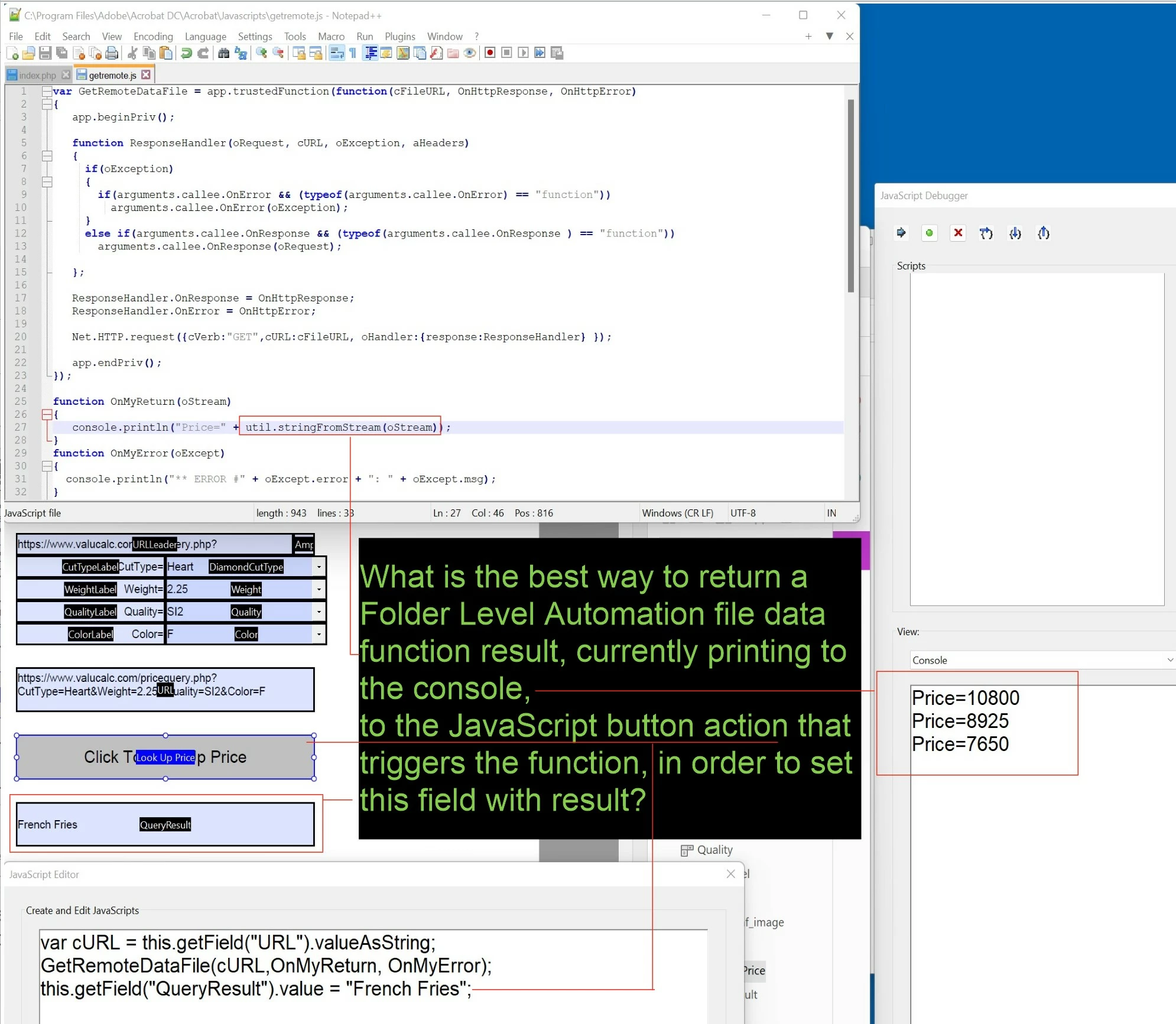


What is the best way to grab the value that is currently being written to the console and return it to a form field so it can be used in further calculations. 


Thom Parker's scripts and instructions can be found in the "Load Remote Data with HTTP" section in this post...

https://www.pdfscripting.com/members/Acquiring_Raw_File_Data.cfm#Scripts


If this is possible to do it opens up an extraordinary range of options for interacting with SQL databases and REST APIs. Just sayin'.

This topic has been closed for replies.

1 reply

Participating Frequently
March 27, 2024

I modified my original approach and now have an extremely reliable way to extend Acrobat forms with PHP to enable securable real time interactions with SQL databases or REST APIs. If you are interested in this type functionality you can download and test using the demo form available at...

https://customdataservices.net/acrobat_forms_list.php


Thom Parker
Community Expert
Community Expert
March 31, 2024

This approach is limited by a few things.

1) It only works from a privileged location. Mostly suitable for automation scripting, not form scripting. 

2) It only works in the desktop Acrobat Pro and Reader.

3) Restricted in Reader unless the current document has special Form Rights that must be purchased from Adobe.  


Thom Parker - Software Developer at PDFScriptingUse the Acrobat JavaScript Reference early and often
Participating Frequently
March 31, 2024

Hi Thom,

Thanks for your reply. I didn't run in to any of these issues in testing (but I am relatively new to Acrobat technologies).


1) It only works from a privileged location. Mostly suitable for automation scripting, not form scripting. 

- Not sure what you mean. You can download it where you'd like, open it, and accept the initial trust prompt.


2) It only works in the desktop Acrobat Pro and Reader.

- Excellent, bypasses many browser-related securtity issues.


3) Restricted in Reader unless the current document has special Form Rights that must be purchased from Adobe. 

- Not sure what you mean. Works great in Reader without additional purchases.


Can you clarify?