New Participant
April 14, 2022
Question

PDF Form - Drop down needs to be selected twice after update

  • April 14, 2022
  • 4 replies
  • 2311 views

Hello,


sinde the last update I have the following issue with my PDF Forms.

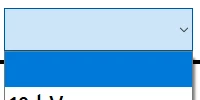
If I select a Drop Down field, the drop shows all entries, closes itself automatically and changes to another "modern" design. Then I have again to click on the drop down to select the option I need to fill in.

change goes from the known design  to this new one 

 

Is this a bug of the new version or this is a setting? 

Thanks!


This topic has been closed for replies.

4 replies

danielb29143847
New Participant
November 21, 2022

I'm having the same issue. I've tried repairing the installation, and uninstalling then reinstalling. I've checked for updates, and have the latest version. The problem persists. I've attached a sample PDF for reference, and verified that it behaves the same as my main document. Any help would be greatly appreciated as this is driving me crazy. Thank you in advance.

hammer0909
Community Expert
Community Expert
April 14, 2022

You'll need to give us some more information. I did a quick test using the latest version of Acrobat DC on Mac and the drop-down menu worked as expected. What OS are you using? 

Dave__M
Community Expert
Community Expert
April 14, 2022

Also - if you don't want to see that blue/purple field background, you can turn it off in your preferences:

BUT... this controls how you, on your machine, view form fields.  It is not part of the document settings at all.

My best,

Dave

hammer0909
Community Expert
Community Expert
April 14, 2022

Can you post a link to the file? So we can see if it's occurring on other machines?

BatehaceAuthor
New Participant
April 14, 2022

I have created a new file. Still the same issue. Here a link to the file. I hope it works.

https://1drv.ms/b/s!AmNv92cbe5lnyUDZw5QusVEqo5D2

Dave__M
Community Expert
Community Expert
April 14, 2022

Can you tell us your Acrobat version and operating system?  It will help with trying to reproduce the issue on our machines.

Thanks,

Dave

BatehaceAuthor
New Participant
April 14, 2022

I have the following version running under Window 10: