

Inspiring
November 14, 2020
Answered

Radio buttons group question

  • November 14, 2020
  • 3 replies
  • 1117 views

Hello,


I have a radio button group (4 buttons). I would like none of them to be checked when the pdf is opened.

Is this possible?

Thank you.

This topic has been closed for replies.
Correct answer JR Boulay

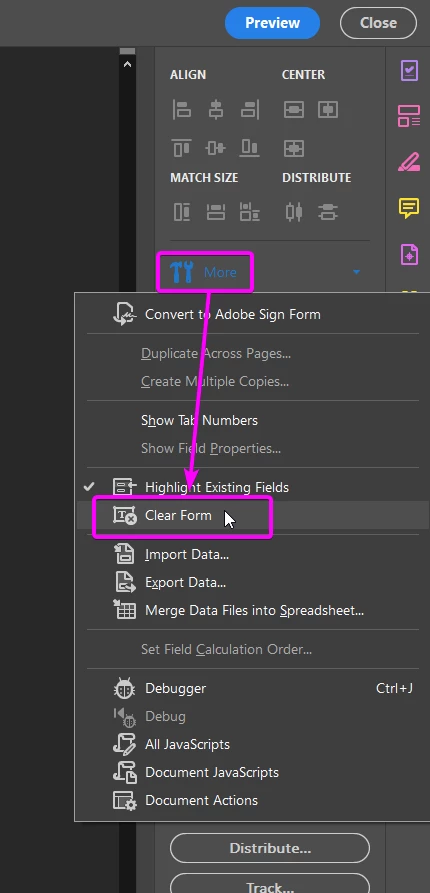
Sure, you just have to "Clear Form" before saving your document.
 

3 replies

oanassAuthor
Inspiring
November 14, 2020

One more thing if possible.. I'm doing a quiz. I have 10 questions with 4 radio buttons as answers for each question.

I would like to put at the end of the quiz a summary of the answers.

Q1 - answer a) (text field)

Q2 - answer c) (text field)

etc.

So the idea is to copy the selected value for a radio button group to a text field. I've searched online but I am not able to make it work. It's recommended to put the script in the Mouse Up event for the button group

this.Text1.value = this.getfield("Group1").value;


Thank you.

oanassAuthor
Inspiring
November 14, 2020

I was able to make it work

I've put this in the text field custom calculation script

event.value = this.getField("Group1").value;


try67
Community Expert
Community Expert
November 15, 2020

Just be aware that when no field is selected in the group it will show "Off" in the text field...

If you don't want that to happen add the following after your current code:

if (event.value=="Off") event.value = "";

ls_rbls
Community Expert
Community Expert
November 14, 2020

+++Adding to the always valuable guidance of JR Boulay,


Or you can also do this same action via JavaScript.


Assuming that all your radio buttons have the same name, regardless of export value (if it is different or not), You can do a Document-level script with just this line:


this.resetForm(["myRadioButtonGroupName"]);


Just open the JavaScript tool and add a name to your function, except that you won't be declaring a function, just type the line as shown above (and change the name inside the quotes to the actual name of your radio button group name). And then save your document.


Next you open it you'll notice that the radio buttons will be unchecked.


If all four radio buttons have different names repeat the same line of the script  for each one.

oanassAuthor
Inspiring
November 14, 2020

Thank you for all the details ls_rbls

JR Boulay
Community Expert
JR BoulayCommunity ExpertCorrect answer
Community Expert
November 14, 2020

Sure, you just have to "Clear Form" before saving your document.


Acrobate du PDF, InDesigner et Photoshopographe
oanassAuthor
Inspiring
November 14, 2020

Thanks a lot JR Boulay. Didn't see that option. I just started using Adobe Forms.