
Participating Frequently
February 2, 2024
Answered

Required checkbox: disable possibility to save/print + codependente checkboxes?

  • February 2, 2024
  • 3 replies
  • 1490 views

So I'm completely new to this so bear with me... I also tried searching here for what I need and the closest I could get was this post:
Solucionado: Enforcing required text fields in pdf before savin... - Adobe Community - 3237090

I have to check boxes, one for Yes other for No. I want that both are required unles one of them has been check (so, if you check Yes, No stops being required and viceversa). Is this possible?
The next thing I need is that one or more required fields havent been filled, it not posible to save the doccument or print it. The linked post apparently does that, but again, being new I have no idea what any of the script or whatever mean. Starting with the fact my adobe is in Spanish and I can't find anything that would ressemble the "onBlur" action.

The boxes are named Check Box3 (yes) and Check Box4 (no)


The most I was able to do was "this.getField("Check Box4").required = false;" : that only sets as not required NO if I checked YES; now i need the code that resets the required values accordingly. 

Ty in advance!
This topic has been closed for replies.
Correct answer Nesa Nurani

@Nesa Nurani Ty again! Oh, how would that script be? I tried asking ChatGPT and got this, but its not working. What is missing?

this.dirty = false; 
var requiredFields = ["Check Box3", "Check Box4"]; 

for (var i = 0; i < requiredFields.length; i++) {
    var field = this.getField(requiredFields[i]);
    if (field && field.required && !field.value) {
        app.alert("Por favor, complete todos los campos requeridos antes de guardar.");
        this.dirty = true; 
        break;
    }
}

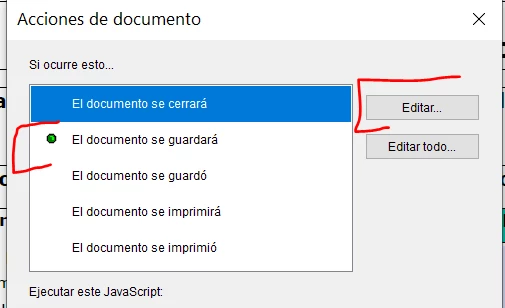
I used that in "Dcouement will save" action (documento se guardará)


Try something like this:


var requiredFields = ["Check Box3", "Check Box4"]; 
for (var i=0; i<requiredFields.length; i++) {
 var field = this.getField(requiredFields[i]);
 if (field.required === true) {
 app.alert("Por favor, complete todos los campos requeridos antes de guardar."); 
  break;}}


If those are only two fields, you check you can use something simpler like this:


var c3 = this.getField("Check Box3").valueAsString;
var c4 = this.getField("Check Box4").valueAsString;

if(c3 === "Off" && c4 === "Off")
app.alert("Por favor, complete todos los campos requeridos antes de guardar."); 


3 replies

try67
Community Expert
February 2, 2024

> The next thing I need is that one or more required fields havent been filled, it not posible to save the doccument or print it. 

This is not possible. The closest you can get to it is to force the printed copy to contain a visible error message about missing fields, or to force all the fields in it to be empty.

You can achieve either one of those things using this (paid-for) tool I've developed:

https://www.try67.com/tool/acrobat-validate-required-fields-before-printing-or-saving


Thom Parker
Community Expert
February 2, 2024

Can the Yes and No checkboxes both be checked?  Or is it one or the other?  

If only one can be checked, then they need to have the same name, but a different export value. 

This will solve the first problem. 


Just as a note, do not use the OnBlur.  This event has limited usefulness. 


Thom Parker - Software Developer at PDFScriptingUse the Acrobat JavaScript Reference early and often
Participating Frequently
February 5, 2024

Hey @Thom Parker ty for your reply 😄 Only 1 checkbox should be checked, so OR yes, OR no. 

Mmm I did not understand the thing about the export value. With the code for the OnBlur trigger Nesa provided, it sets to not required the other one so... It's working. She mentioned something about thi alerting the user if it wasn't filled out, but in my PDF is not doing that. Do you know how to activate that message when there are blank required elements?

Thom Parker
Community Expert
February 5, 2024
Thom Parker - Software Developer at PDFScriptingUse the Acrobat JavaScript Reference early and often
Nesa Nurani
Community Expert
February 2, 2024

You can only alert user that they didn't fill all fields if they try to save, but you can not prevent user to save file.

For checkboxes, place this in any text field as custom calculation script:

var c3 = this.getField("Check Box3");
var c4 = this.getField("Check Box4");
c3.required = (c3.valueAsString==="Off"&&c4.valueAsString==="Off") ? true : false;
c4.required = (c3.valueAsString==="Off"&&c4.valueAsString==="Off") ? true : false;

To find On Blur:

Participating Frequently
February 5, 2024

@Nesa Nurani hello ty for your reply! Got all the checkboxes to work 😄 In spanish for some reason "On Blur" is "Deactivated field"... Had trouble finding the Trigger.

However when you say, "alert user that they didn't fill all fields", should this already be happening with the provided code? Because I'm not getting any alert. Just the outline of the Checkbox is red. 

Nesa Nurani
Community Expert
February 5, 2024

No, alert is not in that script, you can create document action 'Document Will save' or 'Document Did save' or 'Document Will/Did print'...etc and put script in it, with script you should check all your required fields and see if any are empty, if true pop alert. This won't stop the user to save the file, but it will show them if any of the required fields are empty.