



Return code from the Adobe Installer Process is (7).Stopping the installation process.
I used the latest CreativeCloud Packager to package the latest Acrobat Pro DC (Continuous) version for my organization - 18.9.20044. The package installs fine on my 2 personal PCs, but when I try to run the install on another PC, I get this message: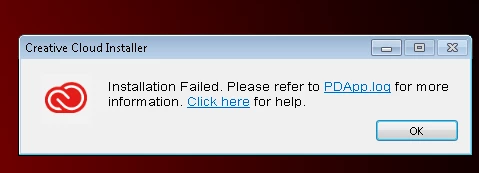
It's a Windows 7 Enterprise Service Pack 1 x64 with Office 365.
I followed all the tips to fix the issue mentioned here: Errors "Exit Code 6" and "Exit Code 7" installing Adobe CS6, CS5.5, CS5, Premiere Elements, and Photoshop Elements including repairing/reinstalling Visual C++ Redistributables (2005, 2010, 2012, and 2015).
Here is the PDApp.log file:
01/31/18 20:37:53:280 | [INFO] | | ASU | MSIInvoker | MSIInvoker | | | 4660 | Build Version - 1.13.0.59
01/31/18 20:37:53:280 | [INFO] | | ASU | MSIInvoker | MSIInvoker | | | 4660 | Logging Level verbosity Set to 4
01/31/18 20:37:53:289 | [INFO] | | ASU | MSIInvoker | MSIInvoker | | | 4660 | Successfully fetched the optionXML content from MSI database ...
01/31/18 20:37:53:294 | [INFO] | | ASU | MSIInvoker | MSIInvoker | | | 4660 | MSI ProductCode ({AC76BA86-1033-FFFF-7760-0C0F074E4100}) is not installed on the system ...
01/31/18 20:37:53:296 | [INFO] | | ASU | MSIInvoker | MSIInvoker | | | 4660 | The install language for Acrobat (APRO18.0) from the fallback map (en_US)
01/31/18 20:37:53:296 | [INFO] | | ASU | MSIInvoker | MSIInvoker | | | 4660 | Bootstrapper launch location is :: C:\Program Files\Altiris\Altiris Agent\Agents\SoftwareManagement\Software Delivery\{50AA0DA0-DF77-4B5F-9415-F7EE1276F540}\cache\ASU\Set-up.dat
01/31/18 20:37:53:361 | [INFO] | | ASU | OPM | OPM | | | 4640 | Build Version - 10.0.0.99
01/31/18 20:37:53:361 | [INFO] | | ASU | OPM | OPM | | | 4640 | Logging Level verbosity Set to 4
01/31/18 20:37:53:361 | [INFO] | | ASU | OPM | OPM | | | 4640 | Schema version and schema compatibility version are same or greater than current
01/31/18 20:37:53:403 | [INFO] | | ASU | OPM | OPM | | | 4640 | _opm_handle_OPDReturnedStatus called with opdStatus as:0
01/31/18 20:37:53:403 | [INFO] | | ASU | OPM | OPM | | | 4640 | No Record found for the input fields in opm_getValueForKey
01/31/18 20:37:54:745 | [INFO] | | ASU | MSIInvoker | MSIInvoker | | | 4660 | Build Version - 1.13.0.59
01/31/18 20:37:54:745 | [INFO] | | ASU | MSIInvoker | MSIInvoker | | | 4660 | Logging Level verbosity Set to 4
01/31/18 20:37:54:745 | [INFO] | | ASU | MSIInvoker | MSIInvoker | | | 4660 | The return code from the Bootstrapper Process is (0).
01/31/18 20:38:38:196 | [INFO] | | ASU | MSIInvoker | AAMEEUtilities | | | 4660 | Process creation completed.
01/31/18 20:38:38:196 | [FATAL] | | ASU | MSIInvoker | MSIInvoker | | | 4660 | The return code from the Adobe Installer Process is (7).Stopping the installation process.
01/31/18 20:38:38:196 | [ERROR] | | ASU | MSIInvoker | MSIInvoker | | | 4660 | Failed in Acrobat (C:\Program Files\Altiris\Altiris Agent\Agents\SoftwareManagement\Software Delivery\{50AA0DA0-DF77-4B5F-9415-F7EE1276F540}\cache\Setup\APRO18.0) deployment (3342383).Stopping the installation process.
Thanks so much if you can point me in the right direction!
 AdChoices