Participant
July 28, 2023
Answered

Small edit screen after newest

  • July 28, 2023
  • 3 replies
  • 603 views

Hello,


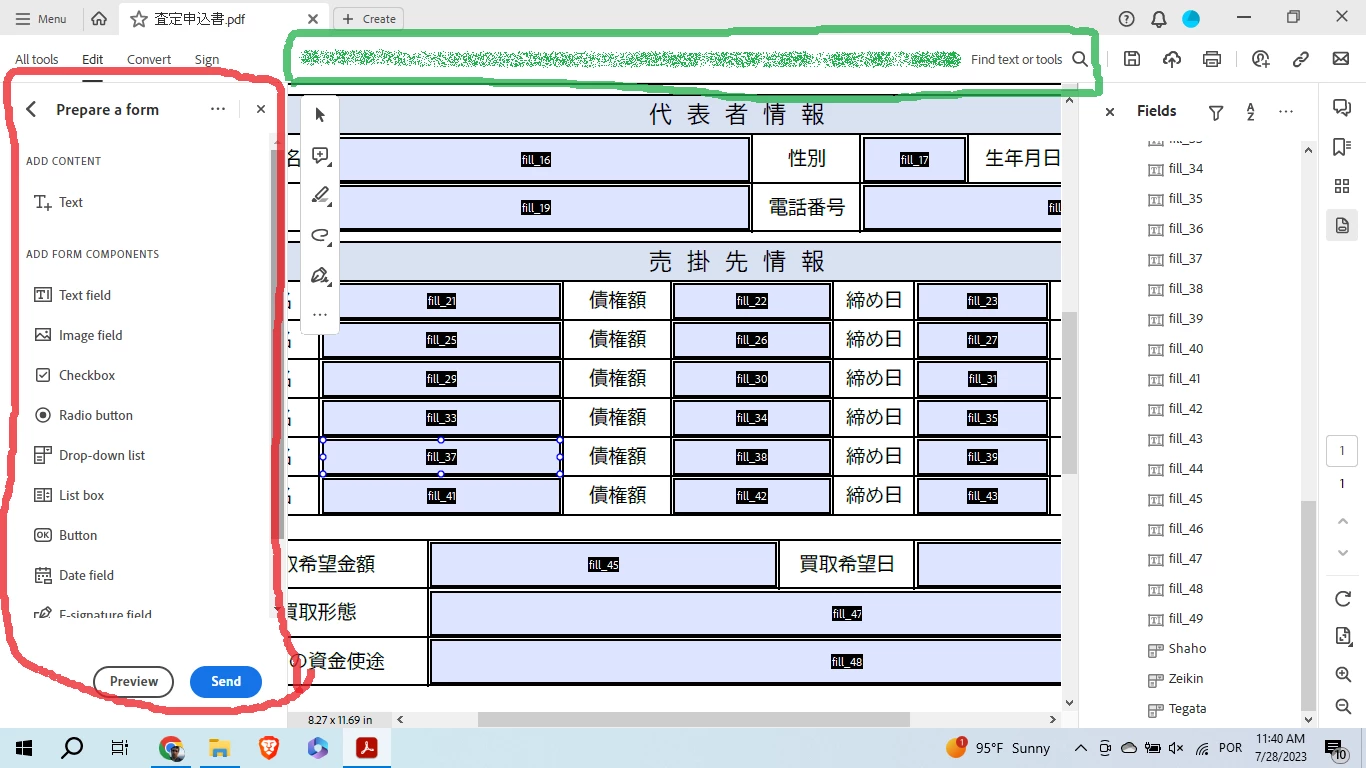
The screen to edit and create a form is really small when working on a laptop, after the newest update.

The toolbar used to be on the top and now it's on the side of the screen which makes it hard to edit forms. (Red circled are in the image)


Is there any way to put it back on top? (Green circled area)


Thanks in advance.
 

This topic has been closed for replies.
Correct answer gary_sc

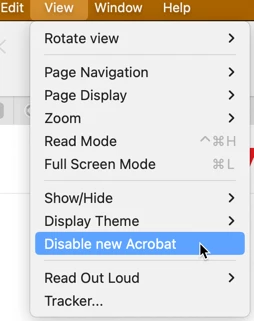
Yes, the best way to move it back to the top is to go into the View menu and select "Disable New Acrobat." The application will need to quit and restart.


3 replies

Participant
July 29, 2023

We apologize for any inconvenience caused by the recent update. We understand the importance of having a user-friendly form editing experience.

To address your concern, we recommend checking if there's an option in the settings to customize the toolbar position betflik . Alternatively, you can try adjusting the zoom level on your browser to see if it helps with the display size.

Participant
August 1, 2023

Thanks for taking the time to reply.

I managed to fix it by following the answer from the user above.

gary_sc
Community Expert
gary_scCommunity ExpertCorrect answer
Community Expert
July 28, 2023

Yes, the best way to move it back to the top is to go into the View menu and select "Disable New Acrobat." The application will need to quit and restart.


Participant
August 1, 2023

Hello,


I did not notice there was an option to disable it.

It worked, thank you so much!

It's much easier to work with the old version on a small screen when I'm traveling and can't bring my desktop with me.

Amal.
Community Manager
Community Manager
July 28, 2023

Hi @Renan313485913pt6 


Hope you are doing well and thanks for reaching out.


For more information about the new UI please go through the help page https://helpx.adobe.com/acrobat/using/new-acrobat-experience.html and see if that works.


Regards

Amal