


Participant
June 24, 2020
Answered

Submit button dilemma

  • June 24, 2020
  • 1 reply
  • 820 views

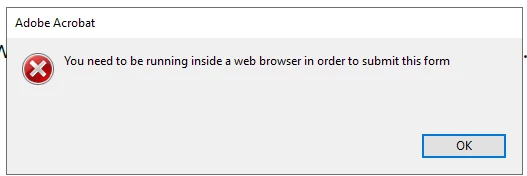
Hello! I have created many documents with the submit. And, they work very well. But, for some reason, today I cannot seem to get it to work. I keep getting a message that I'll attach.

I opened a prior piece I'd created and it works fine. I compared the setup - and everything looks to be the same... 


So, I don't understand why this one is, now, not working for me. Am I overlooking something? Did I miss a step? Thanks, Erica
This topic has been closed for replies.
Correct answer Amal.

Hi Erica,


We are sorry for the trouble. As described the submit button is not working and you are getting the above error message


Please check the URL used in the submit action carefully all should be in loer case and no spaces. Also, there should be no space between 'mailto:'


You may also refer to the help page (https://helpx.adobe.com/acrobat/kb/acrobat-forms-form-data-web.html) and see if that works for you.


Let us know how it goes


Regards

Amal

1 reply

Amal.
Community Manager
Amal.Community ManagerCorrect answer
Community Manager
June 24, 2020

Hi Erica,


We are sorry for the trouble. As described the submit button is not working and you are getting the above error message


Please check the URL used in the submit action carefully all should be in loer case and no spaces. Also, there should be no space between 'mailto:'


You may also refer to the help page (https://helpx.adobe.com/acrobat/kb/acrobat-forms-form-data-web.html) and see if that works for you.


Let us know how it goes


Regards

Amal

Participant
June 25, 2020

THANK YOU! I went back and double-checked it all and the "M" was capitalized in mailto: I knew it was something simple I was missing! Thanks!

Amal.
Community Manager
Community Manager
June 26, 2020

Hi there


We are glad to hear that the issue got fixed.


Feel free to contact us for any assistance require in the future.


Regards

Amal