Participant
August 30, 2017
Answered

unable to type certain letters when filling in a form

  • August 30, 2017
  • 2 replies
  • 37628 views

I am using Adobe Acrobat Reader DC on a Windows 10 Laptop with a UK keyboard.

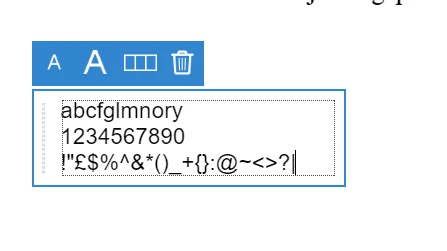
When typing text to fill in a form, pressing many of the letter keys on my keyboard doesn't have any effect.

Below is a screenshot of me trying to type all 26 letters of the alphabet in alphabetical order. As you can see, only 1/2 those letters appear

My keyboard is working fine, and this problem only surfaces when using the Reader program on the desktop. There is a browser version of the program - i can get all letters to appear there.

Anyone else knows how to solve this? I currently have to type each field into MS Word, then copy and paste to fill in the form. It's rather annoying.

Thanks all

Correct answer try67

I recently solved a similar problem for someone else... Maybe it's the same situation here.

Go to Edit - Preferences - General and check if the "Use single-key accelerators to access tools" box is ticked. If so, untick it and try it again.

2 replies

Participant
June 7, 2018

Any update on this @try67?

Participant
October 10, 2022

HELP

I have an issue some letters don't appear when i'm using facebook and google search including the enter button

Any ideas would be very much appreciated

Please help me someone 


Bernd Alheit
Community Expert
Community Expert
October 10, 2022

This is not a issue of Adobe Acrobat.

try67
Community Expert
Community Expert
August 30, 2017

Can you post a full window screenshot? This doesn't look like a form field in a Reader...

Participant
August 31, 2017

Hi there, sure, here it is. I've tried typing out all the letters of the alphabets again - same issue.

I'm using the 'Add text" feature in the  'Fill and sign' tool. It's what appears when i double-click on any field in a regular (ie not fillable) PDF.

Hope this helps.