


January 14, 2020
Question

Verification of Digital Signature "The selected certificate has errors: Invalid policy constraint"

  • January 14, 2020
  • 1 reply
  • 13364 views

When signing a document with a valid certificate the verification of the validity of digital signature states that the "The selected certificate has errors: Invalid policy constraint".
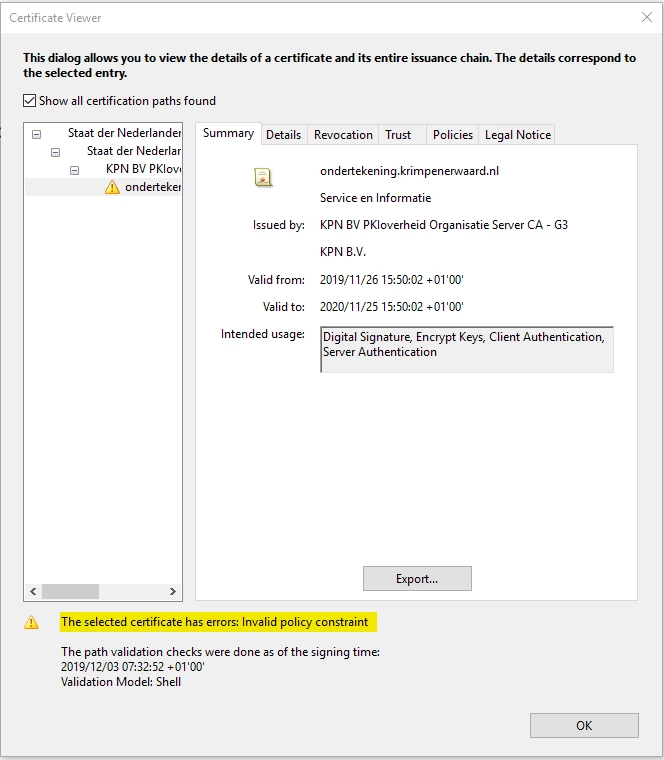
 

I believe the cerificate which is used to sign the document is valid, it has been created based on a PKI-O certificate.

Attached is the document which contains the error.

Does anyone know what steps I should take to make this digotal signature valid, without adding the certificate as a trusted root certificate.

This topic has been closed for replies.

1 reply

Amal.
Community Manager
Community Manager
January 14, 2020

Hi Ron_CSG,


We are sorry for the trouble, As described you are getting the errors: Invalid policy constraint


You may please refer to a similar discussion here (https://community.adobe.com/t5/acrobat/previously-valid-signing-certificate-shows-invalid-policy-constraint-in-dc-2019/td-p/10573803) and see if that works for you.


Let us know how it goes


Regards

Amal

January 15, 2020

Thank you Amal,


We'll look into it.


Best regards,

Ron

Amal.
Community Manager
Community Manager
January 17, 2020

Hi Ron 


Thanks for the update. Please do share your observation. 


We are happy to help


Regards

Amal