
Inspiring
October 3, 2023
Answered

VERY slow, buggy document viewing on some documents

  • October 3, 2023
  • 2 replies
  • 6913 views

This morning I"m finding that a very small (1.4mb) document I'm working on can barely be navigated. It's generated out of InDesign, and has a photo on the front (5.6mb original size) and an Illustrator image on the back (265k) as well as 10 very small image files.

However, other documents seem to be ok. Maybe a bit slow, but generally ok.


When navigating, the front "large" image seems to randomly hide rectangular sections of the image, which alternate while I'm viewing:

It's actually a re-make of a flyer I did 9 years ago.

Overall, there's been a general "slowing down" of Acrobat in different documents, but this is the worst I've seen so far.

Specs:
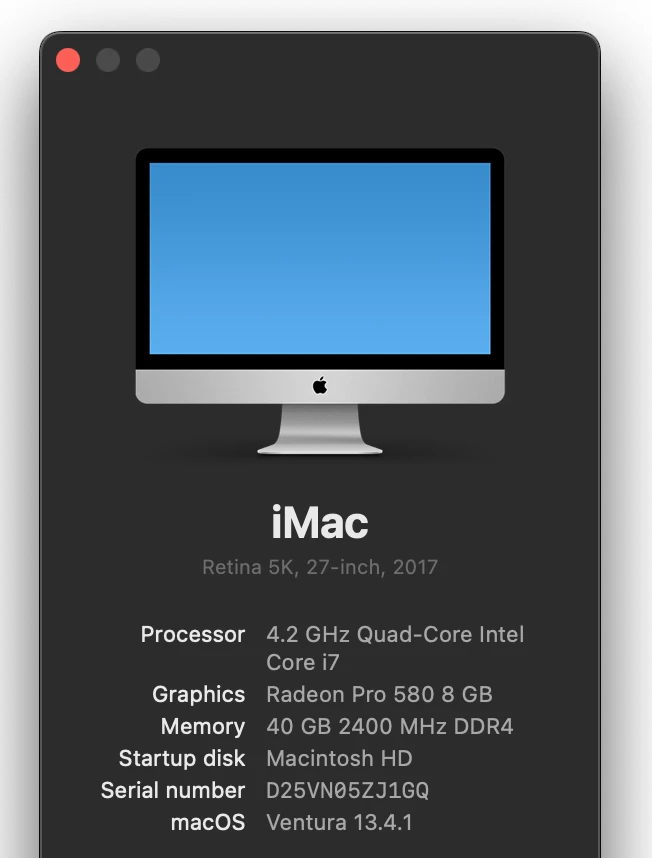
Any help appreciated.

Also see this post, maybe related.


This topic has been closed for replies.
Correct answer ercee89857529

Hi there


We are sorry to hear that.


Would you mind sharing a small video recording of the issue for more clarity? Also, collect the Adobe CC logs https://helpx.adobe.com/creative-cloud/kb/cc-log-collector.html and the print logs as described below for further investigation:


1. Place the plist file com.adobe.Acrobat.FeatureState.plist at location /Library/Application Support/Adobe/Acrobat/Trunk/Preferences

2. Execute the print workflow

3. Logs will be generated at a location similar to /var/folders/t9/93cz_sz9075d4nl5hqrlc6n00000gn/T.

4. The temp folder where the logs are generated is different for different users which is common only upto /var/folders.

5. To get the exact path of the file use the following command on terminal “ sudo find / -name AcrobatPrintLogs.txt “

6. once you get the complete path eg like /private/var/folders/jk/vgtyw__s2dsdphtygd_0jslr0000gn/T/AcrobatPrintLogs.txt

7. just add cat as follows cat /private/var/folders/jk/vgtyw__s2dsdphtygd_0jslr0000gn/T/AcrobatPrintLogs.txt

8. One can see AcrobatPrintLogs


~Amal


Hey guys - meanwhile we have updated our Macs on Sonoma 14.1.1 and I can't reproduce the issue anymore. It seems to be "solved". I can't remember that there was any Adobe Acrobat update recently and I have not turned on automatic update so I assume that it might be OS related.
Maybe someone can confirm this?

All Best

2 replies

Yeager117
Known Participant
June 20, 2024

Its a horrible app. Garbage full of bloatware etc.

Amal.
Legend
October 4, 2023

Hi @turner111 


I hope you're doing well, and I'm sorry to hear that you're experiencing an issue with Adobe Acrobat DC. Let's go through a few troubleshooting steps:

  1. Is this an issue with a particular PDF file or with all the PDFs? Please try opening a different PDF file to see if the problem persists. If you're accessing the file from a shared network or drive, try downloading it to your local computer and then opening it again.

  2. Check your Acrobat DC version: To ensure you have the most recent version, go to "Help" > "About Acrobat." Make sure you have version 23.06.20320 installed. If not, you can check for updates by going to "Help" > "Check for updates" and then reboot your computer.

  3. Reset Acrobat preferences: Sometimes, issues can be related to corrupted preferences. You can try resetting Acrobat preferences to their default settings. Here's a guide on how to do it: Reset Acrobat Preference Settings to Default.

  4. Create a new user profile: It's possible that the issue is tied to your user profile. You can create a new test user profile with full admin rights or enable the root account (for Mac users) to see if the problem persists when using the application under a different profile.


If the issue still persists after trying these steps, please provide more details about the problem and share the specific PDF file you're having trouble with. This will help us further investigate and assist you in resolving the issue.


Let me know how these steps work for you or if you need any further assistance.


~Amal

turner111Author
Inspiring
October 9, 2023

Hi Amal,


1) The "flashing image squares" is with this file only, but many have shown decreased performance, some more than others.

2) I'm current. I'd post but we can't copy from the About box.

3) Will try resetting preferences if issue persists. However, I don't remember selecting the "make performance really choppy" option  😉
4) I'm in the middle of like 6 projects, so no chance I'm going to do anything that has the potential of causing user recognition issues right now. I would be interested, though, in knowing (technically) how a user profile can cause rectangular sections of an image to flash on & off like a slow-motion disco floor.