Participant
September 25, 2023
Answered

When saving to PDF, all of a sudden it is creating secured PDFs

  • September 25, 2023
  • 1 reply
  • 917 views

I've always been able to save Word Documents to PDF by using SAVE AS. Now it creates PDFs that have Security that doesn't allow any changes like creating a form.

This topic has been closed for replies.
Correct answer Eric Dumas

Hi,

  • Can you confirm the settings you use in MS Word? maybe includ a screenshot?
  • Can you confirm the exact versions of your operating system and software
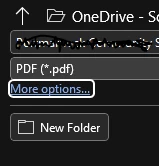
  • When you select Save As, and click on more options
  •  
  •  
  • s
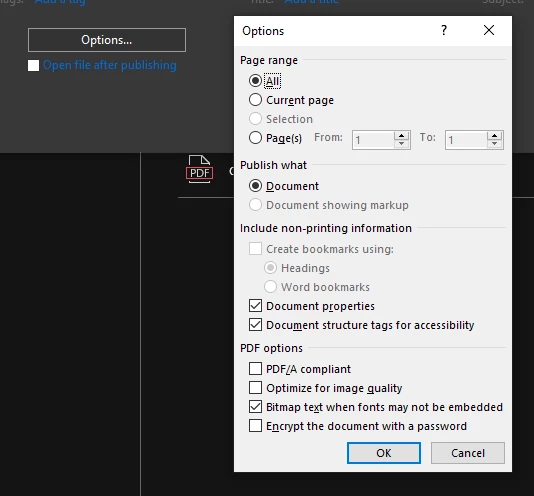
  • Click on the Options button, there is an Automatic Password option at th eend of the list. Make sure it is deselected
  •  

1 reply

Eric Dumas
Community Expert
Eric DumasCommunity ExpertCorrect answer
Community Expert
September 25, 2023

Hi,

  • Can you confirm the settings you use in MS Word? maybe includ a screenshot?
  • Can you confirm the exact versions of your operating system and software
  • When you select Save As, and click on more options
  •  
  •  
  • s
  • Click on the Options button, there is an Automatic Password option at th eend of the list. Make sure it is deselected
  •  

Participant
September 25, 2023

Thank you. I followed your instructions and it led me to the culprit. The PDF/A Compliant box was checked. I unclicked it and I was able to create a form. Now to determine how to post the form and when signed have it emailed to three recipients.

  • I am using Microsoft 365 - Paid subscription
  • Settings
  • Operating System Edition Windows 11 Pro
    Version 22H2
    Installed on ‎12/‎14/‎2022
    OS build 22621.2283
    Serial number
    Experience Windows Feature Experience Pack 1000.22662.1000.0
  • 365 Version:
About
Version : 18.2306.1061.0
  •  

Thank you again!

Eric Dumas
Community Expert
Community Expert
September 26, 2023

Sadly SharePoint approval workflows will not work on a pdf to be signed. It is Either / Or scenario:

  • Either you use an Adobe/Acrobat signature in the pdf - Some good news you can use the Adobe Sign We Parts Adobe Sign for SharePoint Online - User Guide
  • Or you use the approval built-in (creating custom ones is easy enough) within SharePoint.
  • One mixed appraoch can be: 
    1.  create a pdf, 
    2. use Adobe to request and track signature
    3. the signed document is sent to an email address like approval@site.com used only for that purpose
    4. a workflow (some are ready to use in Microsoft Automate) waits for an email to arrive, the attachement is automatically saved in a library (it can have a simple alert setup to let you know a new file has arrived)