
Rob_Cullen
Community Expert
Community Expert
Mar 14, 2018 10:18 AM UTC
Question

How to show a name in a Reply with quote

When I reply to a forum post and paste a quote, how do I reference the person that posted the quoted words?

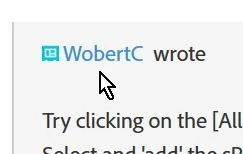
An example screen-clip:  my post was quoted by another forum member and my Avatar name appears in blue letters (hyperlink?):
    This topic is closed to new replies. Start a new post to keep the conversation going.

    2 replies

    jane-e
    Community Expert
    Community Expert
    Mar 14, 2018 12:43 PM UTC

    WobertC  wrote

    When I reply to a forum post and paste a quote, how do I reference the person that posted the quoted words?

    When you click Reply, a bar appears across the top of your message. Click the Quote icon and the reference will be automatic. Please delete most of the quote, especially if it is long!

    A second option is to type the person's name with an @ symbol before it. Use an underscore for a space. A list of names will pop up and you click the name.

    A third option is to copy the person's name and paste it.

    (Remember that Jive sometime is flakey and option #2 may not always work.)

    Translate
    Participant
    Apr 21, 2018 8:20 AM UTC

    thank you

    Translate