


Need help with error of “this object already has a container" which prevents shrinking of page such that content is over-written when labeled
I have a program where I use an action wizard to label pdf files using java script. Before the java script step, I use the header/footer to shrink the pages. Within the "Header & Footer (Add)" Option, I selected "Appearance Options" and checked the "Shrink document to avoid overwriting***" and made sure "Page Range Options" is set to "All Pages."
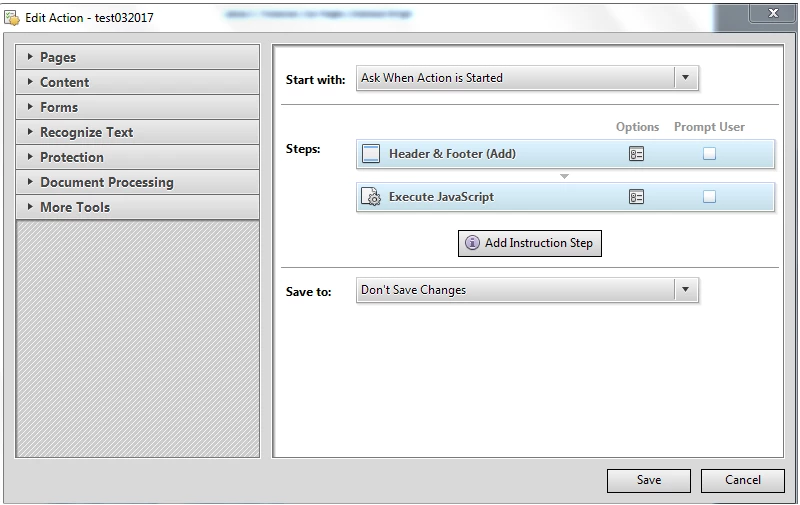
Most of the time, the pages within the pdf are shrunk and a label is applied. However, sometimes, I run into a pdf file where I get an error “this object already has a container.” I did some experimenting and here is what i figured out on my 2-page document where the 1st page is labeled fine and the 2nd page gets over-written.
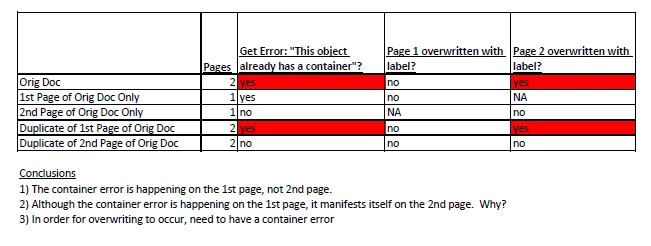
If anyone can help me understand how to prevent the subsequent pages from being overwritten when there is a container error on the 1st page, please let me know.
I am using Adobe Acrobat Pro X 10.1.16 on Windows 7.
 AdChoices