


Participant
July 12, 2018
Answered

SUBMIT button - there is no option to export complete PDF Form

  • July 12, 2018
  • 4 replies
  • 3440 views

I tried to set up a form with a submit button that would attach the PDF format of the form to the email. All tutorials are showing 4 options in the Submit Form Selections Screen whereas I get only three options to choose from.

Here is the screenshot:
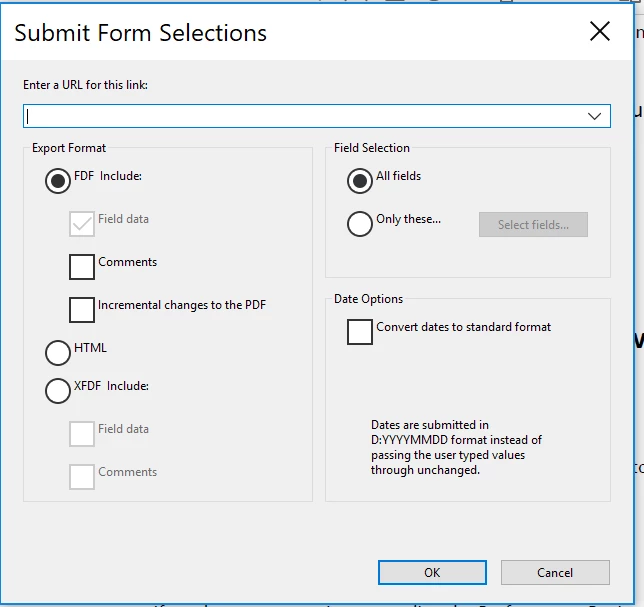
I read somewhere that I need to enable Adobe Reader Extended Rights but you can do that AFTER you set up the SUBMIT button and you can't make any modifications after that.

Can someone help me with this?

Correct answer George_Johnson

Strange. Your file works correctly for me with Acrobat Pro DC. What happens when you set the focus to the "FDF Include" option, and then press the down arrow key several times? It should cycle through the options (FDF > HTML > XFDF > PDF). I'm thinking that the PDF option just isn't showing, but that it's still there and you might be able to get to it this way.

If that doesn't work, you can try using JavaScript instead, as a test. If you need help with the script, post again.

4 replies

Participating Frequently
July 31, 2025

I have the same issue, no matter how I pressed button many times, the PDF Completed document didn't show. It's really hopeless. 😞

Adorobat
Community Manager
Community Manager
July 13, 2018

Hi Nevenak,

As per the issue description mentioned above, you are facing issue when trying to prepare form in Acrobat, is that correct?

Could you try rebooting the machine once if you haven't already and check if that helps?

If that doesn't work, try repairing Acrobat using "Repair installation" option under Help menu, reboot the machine after repair and check.

Try with another pdf form and check if the issue persists. Also, would it be possible to share the pdf form you are working with to replicate the issue at our end?? To share the file here in the forums, refer to the steps given in this link: How to share a file using Adobe Document Cloud

You can also share the link via private message - How Do I Send Private Message

Let us know if you need any help.

Shivam

Participant
July 13, 2018

Hi Shivam,

I repaired Acrobat using “Repair installation” and rebooted the machine, and I also created a mockup but the issue persisted – there is no option of exporting the form in the pdf format when clicking SUBMIT button.

I shared the file with you using Adobe Cloud.

Here is the link:

https://files.acrobat.com/a/preview/2a88dc33-c877-4e4e-99ea-aa757dfd0e7d

Thank you,

Nevena

George_JohnsonCorrect answer
Inspiring
July 13, 2018

Strange. Your file works correctly for me with Acrobat Pro DC. What happens when you set the focus to the "FDF Include" option, and then press the down arrow key several times? It should cycle through the options (FDF > HTML > XFDF > PDF). I'm thinking that the PDF option just isn't showing, but that it's still there and you might be able to get to it this way.

If that doesn't work, you can try using JavaScript instead, as a test. If you need help with the script, post again.

Inspiring
July 12, 2018

Did you create this form in Acrobat, or something else?

Participant
July 12, 2018

I created the form in Adobe Acrobat Pro DC

try67
Community Expert
Community Expert
July 12, 2018

What version of Acrobat do you have, and what OS version?

Participant
July 12, 2018

I have the latest version of Adobe Acrobat Pro DC - 2018.011.20055

Windows edition - Windows 10 Pro