



Unable to Uninstall Adobe Acrobat Pro XI & Can't Figure Out Why
I am running Adobe Acrobat Pro version 11.23 and am trying to uninstall it on my Windows 10 desktop. I started the process by going to the Windows Control Panel, chose Programs and Features, clicked on Adobe Acrobat Pro and chose Uninstall.
This returned Error 2503: "Called RunScript when not marked in progress." as shown in the following image:
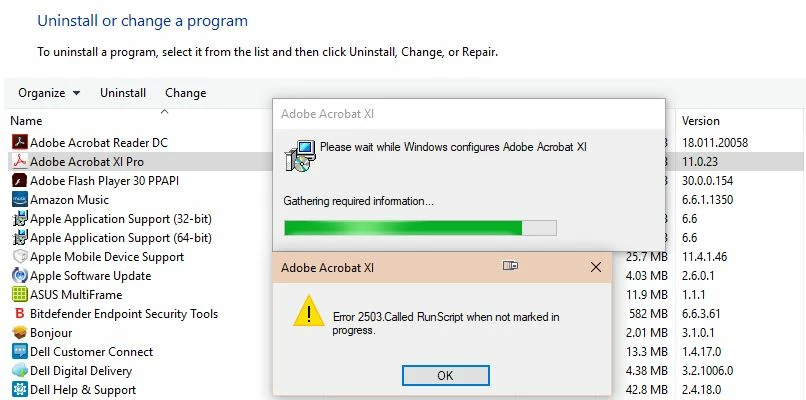
I clicked on OK and a second message appeared - Error 2502: "Called InstallFinalize when no install in progress." as shown in the following image:
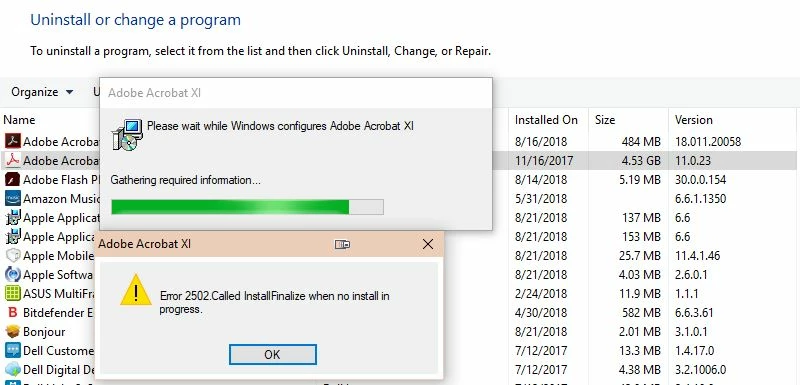
My second attempt was to return back to the Control Panel and instead of clicking on Uninstall, I chose the "Change" option and then chose Remove. The same two errors appeared.
As a third option, I did a search on the Adobe message boards and read multiple solutions directing to download the Adobe Reader and Acrobat Cleaner Tool. I did this, ran the program and was asked to shut down all MS Office programs. I closed all programs through the Windows Task Manager just to ensure the programs weren't running in the background and then continued the run. A few seconds later I was directed to reboot my PC. Once Windows restarted I noticed the Adobe Pro icon was still in my taskbar so clicked on it and the program opened up same as always. To test the features I opened a PDF, clicked to edit it, and all features worked same as before. This told me the uninstall obviously did not work.
What am I doing wrong? Any and all suggestions are greatly appreciated!
Thank you,
Kara
 AdChoices