Participant
April 13, 2018
Answered

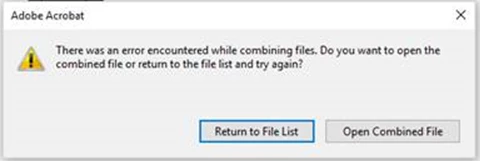
"there was an error encountered while combining files"

  • April 13, 2018
  • 2 replies
  • 10303 views

We use Adobe Acrobat DC v201 across our corporate enterprise.

If we try and combine multiple *.pdf into a file, we have no issue. If we try and combine any Office Suite file, we see this error.

We have removed Adobe Reader DC and ran a repair on Microsoft Office Professional Plus 2013, rebooted. This has not helped.

Can anyone suggest a fix please?

This topic has been closed for replies.
Correct answer AnandSri

Hello Christiaanb,

We apologize for the inconvenience caused, as per the description above, you are not able to combine PDF files as getting an error message, Is that correct?

Please check for any pending updates of Acrobat from help>check for updates, reboot the machine after installing the updates and see if this brings any difference.

You can also try repairing the Acrobat from help>repair installation.

Please refer and try the solution from the following Adobe article Troubleshoot Acrobat PDFMaker issues in Microsoft Office on Windows

If the issue persists, please share the following details:

  • The dot version of Acrobat installed, to identify refer to Identify the product and its version for Acrobat and Reader DC
  • The version of operating system installed?
  • Is this error message comes while combining any PDF files, or specific to one or two PDF files?
  • Make sure that the latest updates of the Operating system and Office is installed.

Let us know how it goes and share your findings.

Regards,

Anand Sri.

2 replies

Participant
September 2, 2022

Has anyone tried to select the "gear" options while in the combine files window. I had to change the select file size to the middle option for my files to combine 

AnandSri
Community Manager
AnandSriCommunity ManagerCorrect answer
Community Manager
April 13, 2018

Hello Christiaanb,

We apologize for the inconvenience caused, as per the description above, you are not able to combine PDF files as getting an error message, Is that correct?

Please check for any pending updates of Acrobat from help>check for updates, reboot the machine after installing the updates and see if this brings any difference.

You can also try repairing the Acrobat from help>repair installation.

Please refer and try the solution from the following Adobe article Troubleshoot Acrobat PDFMaker issues in Microsoft Office on Windows

If the issue persists, please share the following details:

  • The dot version of Acrobat installed, to identify refer to Identify the product and its version for Acrobat and Reader DC
  • The version of operating system installed?
  • Is this error message comes while combining any PDF files, or specific to one or two PDF files?
  • Make sure that the latest updates of the Operating system and Office is installed.

Let us know how it goes and share your findings.

Regards,

Anand Sri.

Participating Frequently
June 27, 2018

Adobe Acrobat DC has a problem with Office 2016.  We use Office 2013 and had no issues with the combine/convert feature until we installed Skype for Business 2016.

I had to modify the registry to get Acrobat DC working correctly.  The registry keys need to be modified to set the MS Office
compatible version.


Steps taken:

1:  Fresh install of Windows 10 x64 Enterprise v1709

2:  Installed Microsoft Office 2013 Pro Plus

3: Installed Acrobat DC and patched to version 2018.011.20040

4: Tested the convert/combine function and it’s working

5: Installed Microsoft Skype for Business 2016

6: Tested the convert/combine function which then errors

7: Applied registry fix and restarted

8: Tested the convert/combine function and it’s working

I had a support ticket open with Adobe for over a month and they closed it without providing a fix, so I figured it out on my own no thanks to them.