
Participant
November 15, 2019
Answered

Adobe After Effects Issue With Composition Preview in macOS

  • November 15, 2019
  • 3 replies
  • 3487 views

Hi Everyone:

I am starting to learn how to use Adobe After Effects but came across an issue I have trouble fixing:

When I want to preview my composition, the entire composition will jump to another window when it plays. (I attached a screen shot for your review in case.)  How can I have it play only on the main composition panel? 
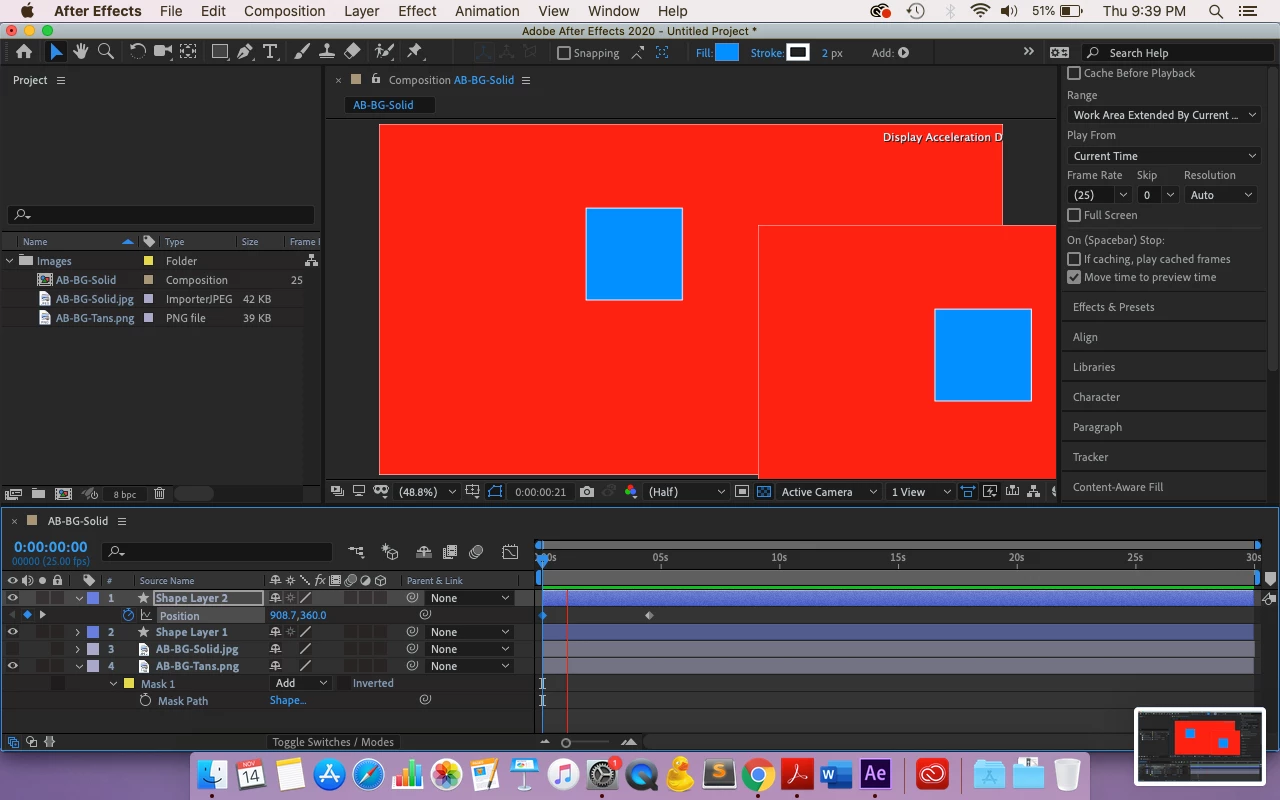
I have never encountered this problem before so I'm trying to understand why it is doing that now?

I use a MacOS Catalina with 2.5 GHz Dual-Core Intel Core i5. Not sure if this information is helpful but I'm putting that out there in case. 


Thanks!


Title edited by Mod

This topic has been closed for replies.

3 replies

Shivangi_Gupta
Community Manager
Community Manager
December 11, 2019

Hi all,


Thanks for your patience. Adobe After Effects has released a patch update which provide a fix for the duplicate preview issues. For more information, please check https://helpx.adobe.com/after-effects/kb/fixed-issues.html


Let us know if you have any other questions.


Thanks,

Shivangi

nishu_kush
Community Manager
Community Manager
November 15, 2019

Hi all,


Thanks for reaching out. We have seen previous posts regarding the same issue. The issue has been reported to the After Effects engineering team.


Thanks,

NKush

Participating Frequently
November 15, 2019

I'm having the same issue and I'm stumped. I'm guessing it has to do with the 2020 update and the 'Display Acceleration Disabled' issue.

On both newly created AE files and old AE files, the composition preview does not show playback. Instead, when I hit play, a secondary preview pops up to the right of the comp preview, within the same pane, and seemingly plays back fine, except I can only see a portion of this preview. Nothing registers on the actual comp preview when playing--it sits on the first frame of wherever the player head is beginning from--though when I stop playback, the comp preview will update to show the current frame as if it's been playing properly the entire time. Audio plays normally. See screen recording of the issue below.


I'm working on a 2010 MacbookPro.

High Sierra version 10.13.6

2.53 Ghz Intel Core i5

8 GB 1067 MHz DDR3

NVIDIA GeForce GT 330M 256 MB

Intel HD Graphics 288 MB

agsheaCorrect answer
Participating Frequently
November 15, 2019
loralucy2Author
Participant
November 16, 2019

It makes sense now, thank you!