


New Participant
August 23, 2016
Answered

Captivate 9 - how to add multiple actions to a button

  • August 23, 2016
  • 2 replies
  • 4422 views

HI all, On Captivate 9 I created a state view slide with four buttons, so when the user clicks on each button, they will see different content displayed.

I want to force navigation to ensure that the user clicks on ALL 4 buttons (in whatever order), before being able to see the 'NEXT' button appear on screen that will allow them to move to the next slide.

I believe that I have to create variables and advanced actions on each button to create this logic, but how can I add additional actions on the same button? I see under 'ACTION' that all buttons already have an action to open the content of the state view when clicked:
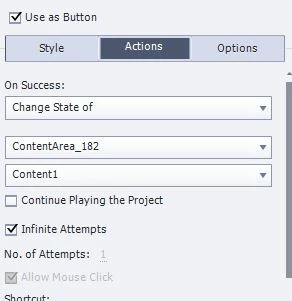
Is there a way to add another action to the same button?  Please share instructions to help me create the logic to achieve this? Many thanks.

    This topic has been closed for replies.
    Correct answer Lilybiri

    You need user variables and a conditional action with two decision for each of your buttons. I posted this work flow multiple times, but it so hard to find the thread again. Another try:

    1. Create 4 variables v_one, v_two....v_four with a default value of 0; they'll be changed to 1 when the associated button is clicked.
    2. Create a conditional advanced action for each button, with two decisions:
      1. First decision 'Always' is a mimicked standard action
           IF 1 is equal to 1
               Assign v_one with 1
               Change State of ....             the action you had a this moment
      2. Second decision 'CheckVars'
        IF v_one is equal to 1 AND
             v_two is equal to 1...
              ....
                         is equal to 1
        Show Bt_Next
        Enable Bt_Next

    Create a similar action for each of the buttons, only the first decision will have to be changed (the variable and the state change).

    The button Bt_Next has to be hidden in Output to start with. Be sure to set the pausing points of the 4 buttons at the same moment,. For the Next button you can have pause at the same time or later.

    2 replies

    Lilybiri
    LilybiriCorrect answer
    Brainiac
    August 23, 2016

    You need user variables and a conditional action with two decision for each of your buttons. I posted this work flow multiple times, but it so hard to find the thread again. Another try:

    1. Create 4 variables v_one, v_two....v_four with a default value of 0; they'll be changed to 1 when the associated button is clicked.
    2. Create a conditional advanced action for each button, with two decisions:
      1. First decision 'Always' is a mimicked standard action
           IF 1 is equal to 1
               Assign v_one with 1
               Change State of ....             the action you had a this moment
      2. Second decision 'CheckVars'
        IF v_one is equal to 1 AND
             v_two is equal to 1...
              ....
                         is equal to 1
        Show Bt_Next
        Enable Bt_Next

    Create a similar action for each of the buttons, only the first decision will have to be changed (the variable and the state change).

    The button Bt_Next has to be hidden in Output to start with. Be sure to set the pausing points of the 4 buttons at the same moment,. For the Next button you can have pause at the same time or later.

    New Participant
    August 23, 2016

    Hi Lilybiri, thank you so much for your response! I think I'm close, but not quite because it's still not working for some reason..

    Here's what I did. As suggested, I created a script for each button,and changed only the first decision point.

    Scripts created are WB1, WB2, WB3 and WB4. All 4 buttons are paused T 1.5 sec.

    Example Action WB1: Decision 1

    Note: The variables: MustClick1, 2, 3 and 4 are originally set to 0:

    Action WB2: Decision 2:

    I assigned the advanced action WB1, WB2, WB3 and WB4 to each button.

    Example, button 4 executes script WB4:

    When I preview the project and I click on all 4 the buttons, decision 1 action on 'Change state of' is working ok because I do see the content it should display, however after clicking the four buttons, I was expecting to see the 'Click_WB' button (which is hidden from the start), but it didn't appear.

    Any idea what I might be doing wrong? Thank you! Tania

    Lilybiri
    Brainiac
    August 23, 2016

    There are two possible reasons:

    1. You need to have that Next button (Click_WB) to start from the start of the slide. It will never be visible in your case, because the playhead remains stuck at 1,5secs and the button's timeline starts only at 3secs. BTW: why is that slide so long? Do you have slide audio?
    2. I see that you did hide that button on the stage, which is not the same as hide it in Output. That is done in the Properties panel, with the eye icon button that you'll find there.

    BTW: be careful with names, you cannot use same name for two items, even though they are totally different. Lucky for you, names are case sensitive.

    I told you to have the pause of the Next button at the same point or later, not to have the timeline later on the slide.

    TLCMediaDesign
    Inspiring
    August 23, 2016

    You need to use advanced actions instead of a simple action.