
November 15, 2018
Answered

Why can't I copy/paste my gradient from Illustrator into InDesign?

  • November 15, 2018
  • 11 replies
  • 23765 views

I have followed every tutorial, reviewed every other forum on this, went step by step with all preferences and my gradient still pastes as an image. Is it the new update that refuses to copy/paste swatches between the two? Please help. Thank you.
Correct answer Laubender

Adobe indesign 14.0.2

Adobe illustrator 23.0.3

Windows 10 64 bit


Hi acew1981 ,

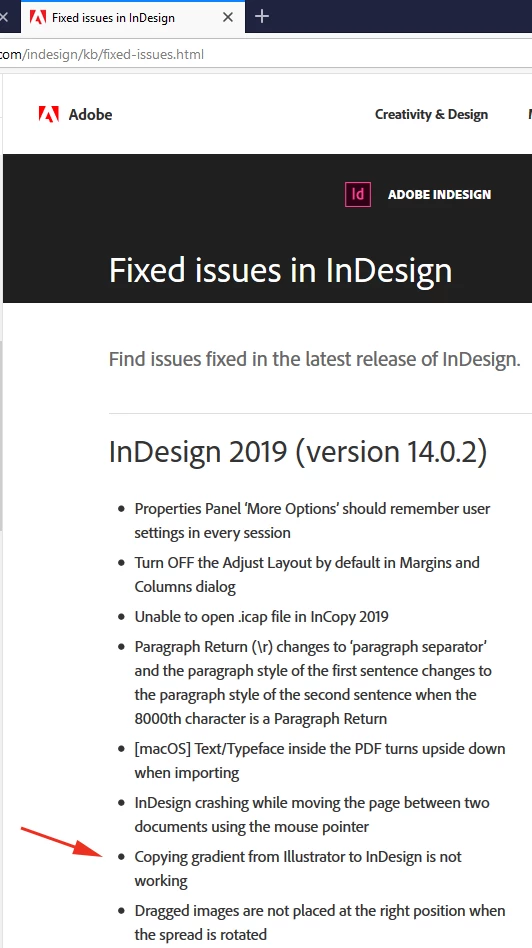
the bug is fixed with InDesign CC 2019 14.0.2.324.

Just tested with Illustrator 23.0.3 on Windows 10.

Paste or Paste in Place was no difference. The gradient I copied over from Illustrator worked as expected.

Also see the list of fixed bugs here:

Fixed issues in InDesign

Regards,
Uwe

11 replies

Known Participant
June 21, 2023

I do think there is an OS difference on this.
I can't get it to work on windows 10 , while there is no problem on Macos. 
This is a very annoying issue.

Community Expert
June 21, 2023

Hi @Ludovic29924883eoep ,

please attach a sample Illustrator file; just with a simple rectangle where the gradient is applied.

I'll test that on the most current versions of InDesign and Illustrator with macOS or Windows.


Thanks,
Uwe Laubender
( Adobe Community Expert )

Known Participant
June 21, 2023

Hello,

Thanks for your quick feedback. Here is a very simple file that contain a rectangle i'm unable to past properly as a gradient:

Participant
May 31, 2023

I had the same problem.. both files were CMYK.. the problem on mine was both ends of the gradient swatches were colour picked so were not solid CMYK values. - ensure the CMYK break down of both ends of the gradient are complete numbers- for example C19 M99 Y55 K2 rather that C:18.78 M98.76, Y54.90, K2.34 🙂

Participant
August 23, 2021

I'm no expert, but I was having the same problem and this worked for me.


In-design preferences

> Display Performance

In the Options area make sure the 'Preserve Object-Level Display Settings' box is ticked


also

> Clipboard Settings

In the Clipboard Handling area - Clipboard area make sure the 'Prefer PDF when Pasting' box is ticked


My gradients started to appear as they should be


I also had problems scaling my gradients once in In-design - if this happens…
If the gradient appears in illutrator as a 'clipped layer' make sure to select the layer and using the layer window open the 'options for' area and make sure the 'LOCK' box is ticked.


I'm not saying this is a fix but these options worked for me.

Community Expert
July 17, 2020

Hi ClusterX,

do you still have the sample where you had issues with?

Somewhere there is indeed a bug, but I still cannot tell what exactly enforces it.


Regards,
Uwe Laubender

( ACP )

Participant
July 17, 2020
Community Expert
July 16, 2020

Hi ClusterX,

what's your operating system?


Just tested a linear CMYK gradient with several color stops. The object with the gradient is pasted.

The bug I detected: Wrong colors! But I also have gradient samples where it worked. Have to test more…


CMYK gradient in Illustrator:


Pasted result in InDesign:


That's a totally differently bug, I think.


German Illustrator 24.2.1

German InDesign 15.1.1.103

on Windows 10


Regards,
Uwe Laubender

( ACP )

Participating Frequently
July 16, 2020

Hi, Laubender.

My system is Win 10.

Now i have working copy/paste gradients. But i don't know what helped to me: some latest windows updates or clearing read only attribute of Indesign prefs folder. Because these two things i made before check.


Participating Frequently
July 5, 2020

Not working again, Indesign 15.1.1 and Illustrator 24.2.1


Participant
July 16, 2020

Yes same here:Indesign 15.1.1 and Illustrator 24.2.1 on Mac OS 10.15.5 (19F101).
Copy paste a vector with a gradient from Illustrator does not work. The gradient is not scaling either.

acew1981
Participant
June 12, 2019

I have just tried this several times and spent two days trying to figure out how to do this. I even contacted adobe about this and their support said it cannot be done. Out of frustration i kept trying many things. I decided to close out both indesign and illustrator. Created new files etc. Still no avail. I then copied the gradient object from illustrator and went into indesign and selected edit menu then "paste into place". it worked! I hope this helps someone else.

Community Expert
June 13, 2019

Hi aaronw22990910 ,

thank you very much for this contribution.

Currently I cannot test this with CC 2019.

What's your exact version of InDesign CC 2019?

What's your operating system?

Thanks,
Uwe

acew1981
Participant
June 13, 2019

Adobe indesign 14.0.2

Adobe illustrator 23.0.3

Windows 10 64 bit

November 16, 2018

Laubender

It is constructive if my question was how to do it in general. That is not the issue.

Your comment of if you asked too much of me was not necessary and also condescending.

Please choose your words differently.

Thank you and this forum is answered.

Community Expert
November 16, 2018

erpdesigns  wrote

Laubender

…Your comment of if you asked too much of me was not necessary and also condescending.

It was not meant this way. Sorry, if you recieved it like so.

Maybe I should have asked if you could do some screenshots first to illustrate the problem.

My fault.

Regards,
Uwe

Community Expert
November 18, 2018

Some details on the bug we are seeing here:

Actually the gradient swatch is applied to the copied object.

But with the wrong values for GradientFillStart and GradientFillLength.

I compared the values from an exported IDMS file of a pasted rectangle to InDesign CC 2018.1 and one to InDesign CC 2019 14.0.1.209. The values in CC 2019 were way off. Not so with the same rectangle pasted to a CC 2018.1 page.

CC 2019 ( all values are in points ):

GradientFillStart="4877.823136474006 -5013.555344725959"

GradientFillLength="7231.69921875"

CC 2018.1:

GradientFillStart="-41.991211531998275 110.90551181102363"

GradientFillLength="84.30709838867188"

How GradientFillStart and GradientFillLength should be calculated.

This sample:

1. New document with non-facing pages 100 x 100 mm page size.

2. Drag out a rectangle 100 x 100 Pt from [0,0] towards the right and the bottom.

3. Fill it with a linear gradient.

The bug is clearly with InDesign CC 2019.

Gradient Fill with CMYK colors

AI: Copy rectangle with applied gradient fill > INDD: Paste

AI CC-2018 > INDD CC-2019 > Bug

AI CC-2019 > INDD CC-2019 > Bug

AI CC-2018 > INDD CC-2018 > No Bug

AI CC-2019 > INDD CC-2018 > No Bug

What's wrong wth INDD CC-2019?

Wrong GradientFillStart

Wrong GradientFillLength

Regards,
Uwe

rob day
Community Expert
Community Expert
November 16, 2018

It looks like there is a problem with CC2019, and you also have to set the Clipboard preferences correctly in both applications before you cut and paste. Check this thread:

https://forums.adobe.com/message/10736367?et=watches.email.outcome#10736367

jane-e
Community Expert
Community Expert
November 16, 2018

Here is the link on User Voice where the bug has been reported to the engineers. As of now, it only has one vote:

I have problems copying illustrations from illustrator into documents InDesign. – Adobe InDesign Feedback

Community Expert
November 18, 2018

jane-e  wrote

… As of now, it only has one vote:

I have problems copying illustrations from illustrator into documents InDesign. – Adobe InDesign Feedback

Just voted to fix the bug.

Thanks for the link, Jane!

Regards,
Uwe

barbara_a7746676
Community Expert
Community Expert
November 15, 2018

I have found that usually only simple shapes with solid colors will copy from Illustrator and paste into InDesign will remain vector, without being converted to an image.

Steve Werner
Community Expert
Community Expert
November 16, 2018

It's also based on how complex the graphic is that you're copying. The vector graphic needs to be less than about 500 paths as described in this old article I wrote years ago:

The Magic Number - InDesignSecrets.com : InDesignSecrets

November 16, 2018

All I want to do is try to bring the gradient swatch over from Illustrator over to InDesign. At one point you could copy and paste it but it does not work. Everything that has been suggested has been done. Thank you for your article which Ive read and thats why I posted the question. Im stuck