


Participant
February 27, 2019
Answered

I get an weird ugly scratch images everytime I open/create a file in photoshop

  • February 27, 2019
  • 2 replies
  • 914 views

http://prntscr.com/mqv98u

Check this screenshot. This is what I see everytime I open a file. Anyone seen this before? I seem to have no clue how to fix this. I got photoshop CS6.

What ive done already:

- uninstall photoshop and reinstall

- download a different version of photoshop and still same problem

Nothing seems to help. However I can still see the main screen of photoshop when I start it first time: http://prntscr.com/mqvcfo

When I open a file or create a file, I see these scratched image. I'm using windows 10. Anyone can help me? Thanks
This topic has been closed for replies.
Correct answer Chuck Uebele

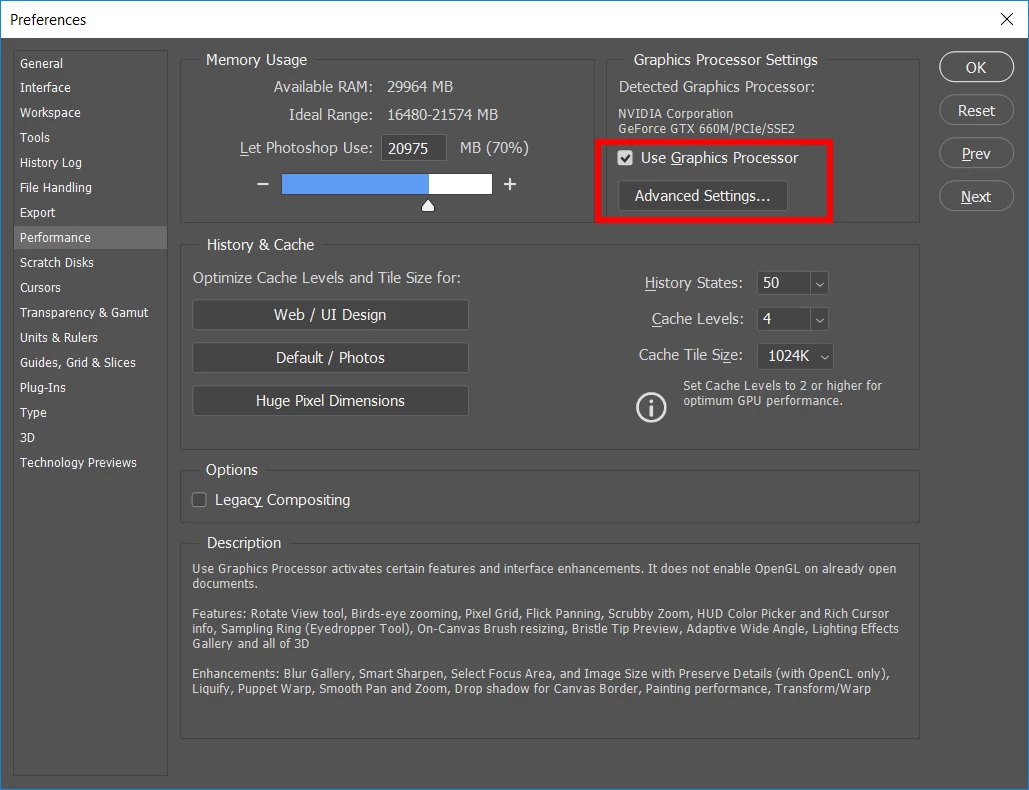
Have you reset your preferences? This doesn't always happen when reinstalling, so make sure you have reset them. If that doesn't work, try changing the preferences on your graphic processor to something different: either do not use of a different level.

2 replies

Chuck Uebele
Community Expert
Chuck UebeleCommunity ExpertCorrect answer
Community Expert
February 27, 2019

Have you reset your preferences? This doesn't always happen when reinstalling, so make sure you have reset them. If that doesn't work, try changing the preferences on your graphic processor to something different: either do not use of a different level.

Participant
February 27, 2019

Hey there and yes it worked!!! You're right. Uninstalling doesn't reset your settings as you said.

How I got it fixed: "i unmarked the use graphics processor" and all of a sudden it worked again.

Thank you so much!!! Can confirm it works now! Thank you so much for your reply

http://prntscr.com/mqw11j

February 27, 2019

hoiy50960499  wrote

How I got it fixed: "i unmarked the use graphics processor" and all of a sudden it worked again.

By disabling the GPU you will lose some functionality that requires it, more info

Photoshop graphics processor (GPU) card FAQ

February 27, 2019

Hi

Looks more than likely and issue with your GPU driver, try updating it from the manufacturers website, you could also try resetting Photoshop preferences

To restore preferences quickly using a keyboard shortcut: Press and hold Alt+Control+Shift (Windows) or Option+Command+Shift (Mac OS) as you start Photoshop. You are prompted to delete the current settings. The new preferences files are created the next time you start Photoshop.

Participant
February 27, 2019

I got it fixed by resetting the preferences settings and it works fine now. Thanks for reply.