


[Layers Panel] FX attribute toggle drop down not showing in Photoshop
Very simple but damn annoying issue has cropped up in Adobe CS 5 Photoshop.
I have my layers panel,
a:) Select layer in which I want to add FX
b;) Go to "filters" drop down and select "blur"
c:) Then select Gaussian blur
d:) pop up box appears where I select my parameters for the blur
e:) I then click "OK"
f:) either the FX attributes appear in the "layers panel" below the selected layer, or at least a toggle switch appears where I have drawn a yellow circle.
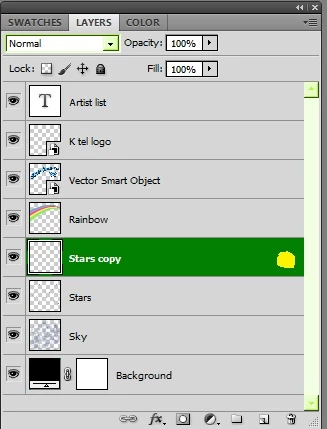
I've done a window > workspace > reset elements, but this has done nothing
I've also checked image properties and is in 8 bit mode.
Image is 12 in by 12 in at 720 dpi; this is a cover for a vinyl LP"
Computer specs are i7 6700 Intel with 32 GIg RAM and Win 7 Pro.
I've worked in the same tech parameters for several other record covers over last two years.
I've never had this problem before.
Frustrating as hell as this has just come out of nowhere, and yeah, at an absolute loss.
{Thread renamed by moderator}
 AdChoices