



Tintart
Inspiring
November 28, 2016
Answered

Tons of tmpzxpsign(...) folders after every program launch

  • November 28, 2016
  • 5 replies
  • 1789 views

This is general, no matter which program I launch.

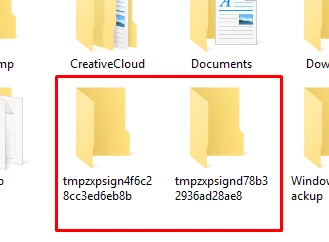
Every time I start Photoshop, Illustrator or InDesign, temporary folders are created on my D:\ drive. They of course are not automaticly removed after program is closed. They are named for example "tmpzxpsign4f6c28cc3ed6eb8b".

I was checking if that is because of any extensions - no luck. Even clean installation does that. Disabling the new welcome screen seems to reduce amount of folders created, but for example Photoshop still generates around 6 of those folders, Illustrator around 2 etc. After day of work it is a mess on my hard drive.

Why is that and how to avoid this? Or at least, store them into one folder, that I could remove safely and easy?
This topic has been closed for replies.
Correct answer Tintart

Thanks for the people who were trying to say anything, but middle finger to adobe for this "great" support and being happy by just grabbing my money. I remind you guys - the support was supposed to be in the price of the product.

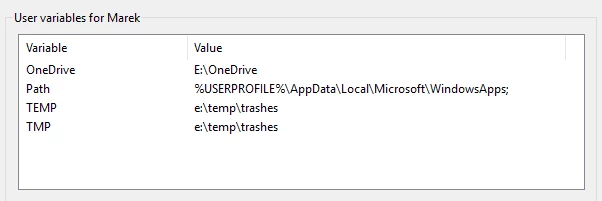
The solution to the problem was to create at least two-level deep temp folder. Then all the adobe trash goes in to the higher one, in my case to the "temp" folder instead of "trashes".

Hope this would be useful to anyone else.

5 replies

Tintart
TintartAuthorCorrect answer
Inspiring
February 1, 2017

Thanks for the people who were trying to say anything, but middle finger to adobe for this "great" support and being happy by just grabbing my money. I remind you guys - the support was supposed to be in the price of the product.

The solution to the problem was to create at least two-level deep temp folder. Then all the adobe trash goes in to the higher one, in my case to the "temp" folder instead of "trashes".

Hope this would be useful to anyone else.

Terri Stevens
Legend
February 1, 2017

From what I can see you got an answer to this on November 29th last year, less than 24 hours after asking the question-so it is a bit rich to complain that you were not helped. You have also marked your own answer as correct even though it is slightly wrong. The solution to this is to append a simple backslash to the temp path environment variables. Yes by creating a trash subfolder it will work, but only because of the presence of that backslash that an Adobe programmer forgot to include in his source code before compiling a program component.

davescm
Community Expert
Community Expert
February 1, 2017

Terri Stevens wrote:

From what I can see you got an answer to this on November 29th last year, less than 24 hours after asking the question-so it is a bit rich to complain that you were not helped.

Also no acknowledgement that this was fixed and the zxpsign folders are now (using latest CC versions) put into the correct place.

Dave

Tintart
TintartAuthor
Inspiring
November 29, 2016

@terri stevens - I was thinking about it as well, but that was not the case.

@mytaxsite.co.uk - keep deleting your files. I will look for solution.

Additional question - does anyone else have the same problem? I have it on my two PC's, so I am guessing it is common.

mytaxsite
Inspiring
November 29, 2016

Personally I would just leave the settings to defaults and periodically make a habit to delete these temporary files manually.  I do it once a week.

Terri Stevens
Legend
November 29, 2016

If you are using Windows type into Cortana 'Environment Variables' or just right click the PC icon and go to properties then Advanced system settings, press the environment variable button. Highlight Temp and press the edit button and add a backslash '\' to the path of your temp folder like below. Repeat tor TMP and also for the system temp variables in the separate box below. For most people that causes these folders to go into the temp folder. I don't have a Mac but the same general procedure should work.

ManiacJoe
Inspiring
April 13, 2017

Adding the trailing backslash to the TMP variable solves the problem of the folders being put in the wrong place.

Now if we could just get PS to clean up after itself and delete these tmp folders when it exits....

Akash Sharma
Legend
November 29, 2016

Could you please check for Photoshop what is your Scratch disk location is set to? See under Preferences>>Scratch disk in Photoshop.

Regards,

Akash

Tintart
TintartAuthor
Inspiring
November 29, 2016

The files are created on D:\ drive, the scratch is selected to E:\ - nothing unusual is happening there.