


danielg42834333
New Participant
December 8, 2018
Answered

Where do smart objects save if you are not logged into creative cloud?

  • December 8, 2018
  • 1 reply
  • 1581 views

So my computer restarted and when I went into photoshop, all the smart object links were broken.  These objects are mostly vector images that I would copy and paste into my photoshop documents from illustrator.  When I relogged in to creative cloud using the ID I thought I had been using, my assets did not re-appear.  My question, is it possible my smart objects were saving even if I apparently wasn't logged into creative cloud?  If so, where are they saved, they must be somewhere on my desktop? 
This topic has been closed for replies.
Correct answer Theresa J

Take a close look at your layers panel. The first layer is an embedded smart object. It lives inside of the Photoshop document, so it shouldn't get lost ever. The third layer is NOT an embedded smart object. It is a linked object from a CC Library. The icon in the lower right shows the cloud, with the red question mark. It is missing because you don't have internet access and don't have access to your library content. When you are connected, it will come back.

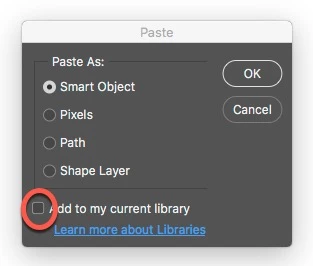
Pasted objects go to a CC library when the box at the bottom of the paste dialog is on. It's very easy to miss this.

1 reply

Bojan Živković11378569
Adobe Expert
December 8, 2018

When you copy/paste from Illustrator that will create Embedded Smart Object layer from what I know. Embedded Smart Object will be saved with file without any link to source image so link cannot be broken.

Did you checked option to save in Libraries panel while pasting? Is that what are you referring?

danielg42834333
New Participant
December 8, 2018

I just created this smart object right now, without internet access.  I copy and pasted it from illustrator into photoshop without add to libraries checked. When my computer restarted last time, I think all these smart objects were wiped.  IS there any way to get them back?

Bojan Živković11378569
Adobe Expert
December 8, 2018

Perhaps you lost your layers (Smart Object layers) because system failure and Photoshop didn't saved recovery file or you closed app without saving, otherwise Smart Objects cannot be wiped just like that.

If you haven't seen recovered file on the next startup then I believe you have lost that layers.