lucillen46641511
Inspiring
February 24, 2018
Answered

cant associate abr

  • February 24, 2018
  • 6 replies
  • 1990 views

i cannot open abr in ps cc. i used to be able to with ps6 and i believe ps cc17. i am currently using cc2018.  i checked file association and abr is not listed in there so that i can associate the .abr to photoshop . the brush opens to a zip file said unable to open,  and ps was not listed there so i did BROWSE and went to windows, programs, adobe and tried both adobe cc as well as ps6 and ps cc...nothing worked.  i am finding a lot of issues with 2018.  i did remove 2017cc. i am running windows7pro 64 bit.  this is driving me nuts.  always a problem with 2018, not happy.  ALSO how can i get back 2017 cc?
This topic has been closed for replies.
Correct answer JJMack

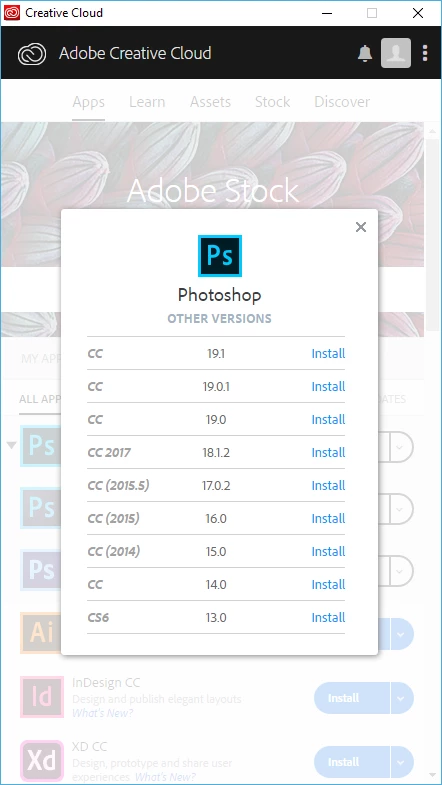
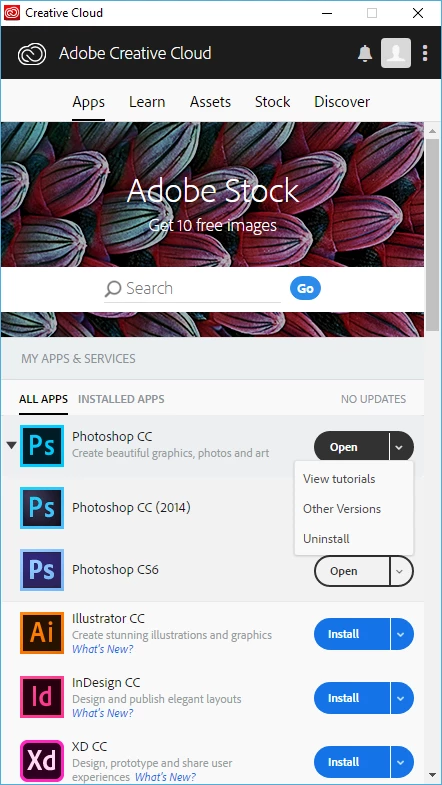
If you are running Windows 7  You most like should run a older Photoshop the CC 2018 fir in the 19.1 update Adobe fixed the problems in its UI scaling by using new features in Windows 10.  You can install CC 207 using the Creative cloud desktop to install other  versions.  And you must extrace .abr file from ZIP gackages to use them. CC 2018 is version 19  and has updated 19.01 and 19.1.  I think 19.1 may have problems on Windows 7

6 replies

D Fosse
Community Expert
Community Expert
February 25, 2018

Do you get any file types at all to associate to Photoshop? Or is it just brushes that won't?

The reason I'm asking is that this is a common problem when you uninstall older PS versions, with newer versions still installed. What happens is that the uninstall takes all file associations with it, leaving the new version orphaned.

If that's the case, uninstall all versions and reinstall as needed. Do it all in version sequence! Newest gets uninstalled first and reinstalled last. If that's not enough, repeat and run the cleaner tool.

lucillen46641511
Inspiring
February 25, 2018

ok i uninstalled cc2017 and 2018, started over again and it WORKED! i reinstalled 2017cc, evidently 2018 has a problem with windows7pro. thanks for all the help.

JJMack
Community Expert
Community Expert
February 25, 2018

So my first reply was correct.....

JJMack
D Fosse
Community Expert
Community Expert
February 25, 2018

Did you extract the zip?

lucillen46641511
Inspiring
February 25, 2018

yes extracted zip

JJMack
Community Expert
Community Expert
February 25, 2018

Where did you check file associations hrer?

JJMack
lucillen46641511
Inspiring
February 25, 2018

ok now its there but i tried associating with both adobe cs6 64 bit and adobe ps cc 2017 and it wont associate...ughhhh. it is associating with AIcs6

here are my choices (2 screens) below. NOTICE: the box is grayed out to uncheck the box to use that program.

then i go to browse tried both ps cc2017 and pscs6

than to ps.exe and still nothing

JJMack
Community Expert
JJMackCommunity ExpertCorrect answer
Community Expert
February 24, 2018

If you are running Windows 7  You most like should run a older Photoshop the CC 2018 fir in the 19.1 update Adobe fixed the problems in its UI scaling by using new features in Windows 10.  You can install CC 207 using the Creative cloud desktop to install other  versions.  And you must extrace .abr file from ZIP gackages to use them. CC 2018 is version 19  and has updated 19.01 and 19.1.  I think 19.1 may have problems on Windows 7

JJMack
lucillen46641511
Inspiring
February 25, 2018

ok thanks for the ideas. where do i find the adobe cleaner?

D Fosse
Community Expert
Community Expert
February 24, 2018

If the download is a zip file you need to extract it first. Then double-click it with Photoshop open and running.

If that doesn't work, try "Import Brushes" from the Brushes panel fly-out menu.

lucillen46641511
Inspiring
February 25, 2018

yup did that and the file association dialog comes up and ps isnt listed on that.

lucillen46641511
Inspiring
February 25, 2018

UPDATE:

Removed 2018cc, rebooted, installed 2017cc, check file associations and still not there...tech support isnt open until monday, this is really ticking me off.

any other suggestions?

JJMack
Community Expert
Community Expert
February 24, 2018

I would think .abr info would have been installed into you windows by Adobe Photoshop installer.  I see it is my Windows Settings for file extension associations currently set to CC 2018.  And I see entries in my Windows 10 Registry for .abr.  If you do not you may need to uninstall Photoshop then run Adobe cleaner then use the creative cloud to install cc 2018.

JJMack