


Redhatgeorge
Participant
October 19, 2015
Answered

How to add a audio effect to whole audio track instead of individual clips?

  • October 19, 2015
  • 1 reply
  • 44282 views

I have been having an issue with the denoiser effect and wanted to try out one of the solutions I have read about. I want to apply the effect to the whole audio track not just each individual clip. I have found tutorials on how to do this but I am working on Premiere Pro CC and have yet to find out how to do it on this version.
This topic has been closed for replies.
Correct answer Meg The Dog

‌I have looked on this page and searched it but I can't seem to find one for premiere pro cc. Can premiere pro cc even do it?


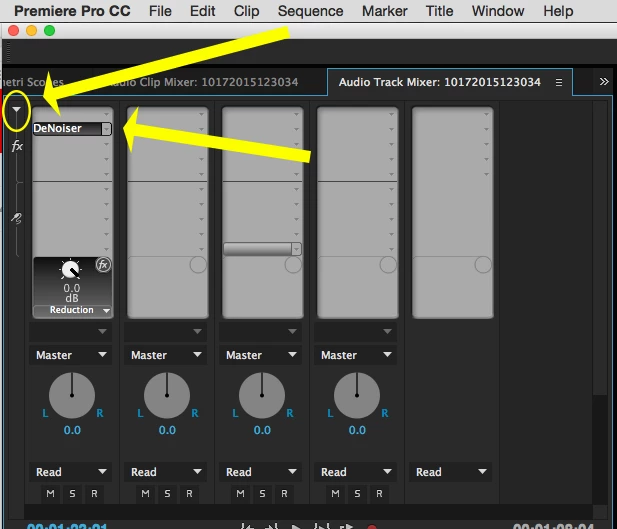
In PPro, go to Window > Audio Track Mixer (not the Audio Clip Mixer).

In the Audio Track Mixer, click on the disclosure triangle in the upper left (it is very small) to see the Effects slots for the tracks.

Click on an open effect slot and from the drop down menu choose the effect you want to apply to the track:

MtD

1 reply

Community Expert
October 19, 2015

You can add the effects to the whole track using the track mixer but I'm not sure if this will help with the denoiser problems. I would use Audition.

Redhatgeorge
Participant
October 19, 2015

‌How do I add it to the track mixer? I think I might try this method and then if it doesn't work I will use Audition.

Legend
October 19, 2015