Oct 2, 2019 11:12 AM UTC
Answered

Locate button in HTML output

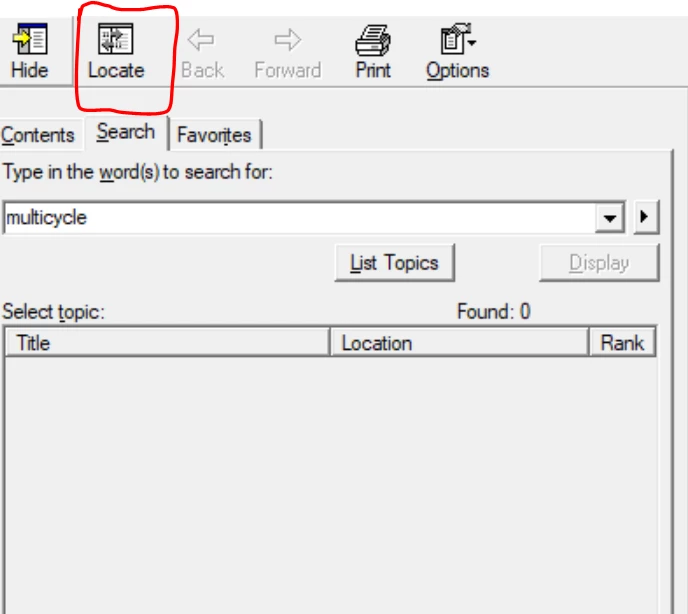
This was a great review Jared(Review at https://community.adobe.com/t5/RoboHelp/My-RoboHelp-2019-Review/m-p/10645169#M126594)and I agree with you on many of your topics! I'm pretty new to RoboHelp and I thought I'd just give it a shot and ask you a question of mine. I've just upgraded a project from RH Classic to "Re-imagined" and I have trouble getting the "locate"-button to appear in the HTML helpfile (after generating the output). I have already "clicked" the "locate"-box in the Window Settings. Is there something else I can do to make the "locate"-button appear in my output again (just like it does in the Classic version)?
I am really greatful for any answer you could give me.

Thanks,

K.

    This topic is closed to new replies. Start a new post to keep the conversation going.
    Peter Grainge
    Peter GraingeCorrect answer
    Community Expert
    Oct 3, 2019 6:59 AM UTC


    Use the menu (bottom right) to mark the Best Answer or Highlight particularly useful replies. Found the answer elsewhere? Share it here.

    9 replies

    Peter Grainge
    Community Expert
    Peter GraingeCommunity ExpertCorrect answer
    Community Expert
    Oct 3, 2019 6:59 AM UTC


    Translate
    Use the menu (bottom right) to mark the Best Answer or Highlight particularly useful replies. Found the answer elsewhere? Share it here.
    Oct 3, 2019 7:04 AM UTC
    Thank you!! 🙂
    Translate
    Peter Grainge
    Community Expert
    Community Expert
    Oct 2, 2019 1:47 PM UTC

    @Jared Very different in 2019. If kajsaros reponds with it still not working I'll poke around some more.


    Translate
    Use the menu (bottom right) to mark the Best Answer or Highlight particularly useful replies. Found the answer elsewhere? Share it here.
    Jared Hess
    Legend
    Oct 2, 2019 1:37 PM UTC

    @kajsaros1 - I don't know how much help I can be as I no longer have my RH 2019 trial. Also, it's been a couple of years since we switched from .chm outputs to HTML 5 outputs. I'm sure RH still has some kind of underlying xml file that controls the Window's properties. In Classic RH, this was in a file called rhwnd.apj. There, in the xml code, under the window's definition, they'd have a buttons tag:


    The value 12366 clears the Location check box.

    The value 14414 marks the Location check box.


    You might want to look into a similar file in Re-imagined version and and see if maybe something got messed up in that during the conversion of your project. Perhaps editing that directly will fix this issue. Good luck!

    Translate
    Peter Grainge
    Community Expert
    Community Expert
    Oct 2, 2019 1:16 PM UTC

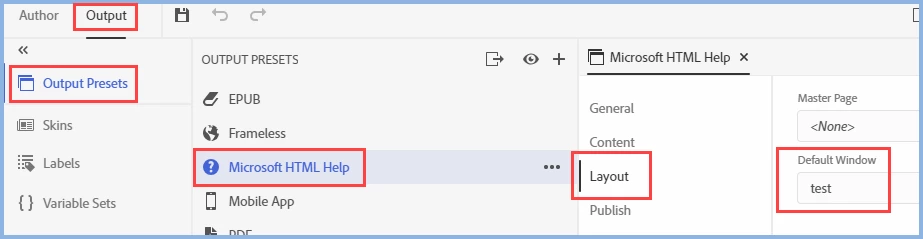
    Is the window selected in the preset the one with the locate button? I created a new window, ticked the check box and then selected the window. Locate button present.


    Translate
    Use the menu (bottom right) to mark the Best Answer or Highlight particularly useful replies. Found the answer elsewhere? Share it here.
    Oct 3, 2019 6:35 AM UTC

    Yes! This worked. Thank you very much for your help!


    /K

    Translate
    Peter Grainge
    Community Expert
    Community Expert
    Oct 2, 2019 11:44 AM UTC

    In Output mode, look at Window Settings > Window Properties. There is a Locate check box there.


    Translate
    Use the menu (bottom right) to mark the Best Answer or Highlight particularly useful replies. Found the answer elsewhere? Share it here.
    Oct 2, 2019 12:04 PM UTC
    The check box is already "checked"...and still no locate-button appears in the generated helpfile. So that's why I'm asking if anybody might know what the problem is...
    Translate
    Peter Grainge
    Community Expert
    Community Expert
    Oct 2, 2019 11:31 AM UTC

    kajsaros1 I have branched your post to a separate thread as it is more about a specific question that others might also have. In Jared's thread, it will get a bit lost.


    Translate
    Use the menu (bottom right) to mark the Best Answer or Highlight particularly useful replies. Found the answer elsewhere? Share it here.