
Inspiring
October 2, 2019
解決済み

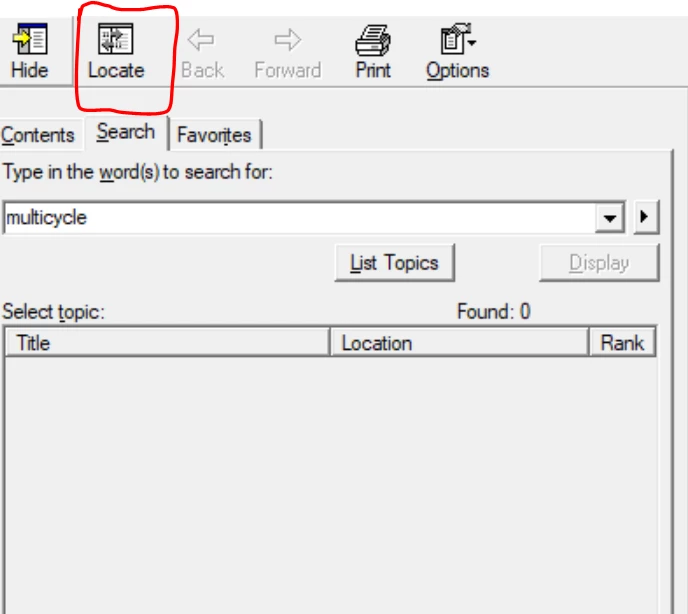
Locate button in HTML output

  • October 2, 2019
  • 返信数 6.
  • 929 ビュー

This was a great review Jared(Review at https://community.adobe.com/t5/RoboHelp/My-RoboHelp-2019-Review/m-p/10645169#M126594)and I agree with you on many of your topics! I'm pretty new to RoboHelp and I thought I'd just give it a shot and ask you a question of mine. I've just upgraded a project from RH Classic to "Re-imagined" and I have trouble getting the "locate"-button to appear in the HTML helpfile (after generating the output). I have already "clicked" the "locate"-box in the Window Settings. Is there something else I can do to make the "locate"-button appear in my output again (just like it does in the Classic version)?
I am really greatful for any answer you could give me.

Thanks,

K.
    このトピックへの返信は締め切られました。
    解決に役立った回答 Peter Grainge


    返信数 6

    Peter Grainge
    Community Expert
    Peter GraingeCommunity Expert解決!
    Community Expert
    October 3, 2019


    Use the menu (bottom right) to mark the Best Answer or Highlight particularly useful replies. Found the answer elsewhere? Share it here.
    kajsaros1作成者
    Inspiring
    October 3, 2019
    Thank you!! 🙂
    Peter Grainge
    Community Expert
    Community Expert
    October 2, 2019

    @Jared Very different in 2019. If kajsaros reponds with it still not working I'll poke around some more.


    Use the menu (bottom right) to mark the Best Answer or Highlight particularly useful replies. Found the answer elsewhere? Share it here.
    Jared Hess
    Legend
    October 2, 2019

    @kajsaros1 - I don't know how much help I can be as I no longer have my RH 2019 trial. Also, it's been a couple of years since we switched from .chm outputs to HTML 5 outputs. I'm sure RH still has some kind of underlying xml file that controls the Window's properties. In Classic RH, this was in a file called rhwnd.apj. There, in the xml code, under the window's definition, they'd have a buttons tag:


    The value 12366 clears the Location check box.

    The value 14414 marks the Location check box.


    You might want to look into a similar file in Re-imagined version and and see if maybe something got messed up in that during the conversion of your project. Perhaps editing that directly will fix this issue. Good luck!

    Peter Grainge
    Community Expert
    Community Expert
    October 2, 2019

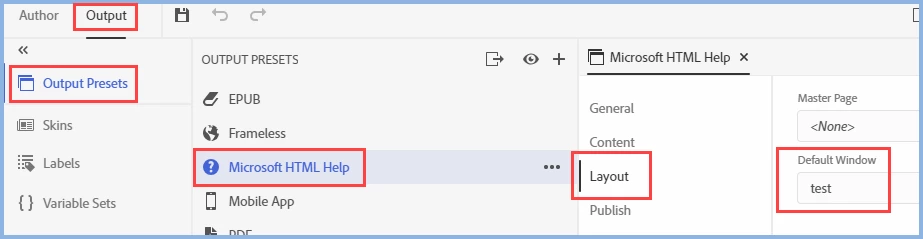
    Is the window selected in the preset the one with the locate button? I created a new window, ticked the check box and then selected the window. Locate button present.


    Use the menu (bottom right) to mark the Best Answer or Highlight particularly useful replies. Found the answer elsewhere? Share it here.
    kajsaros1作成者
    Inspiring
    October 3, 2019

    Yes! This worked. Thank you very much for your help!


    /K

    Peter Grainge
    Community Expert
    Community Expert
    October 2, 2019

    In Output mode, look at Window Settings > Window Properties. There is a Locate check box there.


    Use the menu (bottom right) to mark the Best Answer or Highlight particularly useful replies. Found the answer elsewhere? Share it here.
    kajsaros1作成者
    Inspiring
    October 2, 2019
    The check box is already "checked"...and still no locate-button appears in the generated helpfile. So that's why I'm asking if anybody might know what the problem is...
    Peter Grainge
    Community Expert
    Community Expert
    October 2, 2019

    kajsaros1 I have branched your post to a separate thread as it is more about a specific question that others might also have. In Jared's thread, it will get a bit lost.


    Use the menu (bottom right) to mark the Best Answer or Highlight particularly useful replies. Found the answer elsewhere? Share it here.