


Participant
May 29, 2022
Question

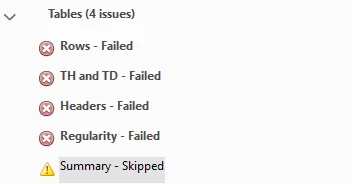
Accessibility checker error message 'Summary - Skipped' what is it and how to resolve?

  • May 29, 2022
  • 1 reply
  • 7859 views

Hi, 

I have been using the PDF accessibility checker in Adobe Pro on my PC. There is an error message under the Table section that says #Summary - Skipped'. Can anyone explain what this error message is for and how to resolve it? 

Ideally, point me in the direction of a resource that explains the error message. 
 

With thanks,

This topic has been closed for replies.

1 reply

Inspiring
May 29, 2022

When you click the Accessibility Check tool, a pop-up appears, listing your Accessibility Checker Options. About a third down that window you will see a Category dropdown field. From that dropdown list, select "Forms, Tables and Lists." Under that category, you will find your missing Check Box for "Tables must have a summary" listing.


🙂

Bevi Chagnon - PubCom.com
Legend
May 29, 2022

Table Summaries were required in the early days of digital accessibility, but are now outdated and unneeded. They were supposed to describe the table, number of rows and columns, etc. But over the years, assistive technologies now announce this information automatically, the summary is no longer needed and adds unnecessary verbosity to the PDF.


 Follow @yn68_2's advice above and don't check for them at all. In your screen shot, the yellow "!" that summaries were skipped is correct, not a failure. Ignore it when testing.


|    Bevi Chagnon   |  Designer, Trainer, & Technologist for Accessible Documents ||    PubCom |    Classes & Books for Accessible InDesign, PDFs & MS Office |
Participant
June 6, 2022

Hi, that is great, thank you for taking the time to reply that is really helpful.